Huawei Virtualization Platform Management and Usage · Topic 2 of 4
FusionCompute Storage Virtualization
Learn FusionCompute storage virtualization: storage resources, devices and datastores, VIMS, disk configuration modes, disk modes, snapshots and migration.
- 6 min
- Includes a diagram
- The storage objects in order: storage resource, storage device, datastore, virtual disk.
- A virtualized SAN datastore uses VIMS and supports thin provisioning, snapshots and storage live migration.
- Disk configuration modes: common, thin provisioning, thick provisioning lazy zeroed.
What it is
Storage virtualization in FusionCompute hides the type of physical storage behind a common object, the datastore. VMs get virtual disks from datastores and do not need to know whether the space comes from a SAN, a NAS or a local disk.
This lets the administrator create, grow, snapshot and move disks with the same steps on any storage.
How it works
Storage resource, storage device, datastore
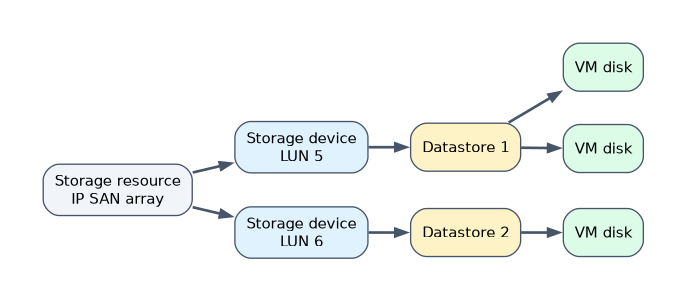 FusionCompute uses three layers of storage object. Learn them in order.
| Object | Meaning | Example |
|---|---|---|
| Storage resource | A physical storage system added to FusionCompute | An IP SAN or FC SAN array, a NAS, or Huawei distributed storage |
| Storage device | A unit of space inside a storage resource that hosts can see | A LUN on a SAN, a shared directory on a NAS, a local disk of a host |
| Datastore | The space FusionCompute uses to store VM disks, created from a storage device and associated with hosts | A datastore on LUN 5, shared by all hosts of a cluster |
For IP SAN, each host first needs a storage interface on the storage plane, so it can reach the array. The administrator then adds the storage resource, scans for its storage devices and creates datastores on them.
Virtualized and non-virtualized datastores
A SAN storage device can be used in two ways.
| Datastore use | How it works | Trade off |
|---|---|---|
| Virtualized | FusionCompute formats the LUN with its own cluster file system, VIMS (Virtual Image Management System), and stores disks as files | Supports thin provisioning, snapshots and storage live migration |
| Non-virtualized | The LUN is given to the VM as a raw block device, without a file system | Higher I/O performance, but loses the advanced disk features |
VIMS lets many hosts of a cluster read and write the same datastore at once. That shared access is what HA and live migration depend on.
Disk configuration modes
When a virtual disk is created, its configuration mode decides how space is allocated on the datastore.
| Configuration mode | Space allocation | Notes |
|---|---|---|
| Common | All space is allocated and zeroed when the disk is created | Creation is slow, performance is good from the start |
| Thin provisioning | Space is allocated only as data is written | Saves space and allows overcommitment; watch datastore usage |
| Thick provisioning lazy zeroed | All space is allocated at creation, blocks are zeroed on first write | Faster to create than common, full space reserved |
Thin provisioning lets the total disk size given to VMs exceed the real datastore capacity. If real usage then fills the datastore, VMs can no longer write, so alarms on datastore usage matter.
Disk types and disk modes
A disk's type says who can use it. A common disk belongs to one VM; a shared disk can be attached to several VMs, for example for clustered databases.
A disk's mode decides how it behaves with snapshots.
| Disk mode | Behavior |
|---|---|
| Dependent | Included in VM snapshots |
| Independent persistent | Not included in snapshots; changes are written to the disk and kept |
| Independent nonpersistent | Not included in snapshots; changes are discarded when the VM is shut down or restored |
Independent nonpersistent disks suit training rooms or kiosks, where every restart should return to a clean state.
Snapshots
A snapshot saves the state of a VM's disks, and optionally its memory, at a point in time. After a snapshot, new writes go to a separate area, so the VM can later be restored to the snapshot.
A snapshot is not a backup. It lives on the same datastore as the disk, so a storage failure loses both. Long chains of snapshots also slow disk I/O.
Storage migration and disk changes
- Storage migration moves a VM's disks to another datastore, while the VM runs or while it is stopped.
- Disk expansion grows a virtual disk; the guest OS must then extend its partition or file system.
- Disks can be attached to and detached from VMs as needs change.
A worked example
An administrator adds an IP SAN storage resource, scans it and finds LUN 3. She creates a virtualized datastore on it and associates it with every host of the cluster.
She creates a 100 GB thin provisioned disk for a new VM; the datastore shows only the space actually written. Before patching, she takes a snapshot of the VM. The patch breaks an application, so she restores the snapshot and the VM returns to its earlier state.
How the exam asks about this
- "Which disk configuration mode allocates space only as data is written?" -> Thin provisioning.
- "Which disk mode discards changes when the VM is shut down?" -> Independent nonpersistent.
- "What advantage does a virtualized datastore have over a non-virtualized one?" -> It supports features such as thin provisioning, snapshots and storage live migration.
What to remember for the exam
- The storage objects in order: storage resource, storage device, datastore, virtual disk.
- A virtualized SAN datastore uses VIMS and supports thin provisioning, snapshots and storage live migration.
- Disk configuration modes: common, thin provisioning, thick provisioning lazy zeroed.
- Disk modes: dependent, independent persistent and independent nonpersistent; only dependent disks are in snapshots.
- Shared disks can attach to several VMs; common disks belong to one VM.
Thin provisioning can overcommit storage. If VMs write until the datastore is full, writes fail, so monitor real usage and set alarms.
Common mistakes
Mixing up storage device and datastore. The storage device is the LUN or disk the host sees; the datastore is what FusionCompute creates on it to hold VM disks.
Treating snapshots as backups. A snapshot sits on the same storage as the disk and is meant for short term rollback, not long term protection.
Expecting snapshots of independent disks. Independent persistent and nonpersistent disks are left out of VM snapshots by design.
Check yourself
What is VIMS?
The Huawei cluster file system that FusionCompute creates on a SAN LUN for a virtualized datastore, so many hosts can share it.
Which disk configuration mode reserves all space at creation but zeroes blocks on first write?
Thick provisioning lazy zeroed.
Which disk mode suits a training VM that must be clean after every shutdown?
Independent nonpersistent, because its changes are discarded when the VM shuts down.
Topic 2 of 4 in Huawei Virtualization Platform Management and Usage
Test yourself on Huawei Virtualization Platform Management and Usage
The full Huawei H13-511 question bank has 600 questions, with timed practice exams and an explanation for every answer.
This study guide is independent and is not affiliated with, endorsed by, or sponsored by Huawei. Vendor names, certification names and exam codes are trademarks of their respective owners and are used for identification only.