Huawei Virtualization Platform Management and Usage · Topic 3 of 4
FusionCompute Network Virtualization
Learn FusionCompute network virtualization: the distributed virtual switch, port groups, uplinks, VLANs, NIC bonding and how VM traffic moves on hosts.
- 6 min
- Includes a diagram
- A DVS is configured centrally and present on every associated host, so VMs keep their network after migration.
- VM NICs attach to port groups; a port group defines the VLAN, security and QoS settings.
- Uplinks are host physical NICs or bonds; bonding gives redundancy and can add bandwidth.
What it is
Network virtualization in FusionCompute gives every VM virtual NICs connected to a virtual switch inside the host. The switch forwards traffic between VMs and, through the host's physical NICs, to the real network.
FusionCompute manages these switches centrally as a DVS (distributed virtual switch). One DVS spans many hosts, so a VM keeps the same network settings when it migrates.
How it works
Why a distributed switch
On a standalone host, each virtual switch is configured on its own. With many hosts that means repeating the same settings everywhere and risking a mismatch that breaks migration.
A DVS is configured once in VRM and applied to every host attached to it. Each host still forwards its own traffic locally, but the configuration is shared.
The network objects
| Object | Meaning |
|---|---|
| DVS | A virtual switch defined centrally and present on each associated host |
| Port group | A set of virtual ports with the same attributes, such as VLAN, security and QoS settings |
| Virtual port | Where one VM NIC connects to the DVS |
| Uplink | A host physical NIC, or a bond of NICs, that connects the DVS to the physical network |
| VM NIC | The virtual network card seen by the guest OS |
A VM NIC is attached to a port group, not configured one port at a time. Change the port group and every VM on it gets the new setting.
VLANs and port groups
Port groups carry the VLAN design into the virtual world. A common pattern is one port group per VLAN, for example "web" on VLAN 10 and "database" on VLAN 20.
| VLAN setting | Behavior |
|---|---|
| One VLAN ID | VM traffic is placed in the port group's VLAN; the guest sends untagged frames |
| Trunk, a range of VLANs | Several VLANs are allowed and the guest OS tags its own frames |
The physical switch port facing the uplink must be a trunk that allows every VLAN used by the port groups on that DVS. A missing VLAN there is a classic reason why VMs on one host cannot reach VMs on another.
Port group security and QoS
Port groups also carry policies that protect the network.
- IP and MAC binding: a VM cannot spoof another address.
- DHCP isolation: a VM cannot act as a rogue DHCP server.
- Broadcast suppression: limits broadcast storms from a VM.
- Traffic shaping: limits the average and peak bandwidth of the VMs' ports.
Uplinks and NIC bonding
An uplink can be a single physical NIC or a bond of several. Bonding gives redundancy, so one failed NIC or cable does not cut the VMs off, and in load sharing modes it also adds bandwidth.
| Bond behavior | Effect |
|---|---|
| Active/standby | One NIC carries traffic; the other takes over on failure |
| Load sharing | Traffic is spread across the NICs; the physical switch side may need a matching aggregation setting |
How VM traffic flows
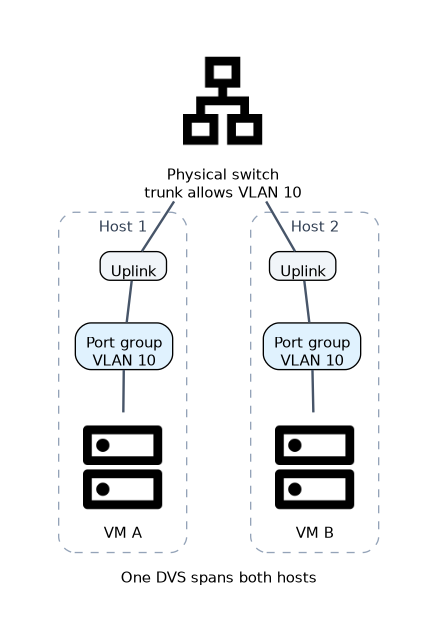 The path depends on where the two VMs are and which VLANs they use.
| Situation | Path |
|---|---|
| Same host, same VLAN | Forwarded inside the host by the virtual switch; never leaves the server |
| Different hosts, same VLAN | Out through the uplink, across the physical switch, into the other host |
| Different VLANs | Needs a Layer 3 device, such as a router, Layer 3 switch or firewall, to route between the VLANs |
The DVS itself is a Layer 2 switch. It does not route between VLANs.
Separating the planes
The same objects carry the planning from the platform design. Management, storage and service traffic usually use different port groups and VLANs, and often different uplinks, so that VM traffic cannot slow down management or storage traffic.
A worked example
A cluster of three hosts has one DVS called "Service" with a bonded uplink on each host. The engineer creates port group "web" with VLAN 10 and port group "db" with VLAN 20, each with a single VLAN ID.
Web VMs on the same host talk directly inside the host. A web VM reaches a database VM through the core Layer 3 switch, because the two are in different VLANs. When DRS migrates a web VM to another host, it stays on port group "web" and keeps working.
How the exam asks about this
- "Which FusionCompute object is a set of virtual ports with the same VLAN and policy settings?" -> A port group.
- "What connects a DVS on a host to the physical network?" -> The uplink, a physical NIC or bond of NICs.
- "How do two VMs in the same VLAN on the same host communicate?" -> Through the virtual switch inside the host, without leaving the server.
What to remember for the exam
- A DVS is configured centrally and present on every associated host, so VMs keep their network after migration.
- VM NICs attach to port groups; a port group defines the VLAN, security and QoS settings.
- Uplinks are host physical NICs or bonds; bonding gives redundancy and can add bandwidth.
- Same host and same VLAN traffic stays inside the host; different VLANs need a Layer 3 device.
- The physical switch port facing an uplink must allow every VLAN used on that DVS.
The DVS does not route. If two VMs are in different port groups with different VLANs, they cannot talk unless a router, Layer 3 switch or firewall routes between those VLANs.
Common mistakes
Configuring VLANs per VM. In FusionCompute the VLAN is set on the port group. VMs inherit it by attaching to that port group.
Forgetting the physical switch. A port group with VLAN 30 fails across hosts if the physical trunk to the uplinks does not allow VLAN 30.
Using a single NIC uplink in production. Without a bond, one cable or NIC fault disconnects every VM using that uplink.
Check yourself
What does an uplink provide in FusionCompute?
It connects the DVS on a host to the physical network through one physical NIC or a bond of NICs.
Why does a VM keep working after migration to another host?
The DVS and its port groups exist on every associated host, so the VM attaches to the same port group with the same VLAN.
What is needed for VMs in VLAN 10 and VLAN 20 to communicate?
A Layer 3 device, such as a router or Layer 3 switch, that routes between the two VLANs.
Topic 3 of 4 in Huawei Virtualization Platform Management and Usage
Test yourself on Huawei Virtualization Platform Management and Usage
The full Huawei H13-511 question bank has 600 questions, with timed practice exams and an explanation for every answer.
This study guide is independent and is not affiliated with, endorsed by, or sponsored by Huawei. Vendor names, certification names and exam codes are trademarks of their respective owners and are used for identification only.