Security Operations · Topic 6 of 7
Incident Response and Evidence Handling
Follow incident response phases and handle digital evidence with order of volatility, chain of custody, hashing, imaging, legal hold and reporting.
- 5 min
- Includes a diagram
- The phases are preparation, detection and analysis, containment eradication and recovery, and post incident activity.
- Collect volatile evidence first: memory before disk, disk before backups.
- Powering off destroys memory evidence, so isolate the host when you need to preserve it.
What it is
Incident response (IR) is the organized handling of a security incident from detection to recovery and learning. Digital forensics is the careful collection and analysis of evidence so that findings are accurate and, where needed, usable in legal or disciplinary action.
At the expert level the exam expects you to support responders: choose what data to collect first, protect its integrity, and make containment decisions that balance stopping damage against preserving evidence.
How it works
Response phases
A common model, used in National Institute of Standards and Technology (NIST) incident handling guidance, has four phases.
| Phase | Key activities |
|---|---|
| Preparation | Plans, contacts, tools, training, logging and exercises |
| Detection and analysis | Confirm the incident, scope it, rank its severity, start documentation |
| Containment, eradication and recovery | Limit spread, remove the cause, restore systems and verify |
| Post incident activity | Lessons learned, root cause, improvements, reporting |
Containment can be short term, such as isolating a host, or long term, such as rebuilding a segment. Eradication removes malware, accounts and persistence, and fixes the weakness. Recovery restores service from known good sources and monitors for return.
Containment versus evidence
Containment decisions involve trade offs. Powering off a compromised machine stops activity but destroys volatile evidence in memory.
Isolating it from the network usually keeps memory intact while stopping communication. Leaving it online to watch an attacker gains intelligence but risks more damage.
Choose by business impact and legal duty. Safety and data loss normally outweigh intelligence gathering, and the decision should be made by those with authority and recorded.
Order of volatility
Collect the most short lived evidence first, because it disappears quickest.
- Processor registers and cache
- Memory, including running processes, network connections and routing or address resolution tables
- Temporary files and swap space
- Disk contents
- Remote logs and monitoring data
- Backups and archived media
Forensic acquisition
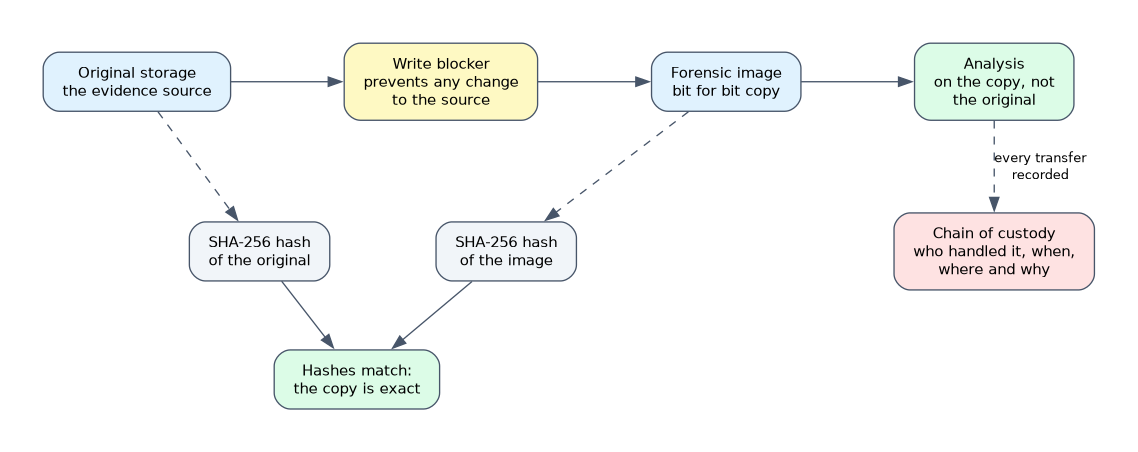 Make a bit for bit image of storage, and analyze the copy, not the original. Use a write blocker, a device that prevents any change to the source disk while it is read.
Compute a cryptographic hash of the original and of the image, and check that they match, which proves that the copy is exact. Prefer Secure Hash Algorithm 256 (SHA-256), since older hashes such as Message Digest 5 (MD5) have known collision weaknesses.
# Linux shell: record a hash of an evidence image
sha256sum evidence.img
Live acquisition captures running memory and volatile data from a system that is on. Dead acquisition images a powered down disk. Live capture changes the system slightly, so document each action and its effect.
In cloud environments, evidence comes from snapshots of volumes, memory capture where supported, and control plane and activity logs, because you often cannot touch the hardware. Make sure log retention was enabled before the incident.
Chain of custody and documentation
Chain of custody is the written record of who handled evidence, when, where and why, from collection to presentation. It shows the evidence was not altered.
Each item gets a unique identifier, tamper evident packaging and secure storage, and every transfer is signed. A break in the chain can make evidence worthless.
Keep a timeline of actions with timestamps, and record commands run. A legal hold may require preserving data that normal retention would delete, so involve legal counsel early. Limit knowledge of the incident to those who need to know.
Roles, communication and reporting
An incident response plan names roles: incident commander, technical leads, legal, communications and management. Notification duties may apply to regulators, customers and law enforcement, with deadlines set by law or contract. Use secure out of band communication in case the main systems are compromised.
The final report covers what happened, impact, root cause, actions taken and recommendations. A lessons learned meeting soon after turns the experience into improvements, such as new detections, patched weaknesses and updated playbooks.
What to remember for the exam
- The phases are preparation, detection and analysis, containment eradication and recovery, and post incident activity.
- Collect volatile evidence first: memory before disk, disk before backups.
- Powering off destroys memory evidence, so isolate the host when you need to preserve it.
- Analyze a forensic image, not the original, and verify it with a hash.
- A write blocker prevents changes to the source media.
- Chain of custody records every handler and transfer of evidence.
- A legal hold suspends deletion of relevant data.
- Lessons learned feed improvements to plans, detections and controls.
When asked what to collect first from a running compromised system, the answer is volatile data such as memory, not the disk.
Common mistakes
Rebooting or wiping first. This destroys evidence and may remove the attacker's traces and your ability to prove scope.
Working on the original disk. Any change harms integrity. Always work on a verified copy.
Skipping documentation during the emergency. Missing notes weaken both the legal case and the lessons learned.
Reconnecting a cleaned system without verification. Confirm eradication and monitor for return.
Using the compromised network to coordinate response can tip off the attacker, so use a separate trusted channel.
Check yourself
Work through these three questions.
Why is memory collected before disk?
Memory is volatile and lost on power off or reboot, while disk data persists.
What does a matching hash of the original and image prove?
That the image is an exact copy, so the evidence integrity can be shown.
Why isolate a compromised host rather than power it off?
Isolation stops communication while keeping memory and running state available for analysis.
Topic 6 of 7 in Security Operations
Test yourself on Security Operations
The full CompTIA SecurityX CAS-005 question bank has 654 questions, with timed practice exams and an explanation for every answer.
This study guide is independent and is not affiliated with, endorsed by, or sponsored by CompTIA. Vendor names, certification names and exam codes are trademarks of their respective owners and are used for identification only.