Network Implementation · Topic 3 of 8
VLANs and Trunking
Learn how VLANs split broadcast domains, how access and trunk ports differ, 802.1Q tagging, native and voice VLANs, and inter VLAN routing on switches.
- 5 min
- Includes a diagram
- Each VLAN is a separate broadcast domain and normally a separate IP subnet.
- Access ports carry one VLAN untagged. Trunk ports carry several VLANs tagged.
- 802.1Q adds a 4 byte tag with a 12 bit VLAN ID.
What it is
A Virtual Local Area Network (VLAN) divides one physical switch into several logical Layer 2 networks. Each VLAN is its own broadcast domain, so broadcasts in one VLAN do not reach another.
VLANs improve security, reduce broadcast traffic and let you group users by function instead of by location. Traffic between VLANs must pass through a router or a Layer 3 switch.
How it works
Access and trunk ports
An access port belongs to one VLAN and carries untagged frames to an end device. A trunk port carries traffic for several VLANs between switches, or between a switch and a router, by adding a tag to each frame.
| Port type | VLANs | Frames | Connects |
|---|---|---|---|
| Access | One | Untagged | Computers, printers, phones |
| Trunk | Many | Tagged (except the native VLAN) | Switch to switch, switch to router |
802.1Q tagging
The Institute of Electrical and Electronics Engineers (IEEE) 802.1Q standard inserts a 4 byte tag into the Ethernet frame. The tag includes a 12 bit VLAN identifier (ID), which allows IDs from 1 to 4094 in normal use.
The receiving switch reads the tag, keeps the frame in the correct VLAN and removes the tag before delivering the frame to an access port.
Native VLAN
The native VLAN is the VLAN whose frames cross a trunk untagged. Both ends of the trunk must agree on the native VLAN, or traffic can leak into the wrong VLAN and switches log mismatch warnings.
For security, administrators avoid using the default VLAN 1 for user traffic and for native VLAN purposes. They also keep unused ports out of the default VLAN.
Voice VLAN
A voice VLAN is a separate VLAN for Internet Protocol (IP) phones. A phone connects to the switch port, and a computer plugs into the phone, so one port carries voice in the voice VLAN and data in the data VLAN.
Separating voice lets the switch apply Quality of Service (QoS) rules to the phone traffic. It also keeps voice off the user broadcast domain.
Inter VLAN routing
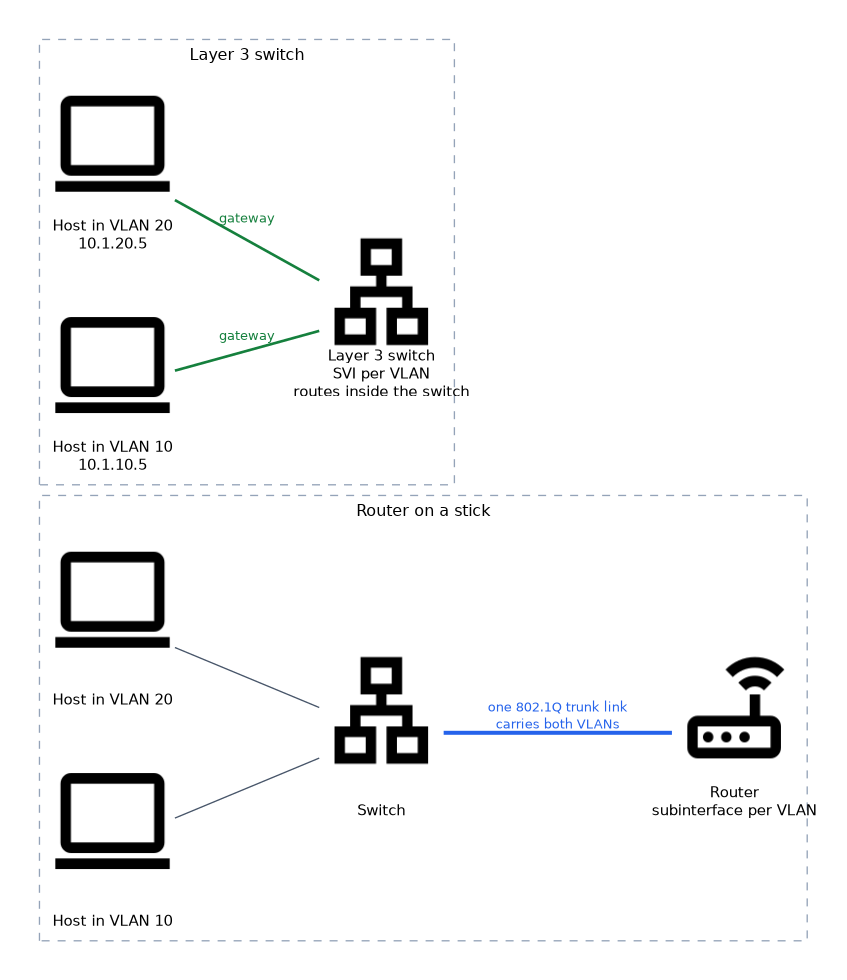 Hosts in different VLANs are also in different IP subnets. To talk, they send traffic to a default gateway that routes between the VLANs.
| Method | How it works |
|---|---|
| Router on a stick | One router interface split into subinterfaces, one per VLAN, on a trunk |
| Layer 3 switch | The switch has a switched virtual interface (SVI) for each VLAN and routes internally |
An SVI is a logical Layer 3 interface on the switch that serves as the gateway for a VLAN. A Layer 3 switch is the normal choice in campus networks because routing happens at hardware speed.
Basic VLAN checks
Verify that the port is in the correct VLAN, that the VLAN exists on every switch along the path, and that the trunk allows the VLAN. A VLAN that is missing from a trunk's allowed list cannot cross it.
The VLAN database and basic commands
On Cisco style switches the VLAN database is a file named vlan.dat, which stores the VLAN IDs and names the switch knows. A VLAN must exist there before a port can usefully be placed in it.
Switch(config)# vlan 10
Switch(config-vlan)# name Sales
Switch(config-vlan)# exit
Switch(config)# interface gigabitethernet 1/0/5
Switch(config-if)# switchport mode access
Switch(config-if)# switchport access vlan 10
Switch# show vlan brief
What to remember for the exam
- Each VLAN is a separate broadcast domain and normally a separate IP subnet.
- Access ports carry one VLAN untagged. Trunk ports carry several VLANs tagged.
- 802.1Q adds a 4 byte tag with a 12 bit VLAN ID.
- The native VLAN is untagged on a trunk and must match on both ends.
- A voice VLAN separates IP phone traffic so it can be prioritized.
- Traffic between VLANs needs a router, a router on a stick or a Layer 3 switch.
- An SVI is the Layer 3 interface for a VLAN on a Layer 3 switch.
- VLAN 1 is the default VLAN and should not be used for user traffic in a secure design.
If two devices on the same switch cannot talk and they are in different VLANs, the fix is routing, not another cable.
Common mistakes
Expecting VLANs to work like extra cables. They only separate traffic logically. Without routing, VLANs cannot communicate.
Mismatching the native VLAN. If the two ends disagree, untagged frames land in different VLANs and cause odd connectivity problems.
Forgetting to allow the VLAN on the trunk. The VLAN exists, but its traffic is blocked from crossing the trunk.
Putting a device in the wrong VLAN. A user who cannot reach resources often just has the port assigned to the wrong VLAN.
Using the same subnet in two VLANs. Each VLAN needs its own subnet.
Leaving unused ports in the default VLAN, or leaving trunking on by default, gives an attacker an easy way onto the network. Assign unused ports to an isolated VLAN and shut them down.
Check yourself
Answer these three.
What does a trunk port add to a frame?
An 802.1Q tag that carries the VLAN ID, except for the native VLAN, which is untagged.
Why can't hosts in VLAN 10 and VLAN 20 talk without extra configuration?
They are in different broadcast domains and subnets, so they need a router or Layer 3 switch.
What is a voice VLAN for?
It separates IP phone traffic so it can be prioritized and kept off the data VLAN.
Topic 3 of 8 in Network Implementation
Test yourself on Network Implementation
The full CompTIA Network+ N10-009 question bank has 910 questions, with timed practice exams and an explanation for every answer.
This study guide is independent and is not affiliated with, endorsed by, or sponsored by CompTIA. Vendor names, certification names and exam codes are trademarks of their respective owners and are used for identification only.