Operational Procedures · Topic 2 of 9
Change Management Procedures
Follow a documented change process: request forms, purpose, scope, risk analysis, rollback plan, sandbox testing, approval and end user acceptance.
- 5 min
- Includes a diagram
- Changes are documented, approved and scheduled.
- The request states purpose, scope, date and time, affected systems, risk analysis and risk level.
- Scope defines the boundaries of the change.
What it is
Change management is the controlled way of making changes to systems, such as installing updates, replacing servers or changing network settings. It reduces the risk that a change breaks something or surprises users. Each change is planned, reviewed, approved, tested, carried out and checked afterward.
How it works
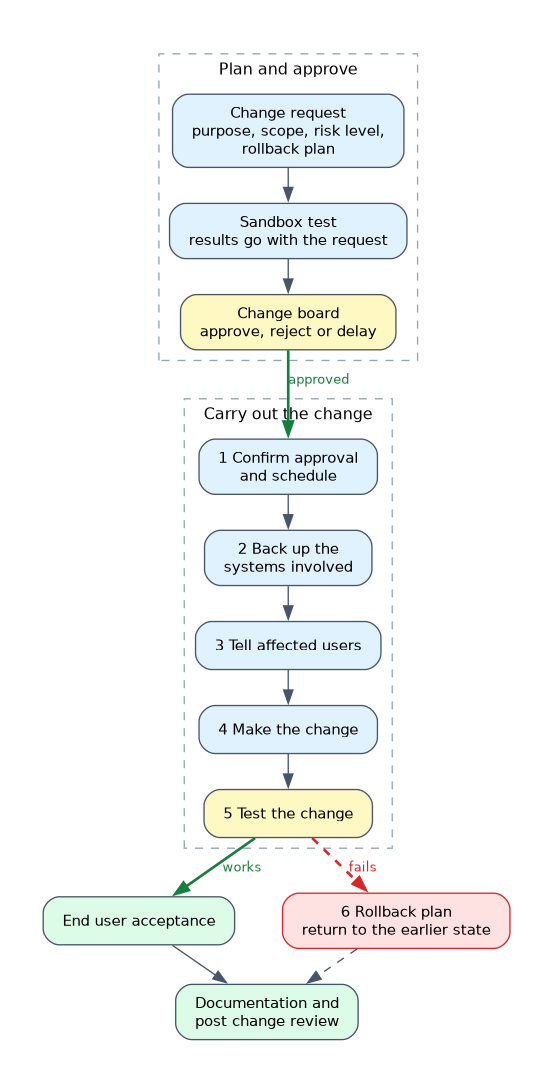
The change request
A change begins with a request form that records the details needed to judge it.
| Item | What it states |
|---|---|
| Purpose of the change | Why it is needed, such as fixing a security flaw |
| Scope of the change | What systems, users or locations the change covers |
| Date and time of the change | When it will happen, often in a window with little impact |
| Affected systems and impact | What will be affected and how many users |
| Risk analysis | What could go wrong and the chance and effect of it |
| Risk level | A rating such as low, medium or high |
| Rollback plan | How to undo the change if it fails |
| Responsible staff members | Who will carry out and who approves the change |
The scope keeps the change from growing beyond what was approved. Choosing a quiet time, such as an evening or weekend, reduces disruption.
Risk analysis and risk level
A risk analysis lists what might fail and what the effect would be. The result is a risk level, which affects how much review the change needs. A small low risk change may need little approval, while a high risk change affecting many users needs more attention.
Plan for failure: rollback and sandbox testing
A rollback plan, also called a back out plan, explains how to return to the earlier working state. It often includes a backup, a saved configuration or a restore point. Without a tested way back, a failed change can cause a long outage.
A sandbox is an isolated test environment that mimics the live system. Testing a change there finds problems before they reach users. The test results go with the request.
Approval
A change board (sometimes called a change advisory board) reviews requests and approves, rejects or delays them. It checks the purpose, risk, plan and timing. Approval means the people responsible have agreed that the change is justified and safe.
Peer review means another technician checks the plan, scripts and settings before the change is carried out.
Carrying out the change
- Confirm approval and the schedule.
- Back up the systems involved.
- Tell affected users in advance.
- Make the change following the plan.
- Test that it works and that nothing else broke.
- Use the rollback plan if it fails.
End user acceptance
After the change, users or business owners confirm it works as expected. This is end user acceptance. It closes the loop, since technical success does not always mean the user's needs are met.
Types of change
Some changes are routine and low risk, such as a standard software update that the team has done many times. These may follow a short, pre approved path. Others are urgent, such as an emergency fix for an active security flaw, and may be approved faster but still need to be recorded and reviewed afterward.
The more unusual or risky the change, the more review it should receive.
A normal change is planned and follows the full path of request, risk analysis and change board approval. It sits between the pre approved standard change and the emergency change.
A change freeze is a period, such as year end or a product launch, when no non emergency changes are allowed.
Documentation after the change
Record what changed and the result, update diagrams, asset records and procedures, and add lessons learned. A post change review checks whether the change met its goal and whether the process worked.
A scenario in which a change fails and users cannot work points to the rollback plan. A scenario that asks how to test safely points to a sandbox.
What to remember for the exam
- Changes are documented, approved and scheduled.
- The request states purpose, scope, date and time, affected systems, risk analysis and risk level.
- Scope defines the boundaries of the change.
- A rollback plan restores the previous state if the change fails.
- A sandbox is an isolated place to test a change.
- The change board approves or rejects requests.
- Notify users and pick a low impact time.
- End user acceptance confirms the change works for users.
- Document the result and update records.
Common mistakes
Skipping the rollback plan. Failure without a way back is a long outage.
Testing in production. Use a sandbox first.
Letting the scope creep. Extra changes were never reviewed or approved.
Forgetting to tell users. A planned outage becomes an unplanned complaint.
Check yourself
What does a rollback plan describe?
How to return to the previous working state if the change fails.
What is the purpose of a sandbox?
To test a change in an isolated environment before it affects live systems.
Who approves a change request?
The change board, or the responsible approvers in the process.
Topic 2 of 9 in Operational Procedures
Test yourself on Operational Procedures
The full CompTIA A+ 220-1202 question bank has 835 questions, with timed practice exams and an explanation for every answer.
This study guide is independent and is not affiliated with, endorsed by, or sponsored by CompTIA. Vendor names, certification names and exam codes are trademarks of their respective owners and are used for identification only.