Operational Procedures · Topic 3 of 9
Workstation Backup and Recovery
Compare full, incremental, differential and synthetic backups, the 3-2-1 rule, on site and off site copies, testing, and Windows and macOS recovery tools.
- 4 min
- Includes a diagram
- Full copies everything. Incremental copies changes since the last backup. Differential copies changes since the last full.
- Restoring incremental backups needs the full backup plus every incremental in order.
- Restoring differential backups needs the full backup plus the latest differential.
What it is
A backup is a separate copy of data that can be used to recover after loss, damage or ransomware. Recovery is the process of restoring that data or the whole system. A plan covers what to back up, how often, where to keep the copies and how to prove that they work.
How it works
Backup types
| Type | What it copies | Backup time | Restore |
|---|---|---|---|
| Full | Everything selected | Longest | Fastest. Only one set needed |
| Incremental | Changes since the last backup of any type | Shortest | Slowest. Full backup plus every incremental |
| Differential | Changes since the last full backup | Medium, grows each day | Medium. Full backup plus latest differential |
| Synthetic full | Combines an existing full and later changes into a new full without re reading all the source | Little load on the source | Fast |
Windows marks each file with an archive attribute that shows whether it has changed since the last backup. Full and incremental backups clear it. A differential backup does not clear it, which is why it keeps growing until the next full backup.
The 3-2-1 rule
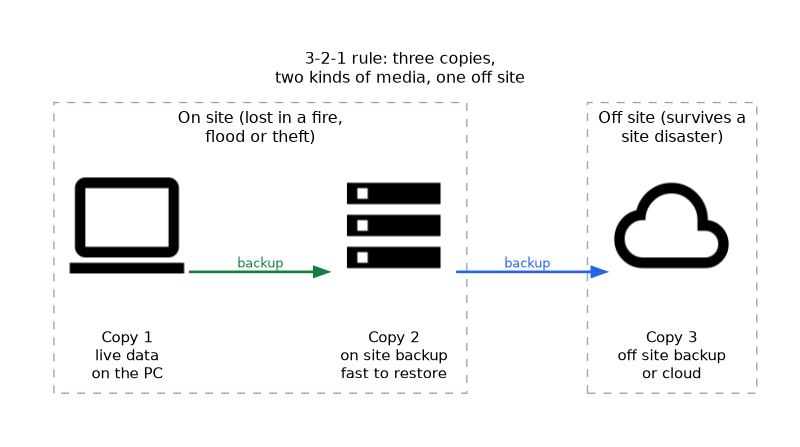 A common guideline is three copies of data, on two different kinds of media, with one copy off site. It guards against a single failure, such as a broken drive, a fire or ransomware. An off site copy might be in the cloud or kept at another location.
| Location | Strength | Weakness |
|---|---|---|
| On site | Fast to restore | Lost in a fire, flood or theft |
| Off site or cloud | Survives a site disaster | Slower to restore, depends on bandwidth |
Backup frequency and rotation
Frequency depends on how much data the organisation can afford to lose. Critical data changes constantly and needs frequent backups. A rotation scheme, such as grandfather father son, uses daily, weekly and monthly sets, and reuses older media on a schedule.
Testing and security
A backup that has never been restored is unproven. Test restores regularly and check that files open.
Protect backups with encryption and access control, because they hold the same sensitive data as the original. Keep at least one copy disconnected from the network, so ransomware cannot encrypt it.
Windows recovery tools
| Tool | Use |
|---|---|
| File History | Saves versions of personal files to another drive |
| Backup and Restore | Older tool for file backup and system images |
| System Restore | Rolls back system files, drivers and registry using restore points |
| System image | Full copy of the system drive for complete recovery |
| Reset this PC (personal computer) | Reinstalls Windows when the system is damaged |
| OneDrive | Cloud storage that can keep copies of user folders |
macOS and Linux
On macOS, Time Machine backs up files to an external or network drive and restores files or the whole system. On Linux, tools such as rsync and tar copy and archive data, and cron can schedule them.
Recovery of a workstation
For a single file, restore it from File History, a backup or the cloud. For a damaged operating system (OS), use a restore point or recovery environment. For a failed drive, replace it, install the OS or a system image, and then restore user data.
For a fast restore, the best backup type is full. For fast backups with the shortest window, it is incremental. Differential sits between the two.
What to remember for the exam
- Full copies everything. Incremental copies changes since the last backup. Differential copies changes since the last full.
- Restoring incremental backups needs the full backup plus every incremental in order.
- Restoring differential backups needs the full backup plus the latest differential.
- The 3-2-1 rule means three copies, two media types, one off site.
- On site backups restore fast but share the site's risks.
- Test restores regularly.
- Encrypt backups and keep a copy offline.
- Windows has File History, System Restore and system images. macOS has Time Machine.
Common mistakes
Mixing up incremental and differential. Incremental is since the last backup of any kind, and differential is since the last full.
Never testing a restore. A backup can fail silently.
Keeping all copies in one place. One fire or theft removes them all.
Treating a sync service as a backup. Deleted or encrypted files may sync away too.
Check yourself
Which backup type takes the shortest time to create?
Incremental.
What does the 3-2-1 rule require?
Three copies of data on two kinds of media with one copy off site.
How many backup sets are needed to restore from a full plus two differentials?
Two: the full backup and the latest differential.
Topic 3 of 9 in Operational Procedures
Test yourself on Operational Procedures
The full CompTIA A+ 220-1202 question bank has 835 questions, with timed practice exams and an explanation for every answer.
This study guide is independent and is not affiliated with, endorsed by, or sponsored by CompTIA. Vendor names, certification names and exam codes are trademarks of their respective owners and are used for identification only.