Operating Systems · Topic 10 of 15
Windows Network Connections
Configure wired, wireless and cellular connections, IP addressing with DHCP and APIPA, DNS, VPN, proxy settings, network profiles and metered connections.
- 4 min
- Includes a diagram
- Connection types are wired, wireless and WWAN (cellular).
- A DHCP server provides the IP address, mask, gateway and DNS settings.
- An address in 169.254.0.0/16 is APIPA and means DHCP failed.
What it is
A Windows client can connect to a network in several ways, and each connection needs a correct address configuration. The technician sets up the link, checks the address settings and chooses a network profile that matches how much the network is trusted. Most of this is done in the Settings app under Network and Internet, or in the Network and Sharing Center.
How it works
Connection types
| Type | Notes |
|---|---|
| Wired | Ethernet cable and a network adapter. Fast and stable |
| Wireless | Wi-Fi to an access point, using the network name (SSID, service set identifier) and security key |
| WWAN | Wireless wide area network, meaning a cellular data connection through a subscriber identity module (SIM) or built in modem |
IP configuration
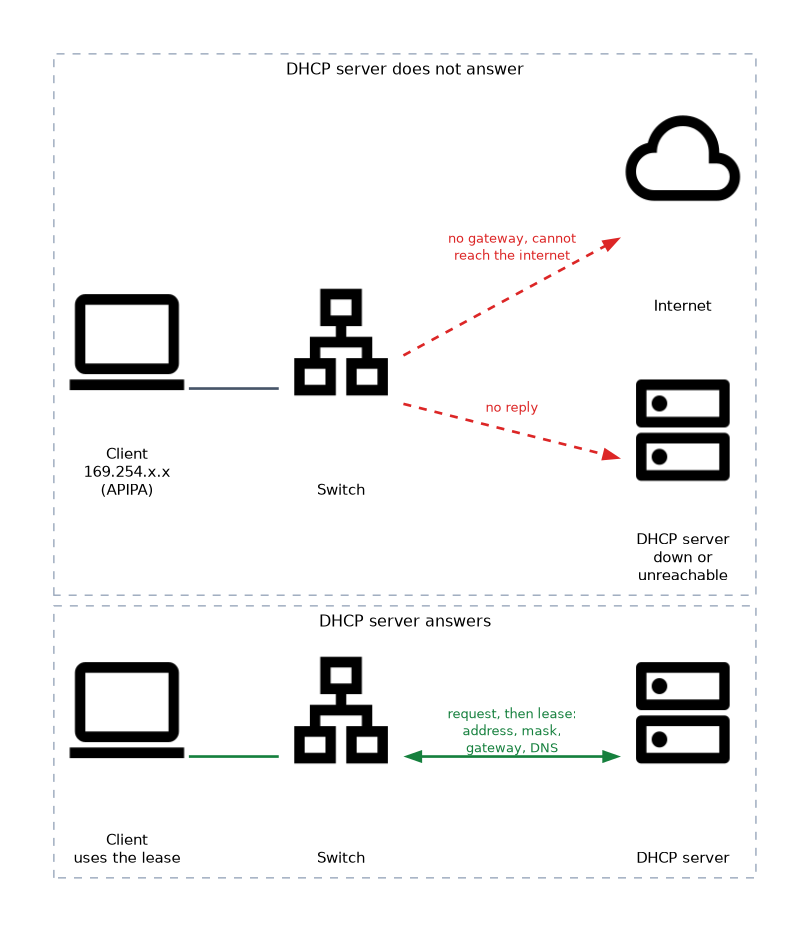 Each device needs an IP (Internet Protocol) address, a subnet mask, a default gateway and DNS (Domain Name System) servers. These can be dynamic or static.
| Method | Meaning |
|---|---|
| Dynamic | A DHCP (Dynamic Host Configuration Protocol) server gives out the settings on a lease. This is the default |
| Static | An administrator types the settings in. Used for servers and printers |
| APIPA | If DHCP does not answer, Windows picks an address in 169.254.0.0/16. Automatic Private IP Addressing |
| Alternate configuration | A fallback static address used when DHCP is not available |
An address starting with 169.254 almost always means the client could not reach a DHCP server. It can talk to other APIPA devices on the same segment, but it has no gateway, so it cannot reach the internet.
The DNS setting turns names into addresses. If a user can reach sites by address but not by name, check the DNS servers. Both Internet Protocol version 4 (IPv4) and Internet Protocol version 6 (IPv6) can be configured in the adapter properties.
Virtual private network (VPN)
A VPN creates an encrypted tunnel across an untrusted network, such as the internet, to a remote network. Windows stores a VPN profile in Settings under Network and Internet, with the server name, VPN type and sign in method. Once connected, the user can reach internal resources as if on site.
Proxy settings
A proxy server sits between the client and the internet to filter or cache traffic. Windows can detect a proxy automatically, use a setup script, or use a manual address and port. A wrong proxy setting is a classic cause of a browser that cannot load pages while other programs still work.
Network profiles
| Profile | Use it for | Effect |
|---|---|---|
| Public | Cafes, airports and other untrusted places | Network discovery and sharing are off |
| Private | Home or a trusted office | Network discovery and sharing may be turned on |
| Domain | A network joined to an Active Directory domain | Set by the domain, not chosen by the user |
When in doubt, choose Public, because it is the safer choice. Discovery means other computers can see this one on the network.
Metered connections
Marking a connection as metered tells Windows to limit background data use. Windows may delay some updates and sync tasks on a metered link. It is useful on a cellular hotspot or a plan with a data cap.
Checking the result
Open a command prompt and run ipconfig /all to confirm the address, gateway, DNS servers and DHCP server. Then use ping and nslookup to test the path and name resolution. The Network troubleshooter in Settings can also diagnose common connection faults.
An APIPA address is a symptom, not a fix. Changing it by hand does not solve it, so find out why the client cannot reach a DHCP server, such as a bad cable or a down server.
What to remember for the exam
- Connection types are wired, wireless and WWAN (cellular).
- A DHCP server provides the IP address, mask, gateway and DNS settings.
- An address in 169.254.0.0/16 is APIPA and means DHCP failed.
- Static addresses are used for servers and printers.
- A VPN provides an encrypted tunnel to a remote network.
- A manual proxy setting can break web access for the browser.
- Public profile turns discovery and sharing off. Private allows them.
- A metered connection reduces background data use.
Common mistakes
Fixing APIPA by typing another address. The client may then reach nothing useful. Fix the DHCP problem.
Choosing the Private profile on public Wi-Fi. This exposes the computer to other users on the network.
Blaming the network when a proxy is set. If the browser fails but other apps work, check the proxy first.
Mixing up DNS and DHCP. DHCP gives out addresses. DNS turns names into addresses.
Check yourself
What does a 169.254.x.x address on a client mean?
The client could not reach a DHCP server and assigned itself an APIPA address.
Which network profile should you pick on airport Wi-Fi?
Public, which turns off discovery and sharing.
Which service turns a website name into an IP address?
DNS (Domain Name System).
Topic 10 of 15 in Operating Systems
Test yourself on Operating Systems
The full CompTIA A+ 220-1202 question bank has 835 questions, with timed practice exams and an explanation for every answer.
This study guide is independent and is not affiliated with, endorsed by, or sponsored by CompTIA. Vendor names, certification names and exam codes are trademarks of their respective owners and are used for identification only.