Operating Systems · Topic 11 of 15
Sharing, Workgroups and Domains
Compare workgroups and domains, then share files and printers with SMB, administrative shares and mapped drives, and see how share and NTFS rights combine.
- 4 min
- Includes a diagram
- A workgroup has accounts on each computer. A domain has central accounts and Group Policy.
- Windows Home cannot join a domain.
- SMB uses TCP port 445 for file and printer sharing.
What it is
Windows computers on a network can be organised as a workgroup or as a domain, and either one can share files and printers. A workgroup is a small peer to peer group where each computer manages its own accounts. A domain is a centrally managed group where accounts and policies live on a server.
How it works
Workgroup versus domain
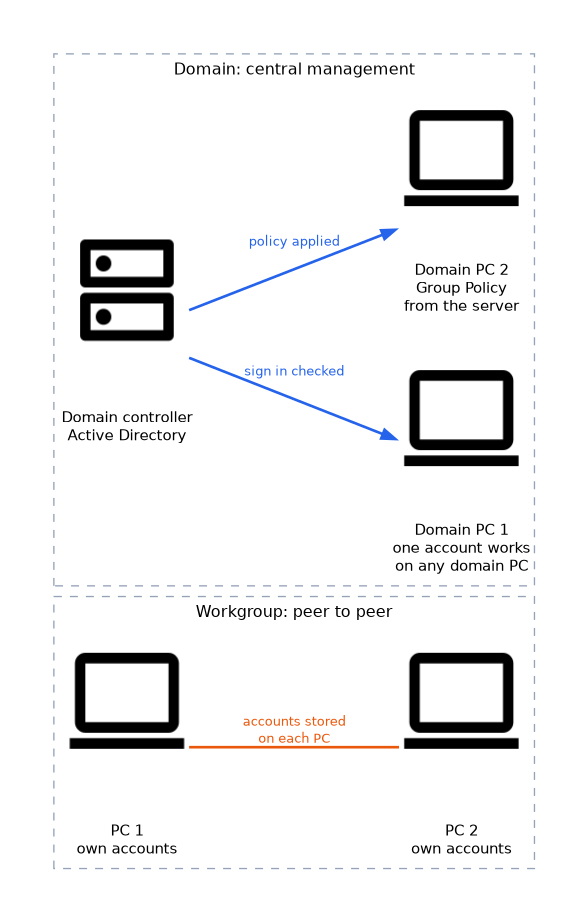
| Feature | Workgroup | Domain |
|---|---|---|
| Accounts | Stored on each computer | Stored centrally in Active Directory |
| Sign in | A user needs an account on every computer used | One account works on any domain computer |
| Management | Per computer | Group Policy from the server |
| Size | Small, typically a home or a few computers | Any size, from small business to large enterprise |
| Editions | All editions | Pro and above (not Home) |
A domain controller is the server that holds Active Directory and checks sign ins. To join a domain, open System properties, choose to rename the personal computer (PC) or change the domain, enter the domain name and supply credentials of an account allowed to join.
Server Message Block (SMB)
SMB is the protocol Windows uses for file and printer sharing. It uses Transmission Control Protocol (TCP) port 445. Linux and macOS can also use SMB, so a share can be reached from other systems.
Sharing a folder
Right click a folder, open its properties and use the Sharing tab. Choose who can access it and what level of access to give. Network discovery and file and printer sharing must be allowed for the active network profile.
| Share permission | Allows |
|---|---|
| Read | View and open files |
| Change | Read, plus add, change and delete files |
| Full Control | Change, plus modify permissions |
Share permissions and New Technology File System (NTFS) permissions together
A shared folder on an NTFS volume has two sets of permissions. A user who reaches the folder over the network gets the more restrictive result of the share and NTFS permissions. A user who sits at the computer is affected only by NTFS permissions.
Administrative shares
Windows creates hidden shares automatically. A dollar sign at the end of the name hides the share from the browse list.
| Share | Points to |
|---|---|
| C$ (and other drive letters) | The root of a drive |
| ADMIN$ | The Windows folder |
| IPC$ | Used for communication between computers (inter process communication) |
Only administrators can use these shares by default. You can reach one by typing the path in File Explorer, such as \\computername\C$.
Mapped drives
A mapped drive gives a network share a drive letter, so it looks like a local drive. In File Explorer, use Map network drive, choose a letter and enter the path in Universal Naming Convention (UNC) form, such as \\server\share. The option to reconnect at sign in makes it persistent.
net use Z: \\server\share /persistent:yesPrinter sharing
A printer connected to one computer can be shared so others can add it. Users connect with the printer's UNC path. The computer that hosts it must be on for others to print, unless the printer is connected directly to the network.
Home folders and roaming profiles
In a domain, an administrator can give each user a home folder on a server and set a user profile to follow the user between computers. This lets the user see the same files and settings at any desk.
If a user can open a folder at the computer but is refused over the network, check the share permissions as well as the NTFS permissions, because network access is limited by the stricter of the two.
What to remember for the exam
- A workgroup has accounts on each computer. A domain has central accounts and Group Policy.
- Windows Home cannot join a domain.
- SMB uses TCP port 445 for file and printer sharing.
- Effective access over the network is the most restrictive of share and NTFS permissions.
- Administrative shares end with a dollar sign: C$, ADMIN$ and IPC$.
- A UNC path looks like
\\server\share. net useor Map network drive creates a mapped drive.- Network discovery and sharing depend on the network profile.
Common mistakes
Assuming share permissions alone decide access. The NTFS permissions apply too, and the stricter one wins for network users.
Thinking hidden means secure. A share with a dollar sign is only hidden from the browse list. It is still reachable by anyone who has the right to it.
Using a domain with Home edition. Home cannot join, so the answer is to upgrade to Pro.
Forgetting the profile. On a Public profile, sharing and discovery are off, so a share may not be visible.
Check yourself
Which port does SMB use?
TCP port 445.
What is the effective access when a share allows Full Control but NTFS allows Read?
Read, because the more restrictive permission wins over the network.
What does the dollar sign at the end of a share name do?
It hides the share from the browse list, as with C$.
Topic 11 of 15 in Operating Systems
Test yourself on Operating Systems
The full CompTIA A+ 220-1202 question bank has 835 questions, with timed practice exams and an explanation for every answer.
This study guide is independent and is not affiliated with, endorsed by, or sponsored by CompTIA. Vendor names, certification names and exam codes are trademarks of their respective owners and are used for identification only.