Mobile Devices · Topic 4 of 5
Mobile Network Connectivity Settings
Configure Wi-Fi, cellular data, Bluetooth pairing, airplane mode, hotspot, tethering and a virtual private network on phones and tablets for the exam.
- 5 min
- Includes a diagram
- Joining Wi-Fi needs the SSID and the right passphrase or credentials.
- Cellular data needs a SIM or eSIM, an active plan and an enabled data setting.
- Roaming uses another carrier and may add costs.
What it is
A phone or tablet reaches the world through several radios. Configuring them means turning the right radio on, joining the right network, and adding a secure tunnel when the network is not trusted.
This page covers Wi-Fi, cellular data, Bluetooth, airplane mode, hotspots and the virtual private network (VPN). Email, sync and management are on the next page.
How it works
Each radio is controlled from the settings menu or a quick toggle, and each one needs its own settings.
Wi-Fi
To join a wireless network, open the Wi-Fi settings, choose the network name (the service set identifier, or SSID) and enter the passphrase. Saved networks reconnect on their own when in range.
Hidden networks do not broadcast their name, so you add the name and security type by hand. Public networks may show a captive portal, a web page that asks you to accept terms or log in before access is allowed.
Cellular data
The device connects to the carrier through a subscriber identity module (SIM) card, or an embedded SIM (eSIM), a built in SIM that is set up by software. The carrier supplies voice and data over fourth generation Long Term Evolution (4G LTE) or fifth generation (5G) networks.
Roaming means using another carrier's network, usually abroad, and it can cost extra. Many users turn off data roaming and set data limits to avoid surprise charges.
Bluetooth pairing
Pairing creates a trusted link between two Bluetooth devices. The steps are the same for most accessories.
- Turn Bluetooth on at the phone.
- Put the accessory in pairing (discoverable) mode.
- Select the accessory from the list on the phone.
- Confirm any code or personal identification number (PIN) shown.
- Test the link by playing audio or typing.
Once paired, the devices reconnect when both are on and in range.
Airplane mode
Airplane mode turns off all radios at once: cellular, Wi-Fi and Bluetooth. You can turn Wi-Fi or Bluetooth back on after enabling it, which is how people keep a headset working in flight.
Hotspot and tethering
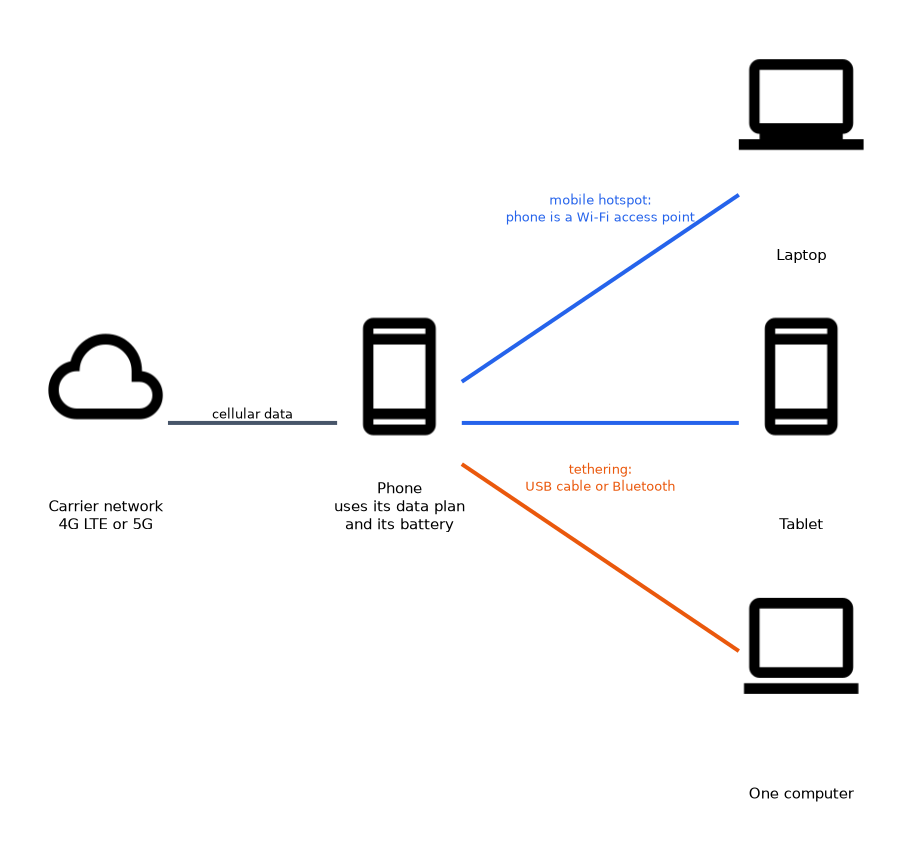 A mobile hotspot turns the phone into a small Wi-Fi access point that shares its cellular connection. You set a network name and a passphrase and then connect other devices as you would any Wi-Fi network. Tethering shares the connection to one device over a cable or Bluetooth.
Both use the phone's data plan and drain its battery. Some plans limit or block sharing.
Virtual private network
A VPN builds an encrypted tunnel from the device to a trusted network. On a phone you add a profile with the server address, account details and the chosen protocol, or install a VPN app from the company.
Use a VPN on public Wi-Fi or whenever you reach company systems from outside.
Location services
Location services use the global positioning system (GPS), Wi-Fi and cell tower data to find the device. Apps ask for permission to use them. Turning them off saves battery and improves privacy, but disables maps and some features.
If a phone shows no signal and no Wi-Fi after you hand it back from a trip, check airplane mode first, because it is the fastest fix.
What to remember for the exam
- Joining Wi-Fi needs the SSID and the right passphrase or credentials.
- Cellular data needs a SIM or eSIM, an active plan and an enabled data setting.
- Roaming uses another carrier and may add costs.
- Bluetooth needs pairing: discoverable mode, select the device, confirm the code.
- Airplane mode turns off all radios, but Wi-Fi and Bluetooth can be switched back on.
- A hotspot shares cellular data as Wi-Fi; tethering shares it with one device.
- A VPN encrypts traffic to a trusted network and is wise on public Wi-Fi.
- Location services use GPS, Wi-Fi and cell data and need app permission.
Common mistakes
Forgetting airplane mode. A device that suddenly cannot use any network is often in airplane mode.
Trusting open public Wi-Fi. Without a VPN, traffic on an open network can be seen by others.
Pairing from the wrong place. Bluetooth pairing needs the accessory in pairing mode and close to the phone. A paired device that is on another phone may refuse a new link.
Confusing Wi-Fi with cellular. A phone can show full Wi-Fi bars but have no internet, because the router has lost its own connection.
Ignoring data limits. Hotspot use and video streaming over cellular can use up a plan quickly.
Check yourself
What does airplane mode do?
It turns off the cellular, Wi-Fi and Bluetooth radios, though Wi-Fi and Bluetooth can be turned back on.
What are the usual steps to pair a Bluetooth headset?
Turn Bluetooth on, put the headset in pairing mode, select it on the phone and confirm any code.
Why use a VPN on public Wi-Fi?
It encrypts the traffic in a tunnel so others on the open network cannot read it.
Topic 4 of 5 in Mobile Devices
Test yourself on Mobile Devices
The full CompTIA A+ 220-1201 question bank has 856 questions, with timed practice exams and an explanation for every answer.
This study guide is independent and is not affiliated with, endorsed by, or sponsored by CompTIA. Vendor names, certification names and exam codes are trademarks of their respective owners and are used for identification only.