Standards and Concepts · Topic 1 of 6
OSI and TCP/IP Models, Frames, Packets and Addressing
Learn the seven OSI layers, the TCP/IP model, how data is wrapped into segments, packets and frames, and which address works at which layer.
- 5 min
- Includes a diagram
- The OSI model has seven layers. The TCP/IP model has four in Cisco teaching.
- Layer 1 is bits, layer 2 is frames, layer 3 is packets, layer 4 is segments.
- MAC addresses work at layer 2, IP addresses at layer 3, and port numbers at layer 4.
What it is
A network model is a layered description of how data travels from one device to another.
Each layer has one job and talks only to the layers next to it. This lets different vendors build products that work together.
Two models matter here. The OSI model has seven layers and is mostly used for teaching and troubleshooting. The TCP/IP model is the practical one that the internet uses.
How it works
Data is wrapped in a new header at each layer on the sender, and unwrapped in reverse order on the receiver.
The OSI model
The seven layers are numbered from the bottom up.
| Layer | Name | What it does | Data unit |
|---|---|---|---|
| 7 | Application | Network services for the user's software | Data |
| 6 | Presentation | Data format, encryption, compression | Data |
| 5 | Session | Starts, keeps and ends conversations | Data |
| 4 | Transport | Port numbers, reliable or fast delivery | Segment (TCP) or datagram (UDP) |
| 3 | Network | Logical addressing and routing | Packet |
| 2 | Data link | Local delivery using MAC addresses | Frame |
| 1 | Physical | Cables, signals and bits | Bits |
A common memory aid, from layer 7 down to layer 1, is "All People Seem To Need Data Processing". Another is "Please Do Not Throw Sausage Pizza Away", which runs from layer 1 up.
The TCP/IP model
The TCP/IP model groups the same work into fewer layers. The version most often taught by Cisco has four.
| TCP/IP layer | Matches OSI layer |
|---|---|
| Application | 5, 6 and 7 |
| Transport | 4 |
| Internet | 3 |
| Network access | 1 and 2 |
Some books split network access into two layers and show five layers in total. The idea is the same.
Encapsulation, frames and packets
Encapsulation means adding a header at each layer as data moves down the stack. The receiver does the opposite, called de-encapsulation.
The words packet and frame are not interchangeable. A packet is the unit at layer 3 and carries IP addresses. A frame is the unit at layer 2 and carries MAC addresses, plus a trailer that lets the receiver check for errors.
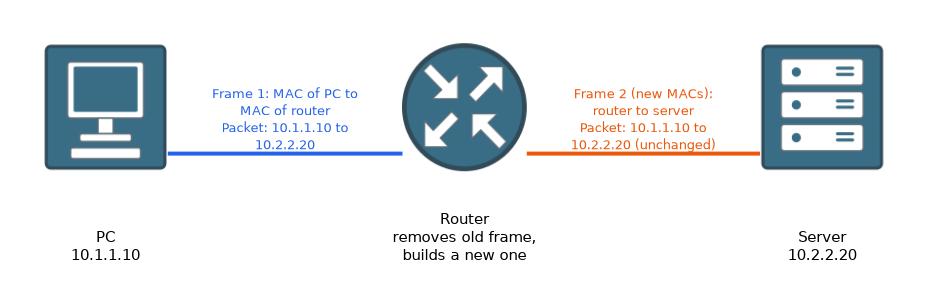
When a packet crosses a router, the router removes the old frame and builds a new one for the next link. The packet, with its source and destination IP addresses, stays the same from end to end.
Addressing
 Three kinds of address work together.
| Address | Layer | Identifies | Changes along the path? |
|---|---|---|---|
| MAC address | 2 | A network interface on the local link | Yes, at every router |
| IP address | 3 | A device on a network, end to end | No, except with NAT |
| Port number | 4 | A program or service on a device | No |
A MAC address is 48 bits long and is written in hexadecimal, for example 00:1A:2B:3C:4D:5E. The first half identifies the manufacturer and the second half is unique to the card.
An IP address says which network and which host. A port number says which service on that host, such as web or email.
What to remember for the exam
Seven facts cover most questions on this topic.
- The OSI model has seven layers. The TCP/IP model has four in Cisco teaching.
- Layer 1 is bits, layer 2 is frames, layer 3 is packets, layer 4 is segments.
- MAC addresses work at layer 2, IP addresses at layer 3, and port numbers at layer 4.
- Encapsulation adds headers going down. De-encapsulation removes them going up.
- A switch works mainly at layer 2. A router works at layer 3.
- A MAC address is 48 bits long. It identifies an interface on the local link.
- The IP addresses in a packet stay the same across routers, while the frame changes at each hop.
When a question names an address, think of the layer first. MAC means layer 2, IP means layer 3, and port means layer 4.
Common mistakes
These four errors appear again and again.
Mixing up packet and frame. A frame belongs to layer 2 and carries MAC addresses. A packet belongs to layer 3 and carries IP addresses.
Placing the layers in the wrong order. Layer 1 is the bottom, physical layer. Layer 7 is at the top, closest to the user.
Thinking the MAC address travels the whole way. The MAC addresses change at every router, because each link has its own frame.
Treating the OSI model as a protocol. It is a reference model. Real networks run TCP/IP.
Do not assume that the application layer means the program itself. It is the network service that the program uses.
Check yourself
Work through these three questions.
What is the data unit at layer 2, and which address does it carry?
The data unit is the frame, and it carries MAC addresses.
Which TCP/IP layer covers the OSI session, presentation and application layers?
The application layer of the TCP/IP model covers OSI layers 5, 6 and 7.
When a packet passes through a router, which addresses stay the same?
The source and destination IP addresses stay the same. The router builds a new frame with new MAC addresses for the next link.
Topic 1 of 6 in Standards and Concepts
Test yourself on Standards and Concepts
The full Cisco CCST 100-150 Networking question bank has 749 questions, with timed practice exams and an explanation for every answer.
This study guide is independent and is not affiliated with, endorsed by, or sponsored by Cisco. Vendor names, certification names and exam codes are trademarks of their respective owners and are used for identification only.