Standards and Concepts · Topic 3 of 6
LAN, WAN, MAN, CAN, PAN, WLAN and Network Topologies
Learn the differences between LAN, WAN, MAN, CAN, PAN and WLAN networks, and how physical and logical topologies such as star, bus and mesh differ.
- 4 min
- Includes a diagram
- A PAN covers one person, a LAN one building, a CAN several buildings, a MAN a city and a WAN large distances.
- A WLAN is a LAN that uses radio, such as Wi-Fi.
- The internet is the largest WAN.
What it is
Networks are named by how far they reach, and drawn in shapes called topologies.
The size of the area a network covers decides its name. The topology describes how the devices are laid out and how data flows between them.
This page covers both ideas. You need to name each network type and recognise each topology from a picture.
How it works
Each network type matches an area, and each topology matches a pattern of links.
Network types
| Type | Full name | Typical area | Example |
|---|---|---|---|
| PAN | Personal area network | Around one person, a few metres | A phone linked to earbuds by Bluetooth |
| LAN | Local area network | One home, office or building | Office computers joined to a switch |
| WLAN | Wireless local area network | The same area as a LAN, using radio | Wi-Fi in an office |
| CAN | Campus area network | Several buildings close together | A university or business park |
| MAN | Metropolitan area network | A town or city | A city wide network run by a council |
| WAN | Wide area network | Large distances, even between countries | The links between company sites, or the internet |
A LAN is usually owned and run by one organisation. A WAN often uses links leased from a service provider. The internet is the largest WAN.
A WLAN is a LAN that uses radio instead of cables. It is the same size as a LAN and the devices usually join through an access point.
Physical and logical topologies
A physical topology shows how the devices and cables are really arranged. A logical topology shows how data flows, whatever the cabling looks like.
For example, an older Ethernet hub network was wired as a star but behaved logically like a bus. All devices shared one medium.
Common topologies
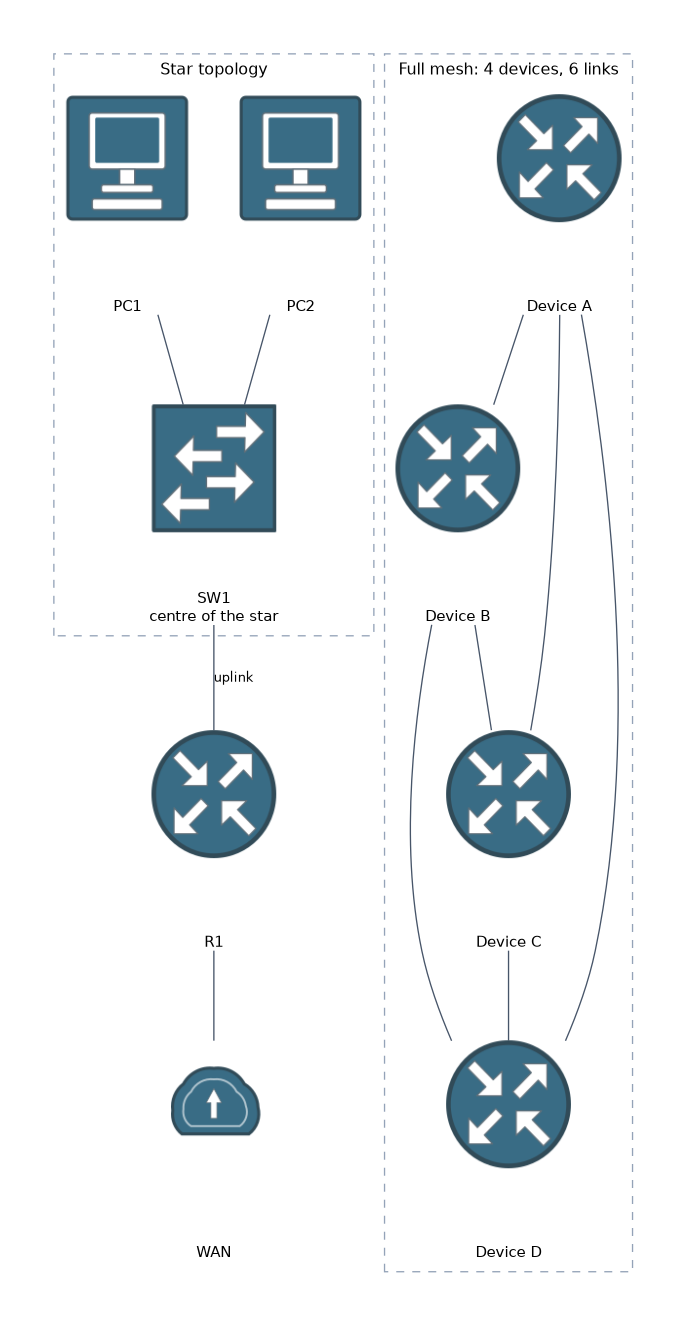 The main shapes are listed below.
| Topology | Layout | Strength | Weakness |
|---|---|---|---|
| Star | Every device connects to one central switch | Easy to add and fix devices. One bad cable affects one device | The central device is a single point of failure |
| Bus | All devices share one cable | Cheap, little cable | One break can stop everyone, and it is hard to troubleshoot |
| Ring | Each device connects to two neighbours in a circle | Orderly traffic | One break can affect the ring |
| Full mesh | Every device connects to every other | Very reliable | Many links, so it is costly |
| Partial mesh | Some devices have several links | Good balance of cost and resilience | More complex than a star |
| Hub and spoke | Branch sites each link to one central site | Simple for WANs | The hub is a single point of failure |
Modern wired LANs are almost always a star, with devices connected to a switch. Reliable WANs often use a partial mesh.
Mesh links grow quickly. A full mesh of n devices needs n times n minus 1, divided by 2, links. Four devices need six links.
What to remember for the exam
Seven facts cover most questions on this topic.
- A PAN covers one person, a LAN one building, a CAN several buildings, a MAN a city and a WAN large distances.
- A WLAN is a LAN that uses radio, such as Wi-Fi.
- The internet is the largest WAN.
- A physical topology shows the layout. A logical topology shows how data flows.
- A star topology connects every device to a central switch. It is the normal LAN design today.
- A full mesh is the most reliable and the most costly.
- A bus topology has one shared cable, and a single break can affect all devices.
Match the name to the distance. If a question gives a rough area, the letters will tell you the answer.
Common mistakes
These four errors appear again and again.
Confusing a CAN with a MAN. A CAN is a campus owned by one organisation. A MAN covers a town or city.
Thinking WLAN and WAN are close in meaning. The L stands for local, so a WLAN is a small area. The W of WAN means wide.
Assuming the physical and logical topologies match. A hub wired as a star still shares one medium like a bus.
Calling a switch based network a bus. Devices that plug into a switch form a star.
Do not mix up the star and hub and spoke shapes. A star is a LAN design, while hub and spoke is usually a WAN design.
Check yourself
Work through these three questions.
Which network type covers several buildings owned by one organisation?
That is a campus area network, or CAN.
What is the difference between a physical and a logical topology?
A physical topology is the real layout of devices and cables. A logical topology shows how data flows between the devices.
Why is a full mesh costly even though it is very reliable?
Every device connects to every other device, so it needs many links.
Topic 3 of 6 in Standards and Concepts
Test yourself on Standards and Concepts
The full Cisco CCST 100-150 Networking question bank has 749 questions, with timed practice exams and an explanation for every answer.
This study guide is independent and is not affiliated with, endorsed by, or sponsored by Cisco. Vendor names, certification names and exam codes are trademarks of their respective owners and are used for identification only.