Standards and Concepts · Topic 6 of 6
Common Network Applications and Protocols
Learn what FTP, SFTP, TFTP, HTTP, HTTPS, DHCP, DNS, ICMP and NTP do, which well known ports they use and whether each one runs over TCP or UDP.
- 4 min
- Includes a diagram
- FTP uses TCP ports 20 and 21 and is not encrypted. SFTP uses TCP port 22 and is encrypted.
- TFTP uses UDP port 69, has no login and is not secure.
- HTTP uses TCP port 80. HTTPS uses TCP port 443 and adds encryption.
What it is
Application protocols are the agreed sets of rules that network services use to do their jobs.
A web browser, an email program and a file copy tool each speak a protocol. The protocol decides the messages, the order of the messages and the port number.
This page covers nine protocols you must know by name, by purpose and by port.
How it works
Each protocol solves one problem and rides on TCP, UDP or directly on IP.
File transfer protocols
Three protocols move files.
| Protocol | Name | Port | Transport | Secure? |
|---|---|---|---|---|
| FTP | File Transfer Protocol | 21 for control, 20 for data | TCP | No, sends data and passwords in clear text |
| SFTP | SSH File Transfer Protocol | 22 | TCP | Yes, runs inside an SSH session |
| TFTP | Trivial File Transfer Protocol | 69 | UDP | No, and has no login |
FTP is full featured and normally asks for a username and password. TFTP is very simple, so network devices often use it to load a configuration or software image on a trusted LAN. SFTP is the safer choice when files cross a network you do not trust.
Web protocols
HTTP carries web pages between a browser and a web server. It uses TCP port 80 and sends everything in clear text.
HTTPS is HTTP protected with encryption, using TCP port 443. A padlock in the browser means the connection is protected. Encryption and certificates are explained in the security chapter.
Addressing and naming protocols
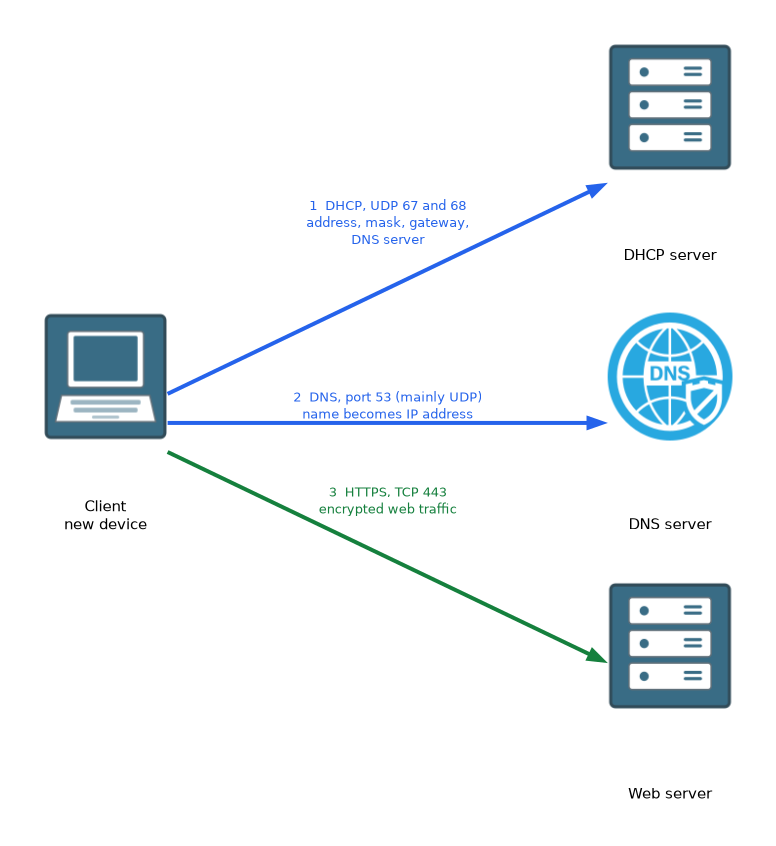 DHCP (Dynamic Host Configuration Protocol) gives devices an IP address, subnet mask, default gateway and DNS server automatically. It uses UDP, with port 67 on the server and port 68 on the client.
DNS (Domain Name System) turns a name such as a website address into an IP address. It uses port 53, mainly UDP for ordinary queries.
The usual order on a new device is that DHCP gives the settings, DNS then finds the server by name, and TCP or UDP carries the data.
Support protocols
ICMP (Internet Control Message Protocol) carries error and test messages, such as the replies you see with ping. It has no port numbers because it works at the IP layer rather than over TCP or UDP.
NTP (Network Time Protocol) keeps the clocks of devices in step. It uses UDP port 123. Accurate time helps with log files and with security checks that depend on dates.
All the protocols together
| Protocol | Port | Purpose |
|---|---|---|
| FTP | TCP 20 and 21 | Transfer files, not secure |
| SFTP | TCP 22 | Transfer files securely |
| TFTP | UDP 69 | Simple file transfer |
| HTTP | TCP 80 | Web pages |
| HTTPS | TCP 443 | Secure web pages |
| DHCP | UDP 67 and 68 | Automatic addressing |
| DNS | 53, mainly UDP | Names to addresses |
| ICMP | None | Errors and tests |
| NTP | UDP 123 | Time |
What to remember for the exam
Seven facts cover most questions on this topic.
- FTP uses TCP ports 20 and 21 and is not encrypted. SFTP uses TCP port 22 and is encrypted.
- TFTP uses UDP port 69, has no login and is not secure.
- HTTP uses TCP port 80. HTTPS uses TCP port 443 and adds encryption.
- DHCP uses UDP ports 67 and 68 and hands out addressing settings.
- DNS uses port 53, mainly UDP, and maps names to IP addresses.
- ICMP carries error and test messages and has no port number.
- NTP uses UDP port 123 and sets the time.
The S in HTTPS stands for secure, and SFTP is the secure choice for file transfer. If a question asks for the safe version, pick the one with the S.
Common mistakes
These four errors appear again and again.
Mixing up SFTP and TFTP. SFTP is secure and uses TCP port 22. TFTP is simple, has no login and uses UDP port 69.
Thinking DNS gives out IP addresses to hosts. That is DHCP. DNS only turns names into addresses.
Giving ICMP a port number. ICMP has none, because it does not run over TCP or UDP.
Assuming the padlock means the site is safe to trust. HTTPS protects the connection. It does not prove that the site owner is honest.
Passwords sent with FTP, HTTP or telnet can be read by anyone who captures the traffic.
Check yourself
Work through these three questions.
Which protocol gives a new device its IP address automatically, and which ports does it use?
DHCP gives the address, using UDP ports 67 and 68.
What is the difference between HTTP and HTTPS?
HTTP uses TCP port 80 and sends data in clear text. HTTPS uses TCP port 443 and encrypts the connection.
Why does ICMP have no port number?
ICMP works at the IP layer and does not run over TCP or UDP.
Topic 6 of 6 in Standards and Concepts
Test yourself on Standards and Concepts
The full Cisco CCST 100-150 Networking question bank has 749 questions, with timed practice exams and an explanation for every answer.
This study guide is independent and is not affiliated with, endorsed by, or sponsored by Cisco. Vendor names, certification names and exam codes are trademarks of their respective owners and are used for identification only.