Infrastructure · Topic 5 of 5
Basic Switching Concepts, MAC Tables and VLANs
Learn how a switch builds a MAC address table, what MAC address filtering does, and how VLANs split a switch into separate logical networks.
- 4 min
- Includes a diagram
- A switch learns MAC addresses from the source address of incoming frames.
- It forwards by destination MAC address, and floods when the destination is unknown.
- Broadcast frames go out of all ports in the VLAN.
What it is
A switch connects devices on one network and forwards each frame only to the port that needs it.
To do this, it keeps a MAC address table. It learns which device is on which port, so it does not need to send every frame to every port.
A switch can also be divided into separate logical networks called VLANs. This page covers the table, MAC address filtering and VLANs.
How it works
The switch learns from the source address of each frame and forwards using the destination address.
The MAC address table
A MAC address is the hardware address of a network interface. The switch builds its table in four steps.
- A frame arrives on a port.
- The switch reads the source MAC address and records it against that port.
- The switch reads the destination MAC address and looks it up.
- If the destination is in the table, the frame goes out of that port only. If it is unknown, the switch floods the frame out of every port in the VLAN except the one it came in on.
Broadcast frames are sent out of all ports in the VLAN. Entries that are not used for a while are removed, which is called aging. The default aging time on Cisco switches is 300 seconds.
You can look at the table on a Cisco switch.
Switch# show mac address-tableThe output lists the VLAN, the MAC address, the type (dynamic or static) and the port for each entry.
MAC address filtering
MAC address filtering allows or blocks devices by their MAC address. It is common on home routers and wireless access points, where you list the devices that may connect.
It adds only light protection. A MAC address can be copied, which is called spoofing, so an attacker can imitate an allowed device.
It is also tedious to maintain. It is a useful extra step, and not a replacement for a strong password and good wireless security.
VLANs
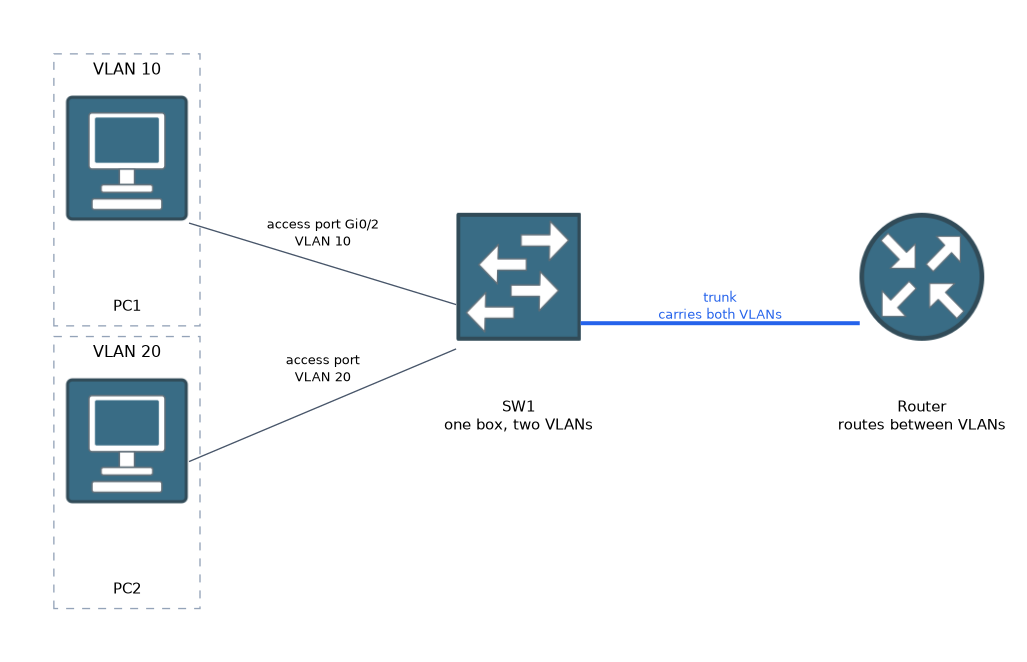 A VLAN (virtual local area network) splits one physical switch into several separate logical networks. Each VLAN is its own broadcast domain.
Devices in different VLANs cannot talk directly. Their traffic must pass through a router or a layer 3 switch. This keeps groups such as staff, guests and phones apart and reduces unneeded broadcast traffic.
Each VLAN has an ID number, such as 10 or 20. VLAN 1 exists by default.
A port that belongs to one VLAN is an access port. A link that carries several VLANs between switches is a trunk.
A basic VLAN setup on a Cisco switch looks like this.
Switch(config)# vlan 10
Switch(config-vlan)# name SALES
Switch(config-vlan)# exit
Switch(config)# interface GigabitEthernet0/2
Switch(config-if)# switchport mode access
Switch(config-if)# switchport access vlan 10
The first lines create VLAN 10 and name it. The last lines make port Gi0/2 an access port in VLAN 10.
Switch# show vlan briefThis command lists each VLAN and the ports that belong to it.
What to remember for the exam
Six facts cover most questions on this topic.
- A switch learns MAC addresses from the source address of incoming frames.
- It forwards by destination MAC address, and floods when the destination is unknown.
- Broadcast frames go out of all ports in the VLAN.
- The default MAC aging time on Cisco switches is 300 seconds.
- MAC address filtering lists allowed or blocked devices, and gives only weak protection.
- A VLAN is a separate logical network on a switch, and VLANs need a router or layer 3 switch to talk to each other.
A switch learns from the source address and forwards by the destination address. Keep these two apart in your mind.
Common mistakes
These four errors appear again and again.
Mixing up source and destination. The table is filled from the source address and used with the destination address.
Thinking MAC filtering is strong security. A MAC address can be spoofed.
Expecting two VLANs to talk without a router. They are separate networks.
Forgetting to put the port in the VLAN. Creating the VLAN does not move any ports into it.
A device that is moved to a different port can appear to lose connectivity until the switch learns its new location or the old entry ages out.
Check yourself
Work through these three questions.
What does a switch do with a frame whose destination MAC address is not in its table?
It floods the frame out of every port in the VLAN except the one it arrived on.
Why is MAC address filtering weak protection?
A MAC address can be copied, so an attacker can imitate an allowed device.
What command lists the VLANs on a Cisco switch?
The
show vlan briefcommand lists them with their ports.
Topic 5 of 5 in Infrastructure
Test yourself on Infrastructure
The full Cisco CCST 100-150 Networking question bank has 749 questions, with timed practice exams and an explanation for every answer.
This study guide is independent and is not affiliated with, endorsed by, or sponsored by Cisco. Vendor names, certification names and exam codes are trademarks of their respective owners and are used for identification only.