Infrastructure · Topic 4 of 5
Basic Routing Concepts
Understand the default gateway, local and remote networks, how a router forwards packets, and how layer 2 and layer 3 switches differ in a LAN.
- 4 min
- Includes a diagram
- A local network is the device's own subnet. A remote network is any other subnet.
- The default gateway is the router address that a device uses for remote networks.
- A router connects networks and uses a routing table to forward packets.
What it is
Routing is the process of moving packets from one network to another.
Devices on the same network can talk directly. To reach a different network, a device hands the packet to a router, which sends it on towards the destination.
This page explains how a device knows when to use a router, and what a router and a layer 3 switch do.
How it works
Each device compares the destination to its own network, and uses the default gateway when the destination is remote.
Local and remote networks
A local network is the subnet that a device belongs to. A remote network is any other subnet.
The device uses its IP address and subnet mask to decide. If the destination address has the same network part, the destination is local, and the device sends the frame straight to it. If the network part differs, the destination is remote.
The default gateway
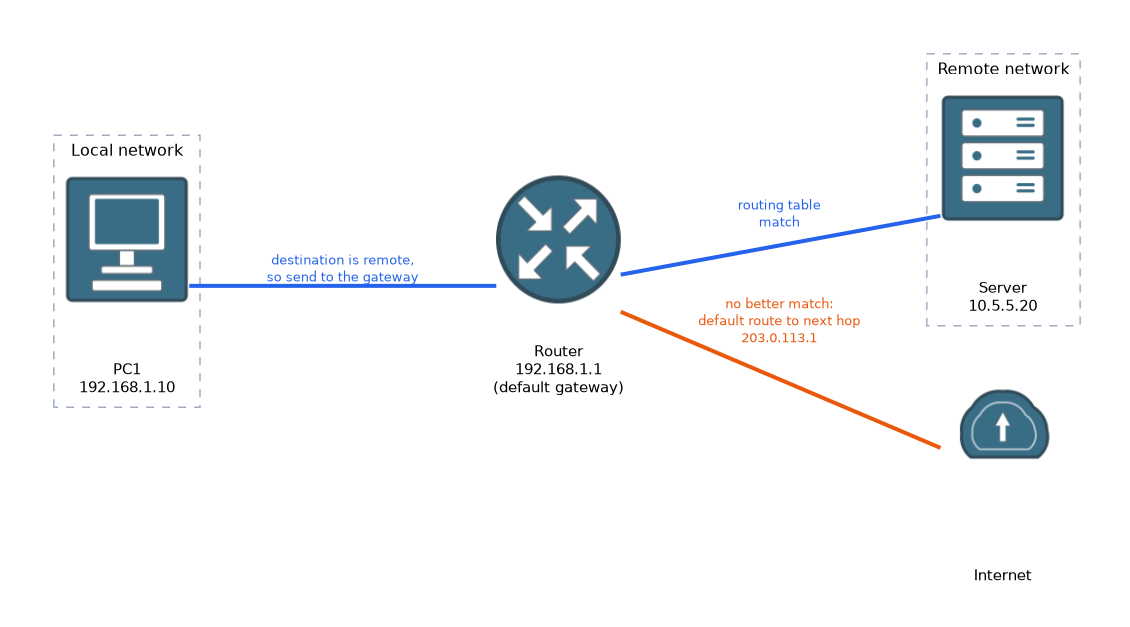 The default gateway is the address of the router on the local network. A device sends all traffic for remote networks to it.
The address is usually the router interface that faces the local network, such as 192.168.1.1. A device needs the correct gateway to leave its own network. Without one, it can talk to local devices but not to the internet.
On a Windows PC, ipconfig shows the default gateway.
What a router does
A router connects different networks. It has an interface in each network and keeps a routing table, which lists the networks it knows about and where to send packets for them.
When a packet arrives, the router looks at the destination IP address and finds the best match in its table. It then sends the packet out of the matching interface. If nothing matches, a default route can send the packet to the next router, often towards the internet.
Routers do not forward broadcasts, so each interface is its own broadcast domain.
A simple default route on a Cisco router looks like this.
Router(config)# ip route 0.0.0.0 0.0.0.0 203.0.113.1It says that traffic with no better match goes to the next hop 203.0.113.1.
Layer 2 and layer 3 switches
A layer 2 switch forwards frames inside one network, using MAC addresses. It does not route between subnets.
A layer 3 switch can do that too. It can route between VLANs and subnets, using IP addresses and a routing table, and it is built to do so quickly in hardware.
| Feature | Layer 2 switch | Layer 3 switch | Router |
|---|---|---|---|
| Forwards frames by MAC address | Yes | Yes | No |
| Routes between subnets | No | Yes | Yes |
| Typical place | Access layer | Larger LANs | Network edge, WAN |
A small network usually uses a router and layer 2 switches. A larger network may use layer 3 switches to move traffic between many internal VLANs.
What to remember for the exam
Six facts cover most questions on this topic.
- A local network is the device's own subnet. A remote network is any other subnet.
- The default gateway is the router address that a device uses for remote networks.
- A router connects networks and uses a routing table to forward packets.
- A default route is used when nothing else in the table matches.
- A layer 2 switch forwards by MAC address. A layer 3 switch can also route by IP address.
- Routers do not forward broadcasts.
If a PC can reach local devices but not the internet, check its default gateway first.
Common mistakes
These four errors appear again and again.
Entering the wrong gateway. The gateway must be an address on the PC's own subnet.
Thinking a layer 2 switch can route. It cannot send traffic between subnets without a router or a layer 3 device.
Mixing up the gateway and the DNS server. The gateway forwards packets. DNS turns names into addresses.
Forgetting that remote means a different subnet. A server in the same building can still be on a remote network.
A wrong subnet mask can make a device think a remote address is local, so it never uses its gateway.
Check yourself
Work through these three questions.
What is the default gateway?
It is the router address on the local network that a device uses to reach remote networks.
How does a device decide that a destination is remote?
It compares the destination with its own network using the subnet mask. If the network part differs, the destination is remote.
What can a layer 3 switch do that a layer 2 switch cannot?
A layer 3 switch can route between subnets and VLANs, using IP addresses.
Topic 4 of 5 in Infrastructure
Test yourself on Infrastructure
The full Cisco CCST 100-150 Networking question bank has 749 questions, with timed practice exams and an explanation for every answer.
This study guide is independent and is not affiliated with, endorsed by, or sponsored by Cisco. Vendor names, certification names and exam codes are trademarks of their respective owners and are used for identification only.