Diagnosing Problems · Topic 3 of 6
Diagnostic Commands and Reading the Results
Run ping, ipconfig, ifconfig, ip, tracert, traceroute and nslookup, interpret their results, and see how firewalls can change what the tests show.
- 5 min
- Includes a diagram
pinguses ICMP echo request and echo reply to test reachability and round trip time.- Ping
127.0.0.1to test the device itself, and then ping the default gateway. tracertandtraceroutelist each hop on the path, using the TTL value.
What it is
Diagnostic commands are quick tests that show how a device is set up and whether it can reach others.
Each command answers a different question. Knowing which one to run, and what its output means, is a core support skill.
Results are not always as simple as they look. A firewall can block a test even when the network is working.
How it works
Start with the device's own settings, then test outwards one step at a time.
Showing addresses
ipconfig on Windows, ifconfig on older Linux and macOS, and ip addr on modern Linux show the IP address, subnet mask and gateway. You are checking that the address is sensible and on the right network. An address that starts 169.254 means the device did not get one from DHCP.
ping
ping sends an ICMP echo request and waits for an echo reply. It shows whether the destination answers and how long the round trip takes.
C:\> ping 192.168.1.1
Reply from 192.168.1.1: bytes=32 time<1ms TTL=64
Reply from 192.168.1.1: bytes=32 time=1ms TTL=64
Typical results are:
| Result | Meaning |
|---|---|
| Reply from | The destination answered |
| Request timed out | No reply came back. The destination may be off, the path may be broken, or a firewall may block ICMP |
| Destination host unreachable | A device along the way reported that it has no route to the destination |
Two ping tests are worth doing early. Ping the loopback address 127.0.0.1 to test the device's own network software. Then ping the default gateway.
tracert and traceroute
tracert on Windows and traceroute on Linux and macOS show each router, called a hop, between you and the destination. They work by sending packets with a rising TTL (time to live) value. Each router lowers the TTL by one, and a router that sees it reach zero reports back.
C:\> tracert 203.0.113.50
  1    <1 ms    <1 ms    <1 ms  192.168.1.1
  2     8 ms     9 ms     8 ms  198.51.100.1
  3     *        *        *     Request timed out.
A line of stars means that hop did not answer.
It may simply be a router that does not reply to these probes, so look at what happens next. If the later hops answer, the path works. If the trace stops there for good, the fault is near that hop.
nslookup
nslookup asks a DNS server to turn a name into an IP address, and can show which server answered.
C:\> nslookup web.example.com
Server:  dns.local
Address:  192.168.1.1

Name:    web.example.com
Address:  203.0.113.50
If a ping to the address works but nslookup fails, DNS is the problem.
How firewalls change the results
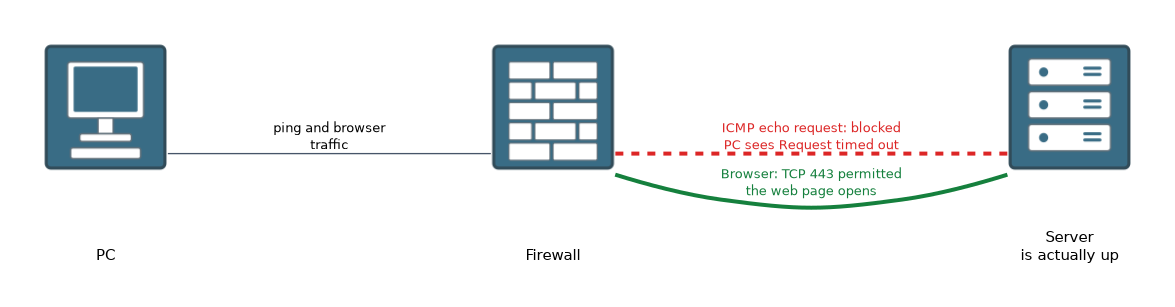 A firewall may block ICMP, which ping and traceroute rely on. Many servers and some routers ignore pings on purpose.
This means a failed ping does not prove that the destination is down. A website may open in a browser while its server ignores ping. Equally, a successful ping does not prove that a service works, because a firewall may still block the port the service uses, such as 443.
| Test result | What you can conclude |
|---|---|
| Ping works | The destination is reachable, at least for ICMP |
| Ping fails | Unclear. It could be off, unreachable or blocked by a firewall |
| Browser works, ping fails | A firewall probably blocks ICMP |
| Ping works, browser fails | The service or a firewall on its port may be at fault |
Use more than one test before you decide where the fault is.
What to remember for the exam
Seven facts cover most questions on this topic.
pinguses ICMP echo request and echo reply to test reachability and round trip time.- Ping
127.0.0.1to test the device itself, and then ping the default gateway. tracertandtraceroutelist each hop on the path, using the TTL value.- A line of stars in a trace means that hop did not answer.
nslookuptests DNS name resolution.ipconfig,ifconfigandip addrshow the local address settings.- A firewall can block ICMP, so a failed ping does not always mean the destination is down.
If a ping to an address works but the name fails, run nslookup to check DNS.
Common mistakes
These four errors appear again and again.
Believing that no reply means the server is down. A firewall may block ICMP.
Reading a star in a trace as a certain fault. Look at the later hops first.
Pinging a far destination first. Test the loopback and the gateway before going further.
Assuming a working ping means the service works. The service port may be blocked.
Do not rely on a single test. Combine ping, a trace and a lookup before you decide on the cause.
Check yourself
Work through these three questions.
What kind of message does ping send?
It sends an ICMP echo request and waits for an echo reply.
A ping times out, but the web page opens in a browser. What is a likely reason?
A firewall may be blocking ICMP while allowing web traffic.
What does a trace line of three stars mean?
That hop did not answer the probes. It may be a fault or just a device that does not reply.
Topic 3 of 6 in Diagnosing Problems
Test yourself on Diagnosing Problems
The full Cisco CCST 100-150 Networking question bank has 749 questions, with timed practice exams and an explanation for every answer.
This study guide is independent and is not affiliated with, endorsed by, or sponsored by Cisco. Vendor names, certification names and exam codes are trademarks of their respective owners and are used for identification only.