Diagnosing Problems · Topic 4 of 6
Accessing and Collecting Data from Network Devices
Compare RDP, SSH, telnet, VPN, console, terminal emulators, network management systems, cloud managed Meraki and scripts for reaching devices.
- 5 min
- Includes a diagram
- SSH uses TCP port 22 and is encrypted. Telnet uses TCP port 23 and is not encrypted.
- RDP uses TCP port 3389 and gives a graphical view of a Windows computer.
- A VPN creates an encrypted tunnel, either for remote users or between sites.
What it is
There are many ways to reach a network device to look at its settings and collect its data.
Some ways use the network itself. Others use a direct cable. Others use a central tool that watches many devices at once.
The right choice depends on whether the network is working, how secure the method is, and how many devices you manage.
How it works
Pick the method that fits the situation, and prefer methods that encrypt the connection.
Remote access protocols
These let you connect to a device across the network.
| Protocol | Port | Use | Secure? |
|---|---|---|---|
| SSH | TCP 22 | Text based command line on a device | Yes, encrypted |
| Telnet | TCP 23 | Text based command line on a device | No, clear text |
| RDP | TCP 3389 | Full graphical desktop of a Windows computer | Normally encrypted |
SSH (Secure Shell) is the standard way to manage routers and switches over the network. Telnet does the same job but sends everything, including passwords, in clear text, so it should be avoided. RDP (Remote Desktop Protocol) is used to see and control a Windows computer or server as if you were sitting at it.
An SSH connection from a PC looks like this.
C:\> ssh -l admin 192.168.1.1VPN
A VPN (virtual private network) builds an encrypted tunnel across another network, usually the internet.
A remote access VPN lets a person working from home reach company resources as though they were in the office. A site to site VPN joins two offices. You often need a VPN connection first, and then use SSH or RDP inside it.
Console access
The console is a direct connection from your PC to the device's console port. It does not use the network, so it still works when the network is down or the device has no address yet.
This is why it is the first way to set up a new device. It is called out of band management, because it is separate from the normal network. Methods that use the network, such as SSH, are called in band.
Terminal emulators
A terminal emulator is a program on your PC that gives you a text window to a device. It can connect by serial for console access, or by SSH or telnet over the network. PuTTY and Tera Term are well known examples.
Network management systems
A network management system, or NMS, is a central tool that monitors many devices. It collects data such as whether each device is up, how busy each link is, and what errors have occurred, and it can raise alerts. It typically relies on management protocols such as SNMP to gather the data.
Cloud managed networks
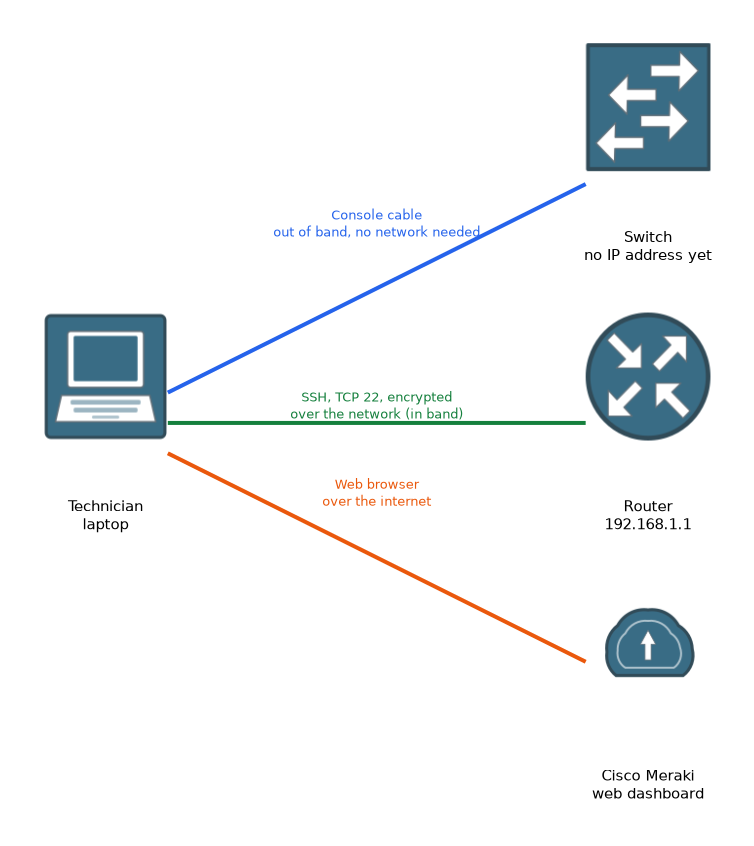 In a cloud managed network, devices are configured and monitored from a web dashboard hosted by the vendor. Cisco Meraki is the Cisco example. The devices contact the cloud over the internet, so one dashboard can manage many sites without anyone visiting them.
Scripts
A script is a small program that runs commands for you. For example, it can log in to many devices over SSH and collect the same information from each. Scripts save time and reduce typing mistakes, which is useful when there are many devices.
What to remember for the exam
Seven facts cover most questions on this topic.
- SSH uses TCP port 22 and is encrypted. Telnet uses TCP port 23 and is not encrypted.
- RDP uses TCP port 3389 and gives a graphical view of a Windows computer.
- A VPN creates an encrypted tunnel, either for remote users or between sites.
- The console is a direct, out of band connection that works when the network does not.
- A terminal emulator is the program used for console, SSH or telnet sessions.
- A network management system monitors many devices from one place.
- Meraki is Cisco's cloud managed networking, run from a web dashboard.
If the question says the network is down or the device is new, the answer is console access.
Common mistakes
These four errors appear again and again.
Using telnet for convenience. Telnet sends passwords in clear text, so choose SSH.
Confusing RDP with SSH. RDP shows a full desktop. SSH gives a text command line.
Trying SSH to a device with no address. A new device needs console access first.
Treating a VPN as the same thing as remote access protocols. A VPN protects the path, and SSH or RDP are used inside it.
Anyone on the path can read a telnet session, including the password.
Check yourself
Work through these three questions.
Why is SSH preferred to telnet?
SSH encrypts the session, while telnet sends everything, including passwords, in clear text.
How do you reach a new switch that has no IP address yet?
Use the console port with a console cable and a terminal emulator.
What is the advantage of a cloud managed network such as Meraki?
Devices at many sites can be managed from one web dashboard over the internet.
Topic 4 of 6 in Diagnosing Problems
Test yourself on Diagnosing Problems
The full Cisco CCST 100-150 Networking question bank has 749 questions, with timed practice exams and an explanation for every answer.
This study guide is independent and is not affiliated with, endorsed by, or sponsored by Cisco. Vendor names, certification names and exam codes are trademarks of their respective owners and are used for identification only.