Network Security · Topic 5 of 8
Troubleshooting AAA with TACACS+ and RADIUS
Compare TACACS+ and RADIUS, configure AAA on IOS XE, and troubleshoot device and network access failures with show, test and debug commands.
- 5 min
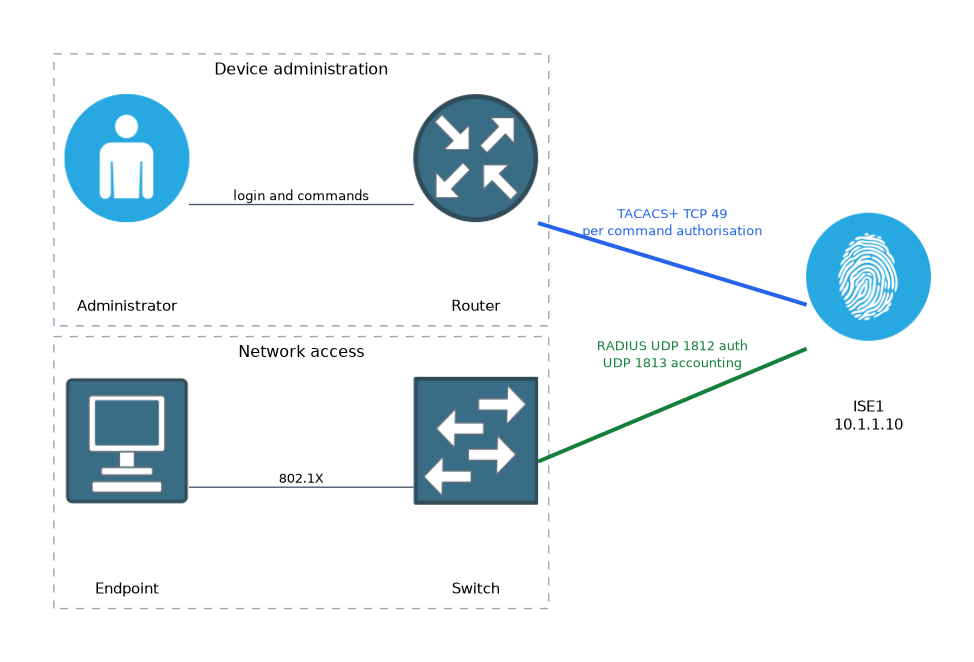
- Includes a diagram
- TACACS+ uses TCP 49 and encrypts the whole body.
- RADIUS uses UDP 1812 and 1813, and encrypts only the password.
- TACACS+ separates authentication, authorisation and accounting, so it can authorise commands.
What it is
AAA stands for authentication, authorisation and accounting, and it controls who may access a device or the network.
Authentication proves who you are. Authorisation decides what you may do, and accounting records what you did. Cisco devices use TACACS+ mainly for administrator access to devices, and RADIUS mainly for network access.
How it works
You must know the protocol differences first, then the configuration, then a repeatable way to troubleshoot.
TACACS+ compared with RADIUS
| Feature | TACACS+ | RADIUS |
|---|---|---|
| Transport | TCP port 49 | UDP ports 1812 and 1813 |
| Encryption | Whole packet body | Password only |
| AAA functions | Authentication, authorisation and accounting are separate | Authentication and authorisation are combined |
| Command control | Per command authorisation | Not designed for it |
| Typical use | Device administration | 802.1X, VPN and wireless access |
RADIUS uses 1812 for authentication and 1813 for accounting. Older systems may use 1645 and 1646. TACACS+ separates the three functions, so you can authorise each command that an administrator types.
Configuring TACACS+ on IOS XE
Router(config)# aaa new-model
Router(config)# tacacs server ISE1
Router(config-server-tacacs)# address ipv4 10.1.1.10
Router(config-server-tacacs)# key SHAREDSECRET
Router(config)# aaa group server tacacs+ TAC-GRP
Router(config-sg-tacacs+)# server name ISE1
Router(config)# aaa authentication login default group TAC-GRP local
Router(config)# aaa authorization exec default group TAC-GRP local
Router(config)# aaa authorization commands 15 default group TAC-GRP local
Router(config)# aaa accounting commands 15 default start-stop group TAC-GRP
The local keyword is a fallback. It is used only when the server does not respond, not when the server rejects the login.
Configuring RADIUS for network access
Router(config)# radius server ISE1
Router(config-radius-server)# address ipv4 10.1.1.10 auth-port 1812 acct-port 1813
Router(config-radius-server)# key SHAREDSECRET
Router(config)# aaa authentication dot1x default group radius
Router(config)# aaa authorization network default group radius
On Cisco ISE, each device must be defined as a network device with the same shared secret. For TACACS+, the policy server must also have the device administration service enabled.
A troubleshooting method
Work from the network upward, and change one thing at a time.
- Reachability: can the device ping the server, using the right source interface and VRF?
- Shared secret: does the key match on the device and the server? A mismatch is a very common cause.
- Server definition: is the device defined as a network device on ISE, with the correct address?
- Method list: does the line or interface use the method list that you configured?
- Policy: does the user match an authentication and authorisation rule on the server?
- Time and certificates: are clocks correct if certificates or tokens are involved?
Useful commands
Router# show aaa servers
Router# show tacacs
Router# test aaa group radius USERNAME PASSWORD new-code
Router# debug aaa authentication
Router# debug aaa authorization
Router# debug tacacs
Router# debug radius
The test aaa command sends a real RADIUS request and shows whether the server accepts, rejects or does not reply. Testing TACACS+ this way varies by platform and release, so check a real login and the TACACS+ debugs instead. Debugs show the exchange as it happens, but they add load, so use them briefly and turn them off with undebug all.
Reading the results
| Symptom | Likely cause |
|---|---|
| Server marked dead, no reply | Reachability, firewall, wrong port or wrong source address |
| Reject for a known good user | Wrong password, or the user does not match a policy rule |
| Login works but commands fail | Command authorisation rule on the server denies them |
| Falls back to local login | Server not responding, so the local method was used |
On ISE, live logs show each request, which policy matched, and the reason for a failure. Use them together with the device output.
What to remember for the exam
Seven facts cover most questions on this topic.
- TACACS+ uses TCP 49 and encrypts the whole body.
- RADIUS uses UDP 1812 and 1813, and encrypts only the password.
- TACACS+ separates authentication, authorisation and accounting, so it can authorise commands.
- Use TACACS+ for device administration and RADIUS for network access.
- The
localfallback applies only when the server does not respond. - A shared secret mismatch is a classic cause of failure.
test aaa grouptests RADIUS, and the AAA debug commands help you check the exchange.
A question about controlling which commands an administrator can run points to TACACS+ command authorisation.
Common mistakes
These four mistakes appear often.
Expecting local fallback after a reject. A reject is a valid answer from the server, so the device does not try the local database.
Mismatched shared secrets. The device and the server must use the same key.
Forgetting the source interface. The server may know the device by a different address.
Leaving debugs running. They consume resources and can slow a busy device.
Keep a local administrator account and test your AAA configuration from a second session before you close the first, or you may lock yourself out.
Check yourself
Work through these three questions.
Why is TACACS+ preferred for device administration?
It separates authentication, authorisation and accounting and can authorise each command, and it encrypts the whole packet body.
When does the
localmethod in a method list get used?Only when the AAA server does not respond, not when the server rejects the login.
What does
test aaa group radius USERNAME PASSWORD new-codecheck?It sends a real RADIUS authentication request and shows whether the server accepts, rejects or does not reply.
Topic 5 of 8 in Network Security
Test yourself on Network Security
The full Cisco CCNP 350-701 SCOR question bank has 822 questions, with timed practice exams and an explanation for every answer.
This study guide is independent and is not affiliated with, endorsed by, or sponsored by Cisco. Vendor names, certification names and exam codes are trademarks of their respective owners and are used for identification only.