Cloud Security · Topic 4 of 6
Ingesting Cloud Logging and Monitoring Data into Splunk
Configure Splunk to ingest cloud and security logs using add-ons, the HTTP Event Collector, syslog and streaming services, then verify the data.
- 5 min
- Includes a diagram
- Splunk stores events in indexes, and the sourcetype defines how they are parsed.
- Add-ons collect data from specific cloud and security technologies.
- HEC is a token based HTTPS input, and it listens on port 8088 by default.
What it is
Splunk collects logs from many sources into one searchable place, so analysts can correlate cloud and security events.
Cloud providers and security products each produce their own logs. Splunk brings them together by receiving, parsing and storing them as events. The exam tests how data gets in, and how you check that it arrived correctly.
How it works
First choose the input method for the source, then set the index and sourcetype, and finally verify.
Splunk building blocks
| Term | Meaning |
|---|---|
| Index | A store for events, which you can give its own retention and access |
| Source | Where the data came from, such as a file or an input |
| Sourcetype | The data format, which tells Splunk how to parse the events |
| Forwarder | An agent that sends data to Splunk indexers |
| Add-on | An app that adds inputs and parsing for a specific technology |
| HEC | HTTP Event Collector, a token based endpoint for events sent over HTTPS |
A correct sourcetype matters. It decides field extraction and timestamps, so a wrong one breaks searches and dashboards.
Input methods for cloud data
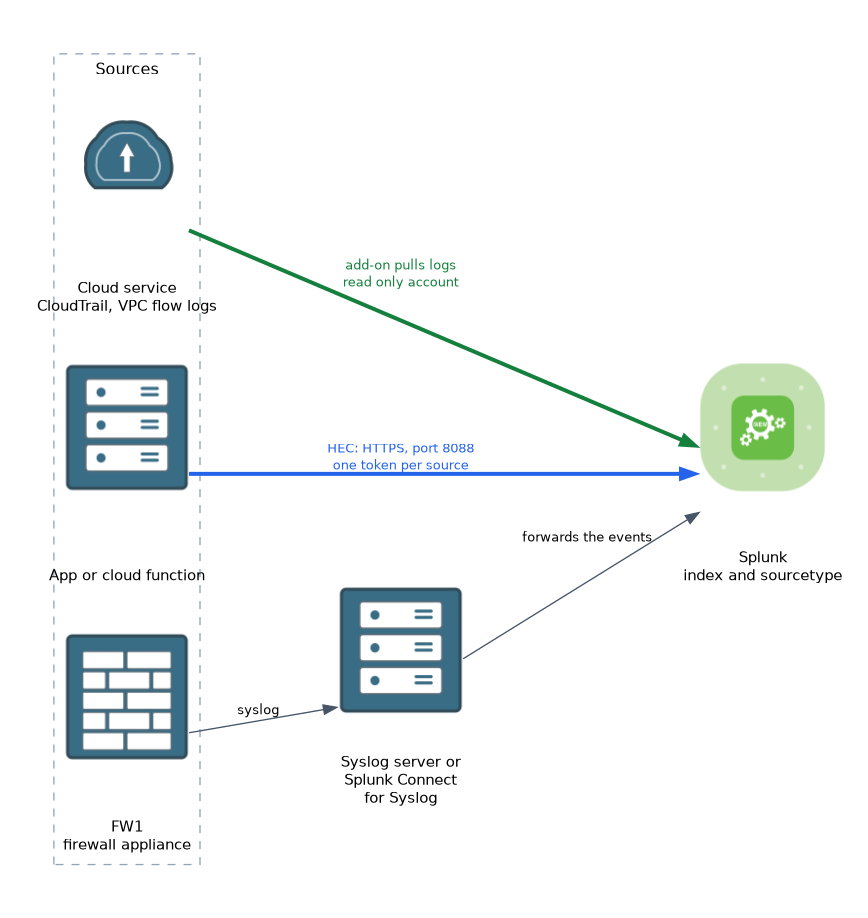 Different sources suit different methods.
- Cloud provider add-ons: pull logs from the cloud APIs or storage.
- HTTP Event Collector: receives events pushed by an application or a cloud function.
- Syslog: receives messages from firewalls and appliances, through a syslog server or a forwarder.
- Streaming services: cloud queues or event hubs that carry logs to Splunk.
- Forwarders: collect files and logs from servers.
Cloud provider add-ons
Splunk offers add-ons for the large providers. The Splunk Add-on for AWS can collect data such as CloudTrail audit events, VPC flow logs, GuardDuty findings and S3 based logs. The Microsoft Cloud Services add-on collects Azure data using event hubs, and the Google Cloud Platform add-on collects logs through Pub/Sub.
To configure one, you install the add-on and create an account or credentials with read only access to the log source. You then create an input, choose the index and set the interval. Use a dedicated least privilege role, so the connection cannot change anything in the cloud.
Splunk Data Manager and the Cisco Security Cloud app can also help to onboard data from supported sources.
HTTP Event Collector
HEC accepts events over HTTPS. You enable it in Splunk, create a token, and assign an index and a default sourcetype. A sender then posts JSON with the token in an authorization header.
Authorization: Splunk TOKEN_VALUE{
"time": 1700000000,
"host": "fw1",
"source": "cloud_fw",
"sourcetype": "my_firewall_logs",
"index": "security",
"event": {"action": "block", "src": "10.1.1.5", "dst": "203.0.113.9"}
}HEC listens on port 8088 by default, and the event endpoint is /services/collector/event. Use HTTPS and one token per source, so you can revoke a token without affecting others.
Syslog from security products
Firewalls and other security tools can send syslog. A common design is a syslog server or Splunk Connect for Syslog that receives the messages and passes them to Splunk. This avoids losing data when Splunk restarts, and makes it easy to tag each source with the right sourcetype.
Verifying ingestion
After you configure an input, check that data is arriving and parsed. A quick search shows events, their source and their time.
index=aws sourcetype=aws:cloudtrail eventName=ConsoleLogin
| stats count by userIdentity.arn, sourceIPAddress
index=security sourcetype=aws:cloudwatchlogs:vpcflow
| stats sum(bytes) by src, destTypical problems include a wrong index, which means searches find nothing, a wrong sourcetype, which means fields are missing, and a wrong time zone, which means events appear at the wrong time. A blocked network path, an expired token, or insufficient permissions on the cloud account can also stop the data.
Using the data
Once the data is in, you can build searches, dashboards and alerts. The Common Information Model (CIM) maps different log formats to common field names, so one search can cover many products. Alerts can then trigger notifications or automation.
What to remember for the exam
Six facts cover most questions on this topic.
- Splunk stores events in indexes, and the sourcetype defines how they are parsed.
- Add-ons collect data from specific cloud and security technologies.
- HEC is a token based HTTPS input, and it listens on port 8088 by default.
- Use a least privilege read only account for cloud log collection.
- Use a syslog server in front of Splunk for firewall and appliance logs.
- Verify ingestion with a search by index and sourcetype.
If events arrive but fields are missing, suspect the sourcetype or a missing add-on before you suspect the network.
Common mistakes
These four mistakes appear often.
Sending everything to one index. Separate indexes allow different retention and access controls.
Using one HEC token for every source. One token makes revocation and troubleshooting harder.
Granting broad cloud permissions. The collector only needs read access to the logs.
Assuming data arrives because the input is enabled. Always search for the data to confirm it.
Keep HEC tokens and cloud credentials secret. Anyone who has a token can inject events into your index.
Check yourself
Work through these three questions.
What does the sourcetype control?
It tells Splunk how to parse the data, including fields and timestamps.
Which port does HEC use by default?
HEC listens on port 8088 by default, and takes events over HTTPS with a token.
How do you confirm that cloud logs reached Splunk?
Run a search on the index and sourcetype and check that events appear with correct fields and times.
Topic 4 of 6 in Cloud Security
Test yourself on Cloud Security
The full Cisco CCNP 350-701 SCOR question bank has 822 questions, with timed practice exams and an explanation for every answer.
This study guide is independent and is not affiliated with, endorsed by, or sponsored by Cisco. Vendor names, certification names and exam codes are trademarks of their respective owners and are used for identification only.