Network Assurance · Topic 5 of 7
IP SLA Probes and Tracking
Configure and verify Cisco IP SLA probes such as icmp echo and udp jitter, schedule them, track results for backup routing, and read the show commands.
- 6 min
- Includes a diagram
- IP SLA sends probes and measures reachability, delay, jitter and loss.
- Common operations are icmp echo, udp jitter, tcp connect, http and dns.
- An operation does nothing until
ip sla scheduleis entered.
What it is
IP SLA makes a router send test traffic and measure the result, so you know how the network behaves from the user's point of view.
The router acts as a probe. It measures things such as whether a target answers, how long the reply takes and how much the delay varies. You can read the results for reporting, or use them to trigger actions, such as removing a failed route.
How it works
You define an operation, schedule it, and optionally track it, using IOS XE syntax.
Common operations
| Operation | What it measures |
|---|---|
icmp-echo | Reachability and round trip time using ICMP |
udp-jitter | Delay, jitter and packet loss, useful for voice |
tcp-connect | Whether a TCP port accepts a connection |
http | Web server response time |
dns | How long a DNS lookup takes |
Defining a probe
R1(config)# ip sla 10
R1(config-ip-sla)# icmp-echo 203.0.113.1 source-interface GigabitEthernet0/0
R1(config-ip-sla-echo)# frequency 10
R1(config-ip-sla-echo)# timeout 2000
The number after ip sla identifies the operation. The icmp-echo line names the target and the source. The frequency is how often the probe runs, in seconds, and the timeout is how long to wait for a reply, in milliseconds.
A probe does nothing until you schedule it.
Scheduling
R1(config)# ip sla schedule 10 life forever start-time nowThe keyword life forever keeps the probe running. The start-time now begins at once. Without the schedule command, the operation stays configured but idle.
A jitter probe
A jitter probe sends a stream of UDP packets, which behave like a voice call. The far end must have an IP SLA responder, which answers the probe and adds accurate timestamps.
R2(config)# ip sla responder
R1(config)# ip sla 20
R1(config-ip-sla)# udp-jitter 10.2.2.2 16384 num-packets 20
R1(config-ip-sla-jitter)# frequency 60
R1(config)# ip sla schedule 20 life forever start-time now
The result includes the round trip time and the jitter in each direction, plus packet loss. A responder gives better data than the simple ICMP echo, because it measures one way values.
Tracking and backup routing
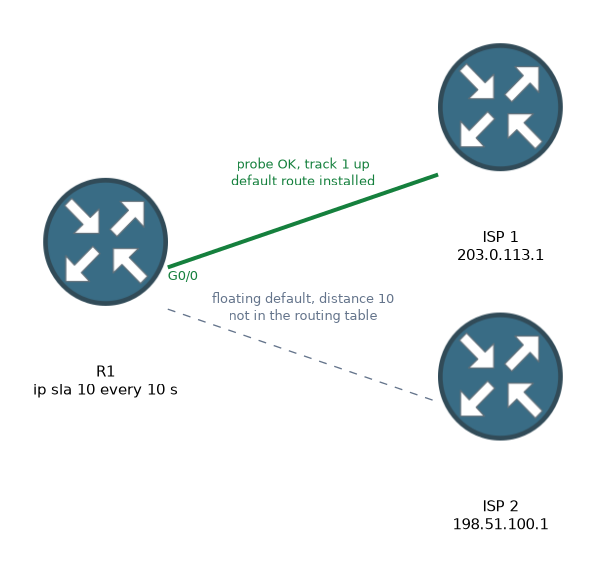
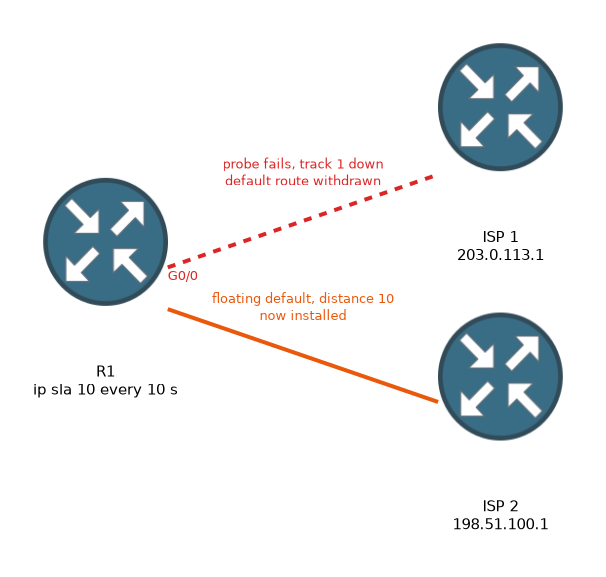 The most common use of IP SLA is to remove a route when a target stops answering. You create a track object that follows the probe, and tie a static route to it.
R1(config)# track 1 ip sla 10 reachability
R1(config)# ip route 0.0.0.0 0.0.0.0 203.0.113.1 track 1
R1(config)# ip route 0.0.0.0 0.0.0.0 198.51.100.1 10
The first default route is in the routing table only while track 1 is up. If the probe to 203.0.113.1 fails, the route is withdrawn.
The second route, with an administrative distance of 10, then takes over. When the probe succeeds again, the primary route returns, and its default distance of 1 makes it the better choice.
The backup route is called a floating static route, since it has a higher distance and so stays out of the table until needed.
Track objects can also be used by HSRP and by policy based routing, so the same probe can drive several decisions.
Verifying
R1# show ip sla configuration 10
R1# show ip sla statistics
R1# show ip sla summary
R1# show track 1
R1# show ip route
show ip sla statistics shows the latest result, the number of successes and failures, and the time of the last test.
A return code of OK means that the probe worked. show track 1 shows whether the object is up or down. show ip route confirms which default route is installed.
Troubleshooting order
- Check that the operation is scheduled, with
show ip sla configuration. - Check the latest return code in
show ip sla statistics. - For a jitter probe, check that the responder is enabled on the target.
- Check the track state, and that the route or feature uses the right track number.
- Check routing and any filter between the probe and the target.
What to remember for the exam
Eight facts cover most questions on this topic.
- IP SLA sends probes and measures reachability, delay, jitter and loss.
- Common operations are icmp echo, udp jitter, tcp connect, http and dns.
- An operation does nothing until
ip sla scheduleis entered. frequencyis in seconds andtimeoutis in milliseconds.- A udp jitter probe needs
ip sla responderon the target. track N ip sla M reachabilitycreates a track object from a probe.- A static route with
track Nis removed when the object goes down. show ip sla statisticsandshow trackverify the result.
When a probe seems idle, check the schedule first. A configured operation that was never scheduled never runs.
Common mistakes
These four mistakes appear often.
Forgetting the schedule. The probe is configured but never starts.
Using a backup route with the default distance. It would not be a floating route, and it would not stay out of the table.
Omitting the responder for jitter. The jitter probe fails or gives poor data without it.
Mixing up units. Frequency is in seconds, and timeout is in milliseconds.
A probe to a single target can give false alarms. If that one target is down but the link is fine, the router removes a good route.
Check yourself
Work through these three questions.
What command starts an IP SLA operation running?
ip sla schedule, for example withlife forever start-time now.How does a floating static route work with IP SLA tracking?
The primary route is tied to a track object and is removed if the probe fails, and then the backup route with a higher distance is used.
Why does a udp jitter probe need a responder?
The responder on the target answers the probe and adds timestamps, so it can measure one way delay and jitter.
Topic 5 of 7 in Network Assurance
Test yourself on Network Assurance
The full Cisco CCNP 350-401 ENCOR question bank has 854 questions, with timed practice exams and an explanation for every answer.
This study guide is independent and is not affiliated with, endorsed by, or sponsored by Cisco. Vendor names, certification names and exam codes are trademarks of their respective owners and are used for identification only.