Network Assurance · Topic 6 of 7
Cisco Catalyst Center Workflows
Learn how Cisco Catalyst Center, formerly DNA Center, designs, provisions and monitors a network, with discovery, templates, assurance and AI features.
- 5 min
- Includes a diagram
- Cisco Catalyst Center was formerly called Cisco DNA Center.
- It is a controller for design, policy, provision and assurance.
- It reaches devices by SSH, SNMP, NETCONF and other supported methods.
What it is
Cisco Catalyst Center is a controller that manages an enterprise network from one place.
It was formerly called Cisco DNA Center, so older books and some product screens still use the old name. It discovers devices, applies configuration, watches the health of the network and helps you fix faults. You state what you want, and the controller works out the device commands, which is the idea of intent based networking.
How it works
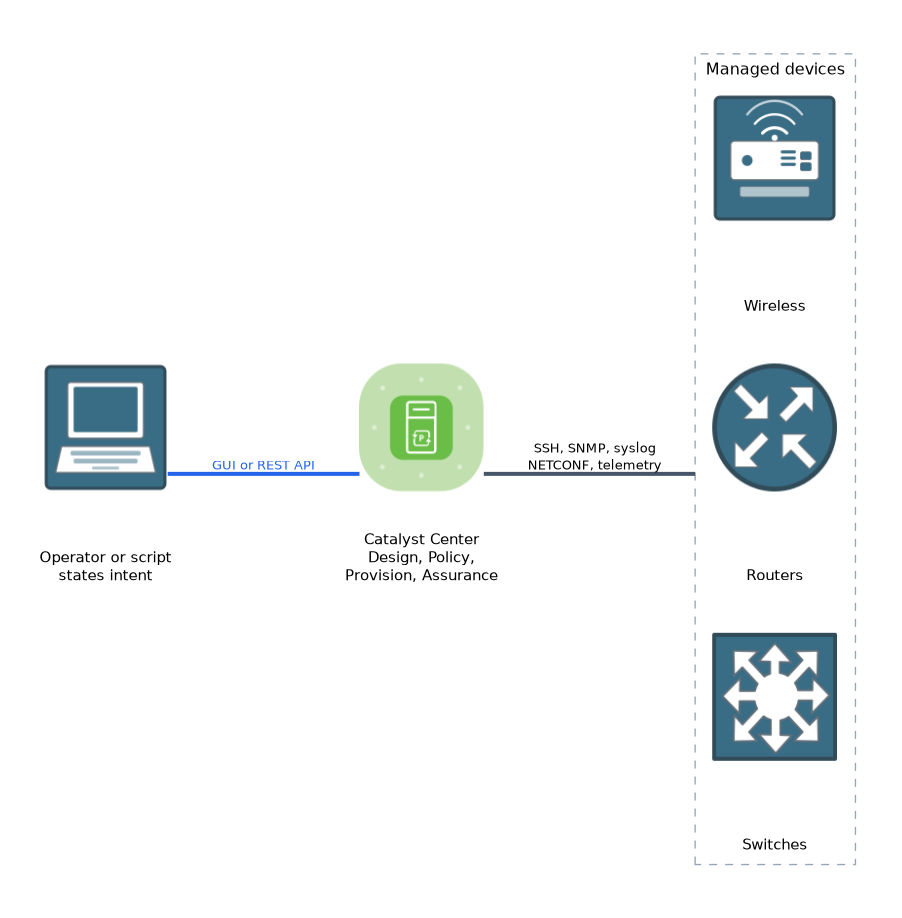
Catalyst Center covers design, policy, provision and assurance, and it adds automation and analytics to each.
How it talks to devices
Catalyst Center reaches devices by the methods they already support. These include SSH for the command line, SNMP and syslog for monitoring, and NETCONF and streaming telemetry on devices that offer them. It also offers a REST API toward other systems, which is covered in the Automation chapter.
To manage a device, the controller needs its credentials and reachability. A device usually needs SSH and SNMP set up first, as in this IOS XE example.
Switch(config)# username admin privilege 15 secret PASSWORD
Switch(config)# ip ssh version 2
Switch(config)# line vty 0 15
Switch(config-line)# transport input ssh
Switch(config-line)# login local
Switch(config)# snmp-server community READONLY RO
The main areas
| Area | What it does |
|---|---|
| Design | Builds the network hierarchy of sites, buildings and floors, and holds shared settings such as servers and credentials |
| Policy | Defines how traffic and users are treated, such as group based access and application policy |
| Provision | Applies configuration and software to devices |
| Assurance | Monitors health and finds the cause of problems |
Applying configuration
Several workflows put configuration on devices.
- Discovery: the controller finds devices by an address range or by following neighbours, using the credentials that you supply. Found devices appear in the inventory.
- Plug and Play: a new device that is switched on can contact the controller, get its configuration and join the network without hands on work.
- Templates: you write a configuration template with variables, and the controller fills in the values for each device. This keeps configuration consistent.
- Software image management: the controller holds approved software images, checks which devices need an update, and schedules the upgrade.
- LAN automation: new switches are configured as the underlay of a fabric with little manual work.
Compliance checks compare device configuration and software against what you expect, and show the differences.
Monitoring and assurance
Assurance collects data from the devices and the clients. It turns that into health scores for the network, devices and clients, and flags issues that need attention. Useful views include:
- A health dashboard for sites, devices and clients.
- Device and client detail pages, with a timeline of events.
- Path trace, which shows the hop by hop path between two addresses and any ACL or fault on it.
- Issue lists, with the likely cause and suggested actions.
AI powered workflows
Newer releases add analytics that use machine learning, along with other AI features.
| Feature | Idea |
|---|---|
| Baselines and anomaly detection | The system learns normal behaviour for a site and flags unusual change |
| Root cause suggestions | Issues are grouped and a probable cause is offered, to save manual searching |
| Wireless optimisation | Radio settings can be tuned using learned data |
| Natural language assistant | Operators ask questions in plain words and get answers or guided steps, in releases that include it |
Which AI features you see depends on the release and the licence. The principle for the exam is that the controller uses collected data to spot problems and suggest actions, instead of relying only on fixed thresholds.
Traditional and AI workflows together
The traditional workflows follow a fixed path that you design: discover, assign to a site, apply a template, check compliance. The AI features sit on top and help you find faults and choose actions faster. A typical day uses both.
Benefits
- One place to manage many devices.
- Consistent configuration from templates and policy.
- Faster fault finding from assurance data.
- Less manual and error prone work.
What to remember for the exam
Seven facts cover most questions on this topic.
- Cisco Catalyst Center was formerly called Cisco DNA Center.
- It is a controller for design, policy, provision and assurance.
- It reaches devices by SSH, SNMP, NETCONF and other supported methods.
- Discovery, Plug and Play, templates and software image management apply configuration and software.
- Assurance gives health scores, issue lists and path trace.
- AI features learn baselines, spot anomalies and suggest causes.
- Templates keep configuration consistent by filling in variables for each device.
Match the area to the job. Design builds the hierarchy, Policy sets rules, Provision applies changes, and Assurance watches health.
Common mistakes
These four mistakes appear often.
Treating Catalyst Center as only a monitoring tool. It also configures and updates devices.
Skipping credentials and reachability. Discovery fails when SSH or SNMP is not set up.
Believing AI replaces the engineer. The suggestions need review before action.
Mixing up Plug and Play with discovery. Plug and Play serves a new device that calls the controller. Discovery is the controller going out to find devices.
A template pushes the same change to many devices, so test it on one device before you apply it widely.
Check yourself
Work through these three questions.
What was Cisco Catalyst Center called before?
It was called Cisco DNA Center.
Which Catalyst Center workflow lets a new switch get its configuration on first boot?
Plug and Play lets a new device contact the controller and receive its configuration.
What does path trace show?
It shows the hop by hop path between two addresses, and any fault or ACL on that path.
Topic 6 of 7 in Network Assurance
Test yourself on Network Assurance
The full Cisco CCNP 350-401 ENCOR question bank has 854 questions, with timed practice exams and an explanation for every answer.
This study guide is independent and is not affiliated with, endorsed by, or sponsored by Cisco. Vendor names, certification names and exam codes are trademarks of their respective owners and are used for identification only.