Network Assurance · Topic 4 of 7
SPAN, RSPAN and ERSPAN
Configure SPAN, RSPAN and ERSPAN to mirror traffic to an analyser: sources and destinations, the RSPAN VLAN, GRE for ERSPAN, and verification.
- 6 min
- Includes a diagram
- SPAN copies traffic on one switch. RSPAN carries the copy across a Layer 2 network. ERSPAN carries it across a Layer 3 network.
- A SPAN source can be a port or a VLAN, with the direction
rx,txorboth. monitor session N sourceandmonitor session N destinationconfigure SPAN.
What it is
Port mirroring copies traffic from one place so that a tool can analyse it without disturbing the original flow.
A switch forwards frames only to the port that needs them, so a packet analyser on a spare port sees nothing useful. Mirroring solves this by sending a copy of chosen traffic to the port where the analyser sits. Cisco has three forms, named SPAN, RSPAN and ERSPAN, and they differ in how far the copy can travel.
How it works
The three forms use the same idea, with a bigger reach each time, and the examples use IOS XE.
Comparing the three forms
| Form | Name | Reach | Carried by |
|---|---|---|---|
| SPAN | Switched Port Analyzer | Same switch | Nothing, local copy |
| RSPAN | Remote SPAN | Other switches in the same Layer 2 domain | A dedicated VLAN across trunks |
| ERSPAN | Encapsulated Remote SPAN | Anywhere with IP reachability | GRE tunnel over IP |
Local SPAN
A SPAN session has one or more sources and one destination. A source can be a port or a VLAN. You choose which direction to copy: received traffic (rx), sent traffic (tx) or both.
Switch(config)# monitor session 1 source interface GigabitEthernet1/0/1 both
Switch(config)# monitor session 1 destination interface GigabitEthernet1/0/24
Here traffic in both directions of port 1 is copied to port 24, where the analyser is attached. You can use a VLAN as the source instead:
Switch(config)# monitor session 2 source vlan 10 rxSome rules to know:
- A destination port normally stops forwarding regular traffic, and is used only for monitoring.
- A port cannot be both a source and a destination in the same session.
- A destination port belongs to one session.
- The number of sessions is limited by the platform.
If the sources carry more traffic than the destination can send, the extra copies are dropped. The original traffic is not affected, but the analyser may miss frames.
RSPAN
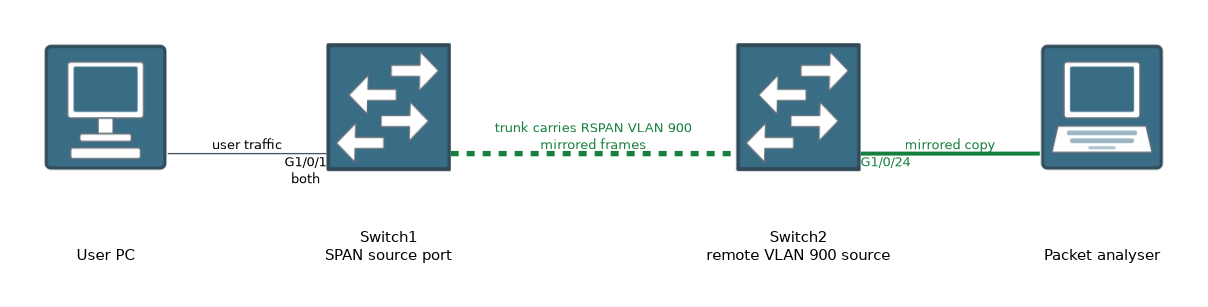 RSPAN lets the analyser sit on a different switch from the source. It uses a special VLAN that carries the mirrored traffic across trunks.
Switch(config)# vlan 900
Switch(config-vlan)# remote-span
The RSPAN VLAN must exist on every switch in the path, and it must be allowed on the trunks between them. Create it with remote-span on each switch.
Source switch:
Switch1(config)# monitor session 1 source interface GigabitEthernet1/0/1 both
Switch1(config)# monitor session 1 destination remote vlan 900
Destination switch:
Switch2(config)# monitor session 1 source remote vlan 900
Switch2(config)# monitor session 1 destination interface GigabitEthernet1/0/24The RSPAN VLAN should carry only mirrored traffic. Do not use it for normal hosts, because mirrored frames are flooded in it.
ERSPAN
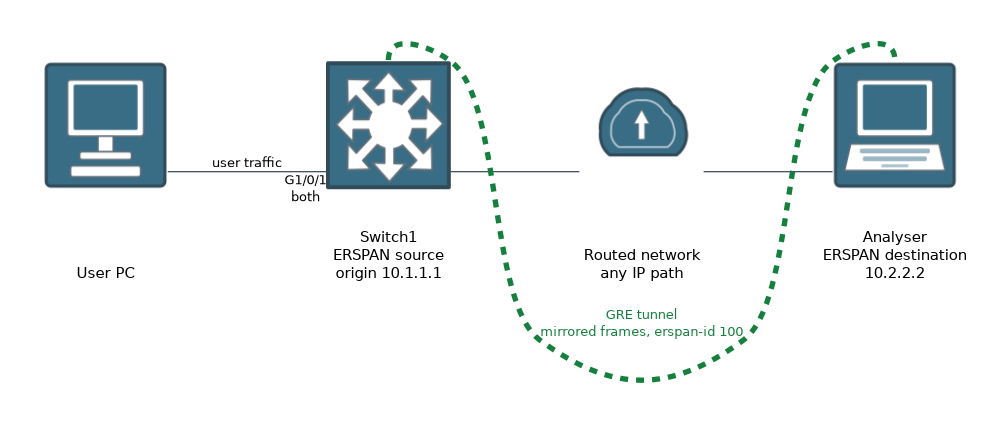 ERSPAN wraps the mirrored frames in GRE and sends them over a routed network. The source and the analyser can be in different sites. The session at the source is an ERSPAN source, and the receiving device is an ERSPAN destination.
Switch1(config)# monitor session 1 type erspan-source
Switch1(config-mon-erspan-src)# source interface GigabitEthernet1/0/1 both
Switch1(config-mon-erspan-src)# destination
Switch1(config-mon-erspan-src-dst)# erspan-id 100
Switch1(config-mon-erspan-src-dst)# ip address 10.2.2.2
Switch1(config-mon-erspan-src-dst)# origin ip address 10.1.1.1
The ip address is the destination of the GRE tunnel, and origin ip address is the source address that the device uses. The erspan-id identifies the session, and it must match at the receiver. The receiving end may be another switch or router set up as an ERSPAN destination, or a tool that understands the encapsulation.
The exact command set depends on the platform and software release. Support for ERSPAN also varies, and some Catalyst models act only as a source.
ERSPAN adds a header, so the packets are larger. Check the path MTU, or large mirrored frames may be dropped.
Verifying
Switch# show monitor session 1
Switch# show monitor session all
Switch# show vlan remote-span
show monitor session shows the type, the sources, the destination and the direction. If a source or destination is missing, the session is not complete, and nothing is mirrored.
Typical uses
- Capture voice or application traffic for troubleshooting.
- Feed an intrusion detection system.
- Send traffic to a monitoring tool at a central site with ERSPAN.
What to remember for the exam
Eight facts cover most questions on this topic.
- SPAN copies traffic on one switch. RSPAN carries the copy across a Layer 2 network. ERSPAN carries it across a Layer 3 network.
- A SPAN source can be a port or a VLAN, with the direction
rx,txorboth. monitor session N sourceandmonitor session N destinationconfigure SPAN.- RSPAN uses a dedicated VLAN created with
remote-span. - RSPAN needs the VLAN on all switches in the path and allowed on trunks.
- ERSPAN encapsulates mirrored traffic in GRE.
- A SPAN destination port normally does not forward regular traffic.
show monitor sessionverifies a session.
Match the form to the path. Same switch is SPAN, same Layer 2 network is RSPAN, and across routers is ERSPAN.
Common mistakes
These four mistakes appear often.
Forgetting remote-span on the VLAN. The VLAN cannot carry RSPAN traffic.
Not allowing the RSPAN VLAN on the trunk. The mirrored frames never reach the other switch.
Expecting a destination port to work as a normal port. It is used for monitoring, and it normally does not forward other traffic.
Ignoring MTU with ERSPAN. The GRE header makes the frames larger.
Do not connect a destination port to the production network by mistake, since it receives copies of other users' traffic.
Check yourself
Work through these three questions.
Which form of mirroring crosses a routed network?
ERSPAN, because it wraps mirrored frames in GRE and sends them over IP.
What must be true of the RSPAN VLAN?
It must be created with
remote-spanand allowed on every trunk in the path.What directions can a SPAN source copy?
It can copy received traffic (
rx), sent traffic (tx) or both.
Topic 4 of 7 in Network Assurance
Test yourself on Network Assurance
The full Cisco CCNP 350-401 ENCOR question bank has 854 questions, with timed practice exams and an explanation for every answer.
This study guide is independent and is not affiliated with, endorsed by, or sponsored by Cisco. Vendor names, certification names and exam codes are trademarks of their respective owners and are used for identification only.