Deployment · Topic 2 of 5
NGIPS Passive and Inline Modes
Learn how Secure Firewall runs as a next generation IPS in passive mode on a SPAN port or tap and in inline mode with inline sets, tap mode and blocking.
- 5 min
- Includes a diagram
- Passive mode inspects a copy of the traffic from a SPAN port or tap and cannot block.
- Inline mode puts the device in the path, so it can drop traffic.
- Inline interfaces are paired and added to an inline set.
What it is
A next generation IPS (NGIPS) deployment uses the inspection engine of Secure Firewall without routing or NAT.
In passive mode, the device only watches a copy of the traffic. It is an intrusion detection system, so it can alert but it cannot stop anything.
In inline mode, the device sits in the traffic path between two interfaces. It is an intrusion prevention system, so it can drop packets as well as alert.
How it works
The interface mode you pick decides whether the device observes traffic or controls it.
Passive mode
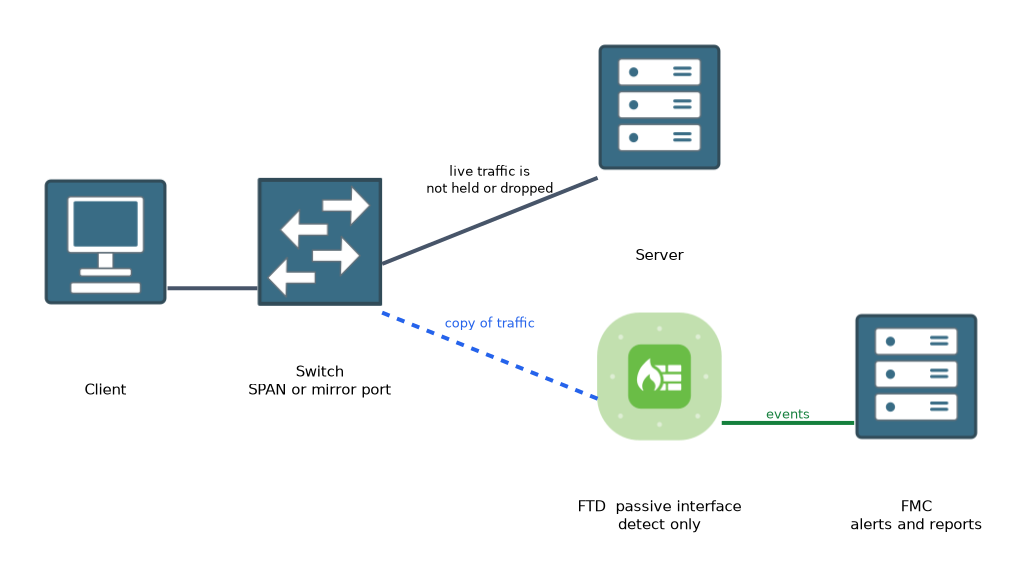 A passive interface connects to a switch SPAN (mirror) port or to a network tap. The device receives a copy of the packets and sends nothing back out of that interface.
Because the real traffic never passes through the firewall, a failure of the device does not break the network. The price is that it cannot block an attack.
When a rule would block, the connection still goes through. The event shows that the traffic would have been dropped, which helps you test a policy safely.
Passive interfaces belong to a security zone of the passive type. The access control policy still decides what to inspect and log.
Inline mode
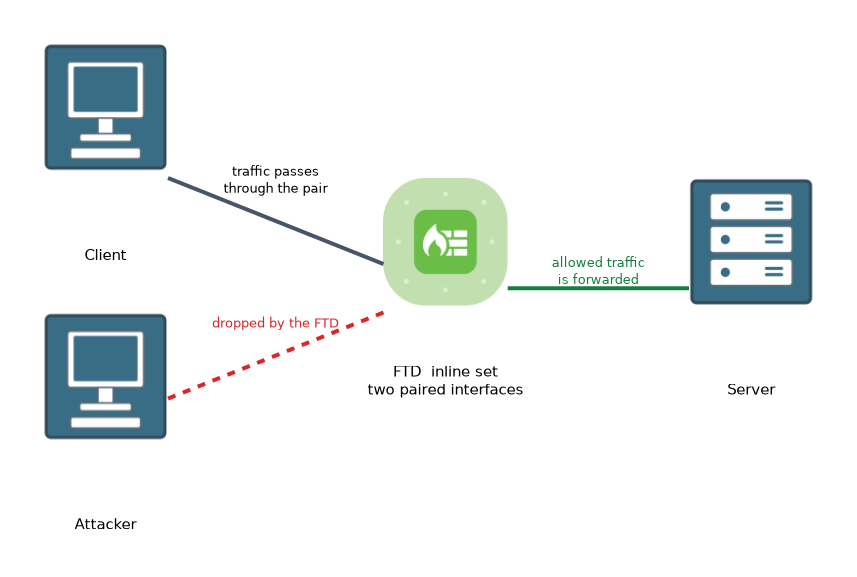 An inline interface pair lets the traffic pass through the device at Layer 2 without an IP address on the data path. The pair is added to an inline set in the FMC.
The device can block, allow or inspect the traffic according to policy. Blocked packets are dropped, so this mode prevents attacks as well as reporting them.
An inline pair is placed between a router and a switch, or between two switches, without changing the addressing of the network.
Inline tap mode
An inline set can be put in tap mode. Traffic still passes through the physical pair, but the engine works on a copy.
The result is an IPS that reports what it would have dropped, while the live traffic is never blocked. It is a safe way to tune rules before you turn on blocking.
Options on an inline set
| Option | What it does |
|---|---|
| Tap mode | Inspects a copy of the traffic and never drops the live packets |
| Propagate link state | If one interface of the pair goes down, the other is also brought down |
| Strict TCP enforcement | Applies stricter checks to the order of TCP packets in a session |
| MTU | Sets the maximum frame size for the set |
| Failsafe | Lets traffic keep flowing if the inspection engine cannot keep up |
Propagate link state matters when a router on one side must notice that the path through the firewall has failed.
Comparing the modes
| Point | Passive | Inline | Inline tap |
|---|---|---|---|
| Traffic path | Copy via SPAN or tap | Passes through the device | Passes through, copy inspected |
| Can drop traffic | No | Yes | No |
| Impact if device fails | None | Can break the path unless bypass or failsafe is used | Same as inline |
| Typical use | Monitoring and testing | Prevention | Tuning before blocking |
Configuring the interfaces
In the FMC, you open the device and edit a physical interface. You set its mode to passive, or you add it to an inline set on the Inline Sets tab. In a passive or inline deployment you give the interface a name and a security zone.
You can run the firewall in routed mode on some interfaces and still use passive or inline interfaces on others. The device-level firewall mode and the interface mode are separate settings.
What to remember for the exam
Seven facts cover the usual questions on NGIPS modes.
- Passive mode inspects a copy of the traffic from a SPAN port or tap and cannot block.
- Inline mode puts the device in the path, so it can drop traffic.
- Inline interfaces are paired and added to an inline set.
- Tap mode on an inline set inspects a copy and never drops live traffic.
- Propagate link state brings down the paired interface when one side fails.
- Passive and inline interfaces belong to zones of the matching type.
- In passive mode and tap mode, events show traffic that would have been dropped.
To test a new intrusion policy safely, use passive mode or inline tap mode first, then switch to blocking when the events look right.
Common mistakes
These four mistakes are common with NGIPS modes.
Expecting a passive device to block. It sees only a copy, so a block rule cannot stop the original packets.
Forgetting link state. Without propagate link state, a router may keep sending traffic into a path that no longer works.
Putting a passive interface on the path. A passive interface must be fed by a SPAN port or tap, not by the live traffic path.
Mixing up tap mode and passive mode. Tap mode is an inline set that inspects a copy, while passive mode uses a mirror feed.
An inline device is a point of failure in the path. Plan for bypass or failsafe behaviour and check what your platform supports.
Check yourself
Work through these three questions.
Why can a passive IPS not stop an attack?
It only receives a copy of the traffic from a SPAN port or tap, so the original packets are never held or dropped.
What does tap mode on an inline set do?
Traffic still passes through the pair, but the engine inspects a copy, so events show what would have been dropped and live traffic is never blocked.
What does propagate link state do?
When one interface of an inline pair goes down, the other interface is also brought down so that neighbouring devices see the failure.
Topic 2 of 5 in Deployment
Test yourself on Deployment
The full Cisco CCNP 300-710 SNCF question bank has 865 questions, with timed practice exams and an explanation for every answer.
This study guide is independent and is not affiliated with, endorsed by, or sponsored by Cisco. Vendor names, certification names and exam codes are trademarks of their respective owners and are used for identification only.