Deployment · Topic 1 of 5
Routed and Transparent Firewall Modes
Learn how Secure Firewall Threat Defense works in routed and transparent mode, what bridge groups do, where the mode is set, and how to check it.
- 5 min
- Includes a diagram
- Routed mode makes the firewall a Layer 3 hop with an IP address on each interface.
- Transparent mode makes the firewall a Layer 2 device that joins interfaces into a bridge group.
- A bridge group has one BVI that holds the management IP address.
What it is
A Secure Firewall Threat Defense device (FTD) acts either as a Layer 3 hop or as a Layer 2 bump in the wire.
In routed mode, every interface that carries traffic has its own IP address and belongs to its own subnet. The firewall routes packets between those subnets, so hosts see it as their gateway.
In transparent mode, the firewall does not route between subnets. It joins interfaces into a bridge group, and hosts do not see the firewall as a router hop. You can add it to an existing network without changing the IP addressing.
How it works
The mode decides how the firewall forwards traffic, which features it offers, and how you manage it.
Routed mode
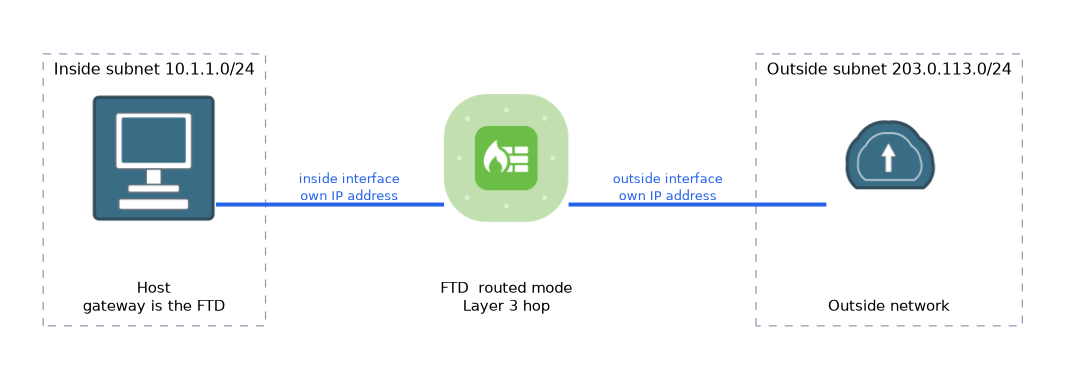 Routed mode is the usual choice at the edge of a network. The device performs routing lookups, NAT, dynamic routing and VPN termination.
Each interface gets a name, a security zone and an IP address. Traffic between two zones is allowed or blocked by the access control policy.
Routed mode can also use bridge groups for some interfaces. A Bridge Virtual Interface (BVI) carries the IP address for the whole group. This is sometimes called integrated routing and bridging.
Transparent mode
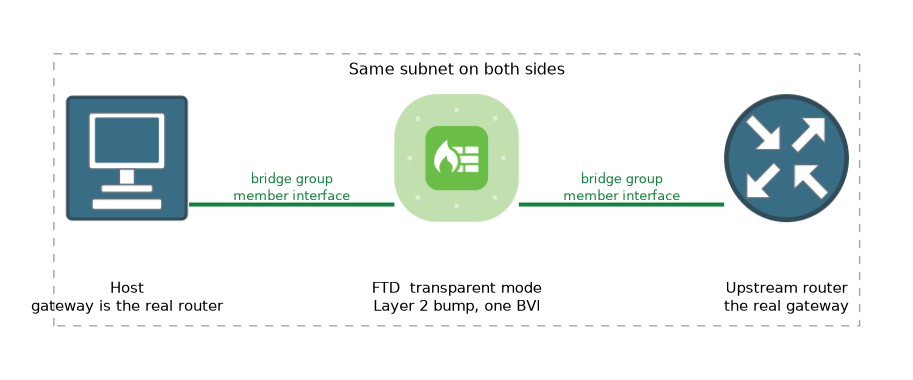 In transparent mode, the firewall forwards frames by MAC address and learns them like a switch. Interfaces are placed in a bridge group, and the group has one management IP address on the BVI.
Hosts on both sides stay in the same subnet. Their default gateway is still the real router on the far side of the firewall.
The firewall inspects traffic and applies policy, but it does not act as the gateway. Features that depend on Layer 3 interfaces, such as VPN termination and dynamic routing on the data path, are not available in the same way as in routed mode.
Comparing the two modes
| Point | Routed mode | Transparent mode |
|---|---|---|
| Layer | Layer 3 hop | Layer 2 bump in the wire |
| Interface addressing | IP address on each interface | One IP address on the BVI |
| Subnets | Different subnet on each interface | Same subnet across the bridge group |
| NAT and routing | Fully supported | Limited |
| Easy to insert into a network | Needs readdressing | Needs no readdressing |
Where the mode is set
The firewall mode belongs to the device, not to a policy. You choose it when you register the device in the Secure Firewall Management Center (FMC), and you can also set it on the device CLI before registration.
> configure firewall transparent
> configure firewall routed
> show firewall
Firewall mode: Routed
Changing the mode on a registered device is disruptive. Plan the mode before the device goes live.
Traffic in transparent mode
A frame from a host on one side of the bridge group is looked up by MAC address. If the destination MAC is on the other interface, the firewall inspects the traffic and forwards it. For an unknown destination the firewall does not flood like a switch, and it can send a probe to find the host.
Because the device is invisible to hosts, access control rules can still block or allow by zone, network, port and application. The interfaces of a bridge group are placed in security zones in the same way as other interfaces.
What to remember for the exam
Seven facts cover the usual questions on firewall modes.
- Routed mode makes the firewall a Layer 3 hop with an IP address on each interface.
- Transparent mode makes the firewall a Layer 2 device that joins interfaces into a bridge group.
- A bridge group has one BVI that holds the management IP address.
- Transparent mode lets you insert a firewall without changing the IP addressing.
- Routed mode supports NAT, dynamic routing and VPN termination as full features.
- The mode is chosen at registration, or on the CLI with
configure firewall transparentorconfigure firewall routed. show firewallon the device CLI shows the current mode.
When a question says the firewall must be added without readdressing or changing the default gateway, think transparent mode.
Common mistakes
These four mistakes are common when you study the two modes.
Assuming transparent mode means no inspection. The firewall still applies access control, intrusion and file policy.
Treating the BVI like a routing interface. In transparent mode it provides management reachability, and the firewall does not route between subnets.
Changing the mode on a live device. The change is disruptive, so decide before registration.
Thinking mode is a policy setting. It is a property of the device, so you do not set it in the access control policy.
Hosts in a transparent deployment still use the upstream router as their gateway. If you point them at the firewall, traffic will not flow as intended.
Check yourself
Work through these three questions.
Which firewall mode lets you add a device without changing IP addressing, and why?
Transparent mode. The firewall joins interfaces in a bridge group at Layer 2, so hosts stay in the same subnet and keep their gateway.
What does the BVI do in a bridge group?
It holds the one IP address for the group, which is used to manage the firewall.
How do you see the current mode on the device CLI?
Run
show firewall, which shows whether the firewall mode is routed or transparent.
Topic 1 of 5 in Deployment
Test yourself on Deployment
The full Cisco CCNP 300-710 SNCF question bank has 865 questions, with timed practice exams and an explanation for every answer.
This study guide is independent and is not affiliated with, endorsed by, or sponsored by Cisco. Vendor names, certification names and exam codes are trademarks of their respective owners and are used for identification only.