Deployment · Topic 3 of 5
Port Channels and Failover
Learn how EtherChannel port channels and Active Standby failover high availability work on Secure Firewall Threat Defense, plus the requirements.
- 5 min
- Includes a diagram
- A port channel bundles interfaces into one logical interface for bandwidth and resilience.
- A port channel can use LACP in active or passive mode, or be set to on with no negotiation, and at least one LACP side must be active.
- FTD high availability is Active/Standby only.
What it is
Port channels and failover protect a firewall design from link failure and from device failure.
A port channel (EtherChannel) bundles several physical interfaces into one logical interface. It adds bandwidth and keeps working if one member link fails.
Failover pairs two identical firewalls. One is active and passes traffic, and the other is standby and takes over if the active unit fails.
How it works
Both features are configured in the Secure Firewall Management Center (FMC) and deployed to the devices.
Port channels
You add an EtherChannel interface on the device page, and then select member physical interfaces. The channel can use LACP, the standard negotiation protocol, or a fixed setting with no negotiation. The modes in the table are the general LACP behaviour, and the choices offered can vary by release.
| Mode | Behaviour |
|---|---|
| Active | Sends LACP messages and asks the other side to bundle |
| Passive | Answers LACP messages but does not start them |
| On | Forms the channel without negotiation |
At least one side must be active for a negotiated bundle to form. The switch on the other end needs a matching port channel.
Traffic is spread over the member links using a hash of packet header fields, so one flow stays on one link. A port channel can carry an IP address in routed mode, or act as a member of a bridge group in transparent mode.
Failover
FTD supports Active/Standby high availability. There is no Active/Active mode for FTD.
The two units must be the same hardware model and run the same software version. They need matching licences and interface layouts, and the same number and type of interfaces.
You create the pair in the FMC by choosing the primary device, then the secondary device, and then defining the links. The primary unit's configuration is pushed to the pair.
The failover and state links
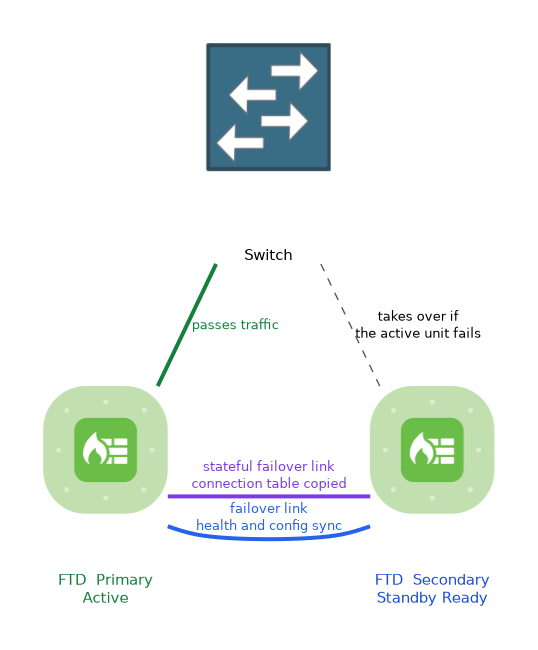 Two connections are used between the units:
- The failover link carries health messages and configuration sync.
- The stateful failover link copies the connection table and similar state so that existing connections survive a switchover.
The two functions can share one physical interface, or you can use a separate one for each. Both links should be on a dedicated, private path between the units.
You give each link an interface and an IP address pair. You can also set an encryption key to protect the traffic between the units.
What triggers a switchover
The standby unit takes over when the active unit stops answering health checks. It also takes over when enough monitored interfaces fail.
You can choose which interfaces are monitored, and you can set standby IP addresses for them. A manual switch of the active peer is also available in the FMC.
Verifying
On the device CLI, show failover shows the state of both units.
> show failover
Failover On
Failover unit Primary
This host: Primary - Active
Other host: Secondary - Standby Ready
Check that one unit is Active and the other is Standby Ready. If the state shows Failed, look at the failover link first.
For port channels, check the bundle and its member interfaces on the device page in the FMC. A matching show etherchannel summary on a Cisco IOS switch shows the other end.
What to remember for the exam
Seven facts cover the usual questions on port channels and failover.
- A port channel bundles interfaces into one logical interface for bandwidth and resilience.
- A port channel can use LACP in active or passive mode, or be set to on with no negotiation, and at least one LACP side must be active.
- FTD high availability is Active/Standby only.
- The two units need the same model, the same software version and matching licences.
- The failover link carries health and configuration messages.
- The stateful link copies connection state so that existing connections survive a switchover.
show failoveron the device CLI shows which unit is active.
A question about keeping existing connections alive during a switchover points to the stateful failover link.
Common mistakes
These four mistakes are common with these two features.
Expecting Active/Active on FTD. High availability is a single active unit with one standby.
Mismatched hardware or software. The pair will not form if the units differ in model or version.
Passive on both ends of a port channel. Neither side starts LACP, so no bundle forms.
Sharing the failover link with data traffic. The link should be a private connection between the two units.
A failover pair that loses its failover link can end up with two active units. Protect that link and monitor it.
Check yourself
Work through these three questions.
Which failover mode does FTD support?
FTD supports Active/Standby high availability only. One unit passes traffic and the other waits to take over.
What is the job of the stateful failover link?
It copies connection state to the standby unit so existing connections can survive a switchover.
Which command shows the failover state on the device CLI?
show failover, which lists each unit and whether it is Active or Standby Ready.
Topic 3 of 5 in Deployment
Test yourself on Deployment
The full Cisco CCNP 300-710 SNCF question bank has 865 questions, with timed practice exams and an explanation for every answer.
This study guide is independent and is not affiliated with, endorsed by, or sponsored by Cisco. Vendor names, certification names and exam codes are trademarks of their respective owners and are used for identification only.