Configuration · Topic 8 of 9
Zero Trust Access and VPN
Learn how Secure Firewall gives secure access with site to site VPN, remote access VPN with Secure Client, and zero trust network access to apps.
- 5 min
- Includes a diagram
- Site to site VPN uses IKE and IPsec between two networks.
- Topologies are point to point, hub and spoke, and full mesh.
- Route based VPN uses a virtual tunnel interface, and policy based VPN matches traffic by network.
What it is
Secure access features let users and sites reach private resources through the firewall in a protected way.
A site to site VPN joins two networks with an encrypted tunnel. A remote access VPN lets a user connect from anywhere with a client. Zero trust network access (ZTNA) gives a user access to one application at a time, after the user and the request have been checked.
All three are configured in the Secure Firewall Management Center (FMC) and deployed to the device.
How it works
Each feature has a wizard or policy in the FMC, and each depends on certificates, objects and routing.
Site to site VPN
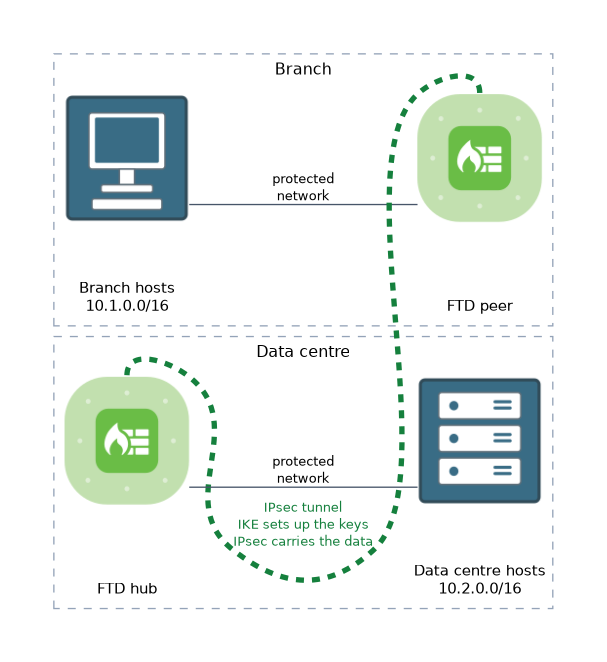 A site to site VPN uses IPsec with IKE to protect traffic. IKE sets up the keys, and IPsec carries the data.
You build a topology in the FMC. The topology type can be point to point, hub and spoke, or full mesh. Each endpoint lists the protected networks, and the peers agree on the policies.
| Item | What it sets |
|---|---|
| IKE policy | How the peers authenticate and set up keys |
| IPsec proposal | How the data is encrypted and checked |
| Authentication | A pre shared key or certificates |
| Protected networks | Which traffic enters the tunnel |
Both IKEv1 and IKEv2 exist, and IKEv2 is the usual choice for new work. A policy based tunnel selects traffic by network match. A route based tunnel uses a virtual tunnel interface, and routing decides which traffic goes in.
Remote access VPN
A remote access VPN uses the Cisco Secure Client, which was called AnyConnect in earlier releases. The FMC offers a wizard that walks through the main steps.
- Choose the policy name and the devices.
- Create a connection profile, with authentication, address pool and group policy.
- Upload the Secure Client package.
- Pick the interface and the certificate that clients will use.
Authentication can use a server such as RADIUS or LDAP, a client certificate, or both. SAML is available in recent releases. A group policy sets what the client gets, such as DNS servers and split tunnel behaviour.
The connection can use TLS with DTLS, or IKEv2 with IPsec. The device holds a certificate so that clients can trust it.
Zero trust network access
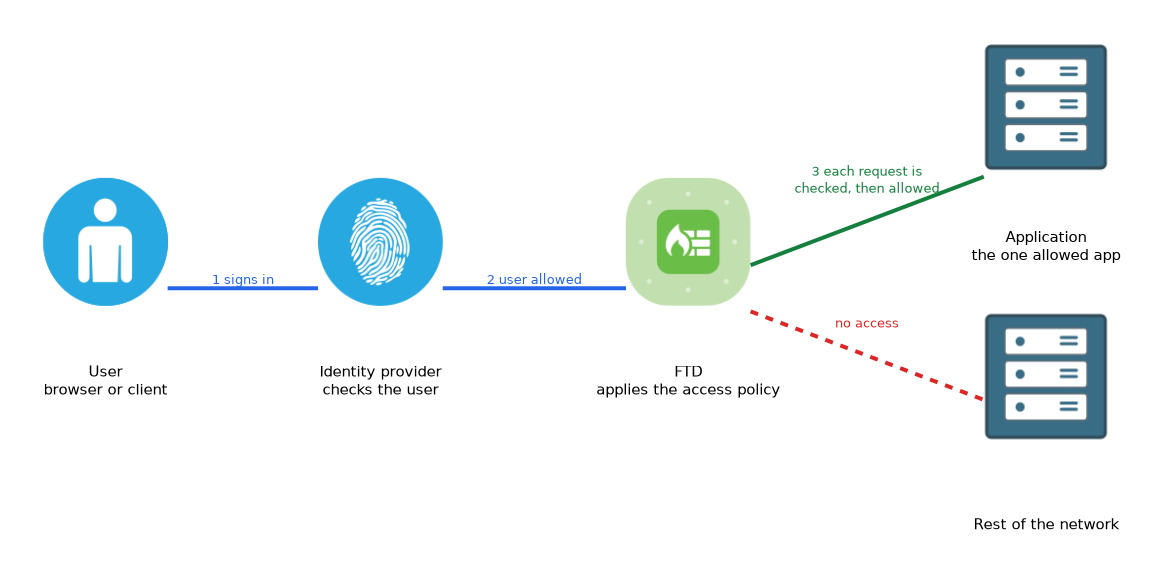 ZTNA is a newer feature of recent releases. It protects individual applications. Users reach an application through the firewall after they sign in with an identity provider, and no full VPN is needed.
You define the application, the identity provider and the rules about who may use it. The firewall checks the user and the access policy for each request. This limits what a user can reach, compared with a VPN that gives access to a whole network.
ZTNA needs a supported release, so check version requirements before you plan it.
Comparing the options
| Option | Scope | Typical user |
|---|---|---|
| Site to site VPN | Network to network | Branches and partners |
| Remote access VPN | The user device to a network | Staff working away |
| ZTNA | One application | Users who need only some apps |
Verifying
> show crypto ikev2 sa
> show crypto ipsec sa
> show vpn-sessiondb anyconnect
The first two show the security associations of a tunnel. The last shows connected remote access users. Which prompt accepts them can depend on the release, and some run in the diagnostic CLI.
What to remember for the exam
Seven facts cover the usual questions.
- Site to site VPN uses IKE and IPsec between two networks.
- Topologies are point to point, hub and spoke, and full mesh.
- Route based VPN uses a virtual tunnel interface, and policy based VPN matches traffic by network.
- Remote access VPN uses the Cisco Secure Client and a connection profile.
- A group policy sets what a remote client receives.
- ZTNA gives access to individual applications, not a whole network.
show crypto ikev2 saandshow crypto ipsec sacheck site to site tunnels.
When a question needs access to only one application without a client VPN, think of ZTNA.
Common mistakes
These four mistakes are common with secure access.
Mismatched policies. IKE or IPsec settings that differ between peers stop the tunnel from forming.
Missing routes. A route based tunnel carries only traffic that routing sends into it.
Forgetting the NAT exemption. VPN traffic must not be translated by a NAT rule that was meant for internet traffic.
Treating ZTNA as a full VPN. It limits users to chosen applications.
Clients must trust the certificate the device presents. An untrusted certificate causes warnings and failed connections.
Check yourself
Work through these three questions.
What does a connection profile hold in a remote access VPN?
It holds the authentication method, the address pool and the group policy for the connection.
How does ZTNA differ from a remote access VPN?
ZTNA gives a user access to individual applications, and a remote access VPN gives the user device access to a network.
Which commands check the state of an IKEv2 tunnel?
show crypto ikev2 saandshow crypto ipsec sa.
Topic 8 of 9 in Configuration
Test yourself on Configuration
The full Cisco CCNP 300-710 SNCF question bank has 865 questions, with timed practice exams and an explanation for every answer.
This study guide is independent and is not affiliated with, endorsed by, or sponsored by Cisco. Vendor names, certification names and exam codes are trademarks of their respective owners and are used for identification only.