Configuration · Topic 9 of 9
Snort in Threat Defense
Learn how Snort inspects traffic inside Secure Firewall Threat Defense, how packets pass between Lina and Snort, and how Snort 2 and 3 differ.
- 4 min
- Includes a diagram
- FTD has two engines, Lina for the data path and Snort for inspection.
- Lina handles routing, NAT, VPN and the connection table.
- Snort handles application identification, intrusion and file inspection.
What it is
Snort is the inspection engine inside Secure Firewall Threat Defense (FTD), and it does the deep packet work.
FTD software has two main parts. The first is Lina, the data path inherited from the ASA. The second is Snort, which handles application identification, intrusion prevention and file inspection.
Lina handles routing, NAT, access lists, VPN and the connection table. Snort reads traffic that Lina passes to it, and it returns a verdict.
How it works
Both engines work on each connection, and the split of jobs is the key point.
What Lina does
Lina looks at the packet first. It checks the connection table, routes the packet, applies NAT and handles basic access lists.
The connection table is how Lina remembers decisions. When a packet belongs to a known connection, Lina can follow the earlier decision instead of asking Snort again for every packet. This keeps the load on Snort lower and the forwarding fast.
Traffic that the policy does not need to inspect can be handled by Lina alone. An example is a prefilter rule that fastpaths traffic, or a block that is decided early.
What Snort does
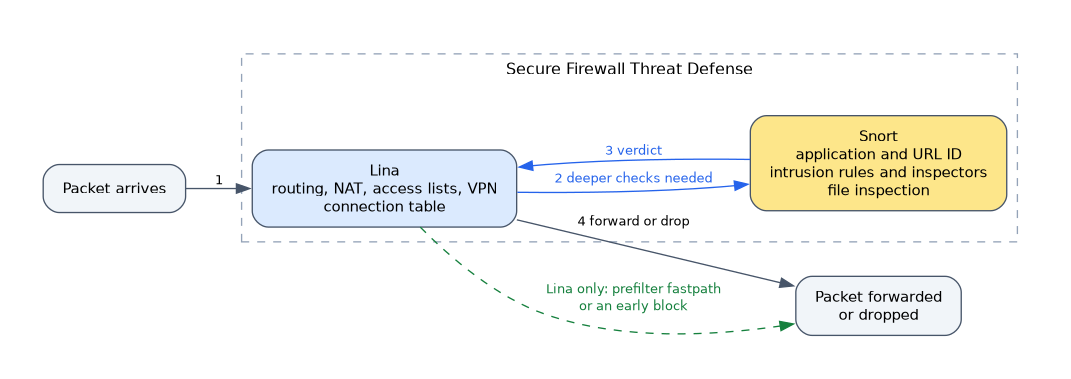 Snort receives the connection when deeper checks are needed. It runs several steps in turn.
- It identifies the application, and for web traffic the URL category.
- It matches the access control rules that need that information.
- It runs the network analysis inspectors and the intrusion rules.
- It inspects files for file and malware policy.
The result goes back to Lina as a verdict. Lina then lets the packets pass or drops them. After Snort decides about a connection, later packets of that connection often follow the decision without a full inspection.
Snort 2 and Snort 3
FTD supports two versions of the engine. Snort 3 is the newer version, and newer releases use it by default on new devices. Existing devices can be moved from Snort 2 to Snort 3.
| Point | Snort 2 | Snort 3 |
|---|---|---|
| Configuration | Preprocessors | Inspectors |
| Rule updates | SRU | LSP |
| Rules | Older syntax | New rule syntax and rule groups |
| Newer features | Not available | Used by features such as EVE |
Snort 3 brings a cleaner configuration model, and newer features need it. Snort 2 is the older engine, and support for it depends on the release.
The engine version is a device setting, and it applies to the device as a whole. When you switch it, the intrusion and network analysis policies work in the form for that version.
Seeing Snort at work
> show snort statistics
> system support firewall-engine-debug
show snort statistics gives counters on what Snort processed and decided. The system support firewall-engine-debug command shows how a single connection was matched against the access control rules.
When Snort is busy or down
If Snort cannot keep up, the device may buffer, drop or pass traffic depending on the settings. Some inline sets have an option that lets traffic through when the engine fails. This protects availability, but it reduces inspection.
What to remember for the exam
Seven facts cover the usual questions.
- FTD has two engines, Lina for the data path and Snort for inspection.
- Lina handles routing, NAT, VPN and the connection table.
- Snort handles application identification, intrusion and file inspection.
- Snort returns a verdict to Lina, which then forwards or drops the traffic.
- Snort 3 is the newer engine and is used by default on new devices in newer releases.
- Snort 2 uses SRU and preprocessors, and Snort 3 uses LSP and inspectors.
- Some newer features, such as EVE, need Snort 3.
If a question asks which part of FTD performs NAT or routing, the answer is Lina, not Snort.
Common mistakes
These four mistakes are common with Snort.
Thinking Snort does routing. Routing and NAT are done by Lina.
Mixing up SRU and LSP. SRU is for Snort 2 and LSP is for Snort 3.
Assuming all features work on both versions. Some need Snort 3.
Forgetting that policies differ by version. Intrusion and network analysis settings are tied to the engine version.
Switching the Snort version of a device is a significant change. Plan a maintenance window and check the policies after the switch.
Check yourself
Work through these three questions.
Which part of FTD performs NAT and routing?
Lina does, and Snort does the deep inspection.
What does Snort send back to Lina?
It sends a verdict for the connection, and Lina then forwards or drops the traffic.
Which rule update package belongs to Snort 3?
The Lightweight Security Package, LSP, because Snort 2 uses SRU.
Topic 9 of 9 in Configuration
Test yourself on Configuration
The full Cisco CCNP 300-710 SNCF question bank has 865 questions, with timed practice exams and an explanation for every answer.
This study guide is independent and is not affiliated with, endorsed by, or sponsored by Cisco. Vendor names, certification names and exam codes are trademarks of their respective owners and are used for identification only.