Configuration · Topic 7 of 9
NAT, QoS and Routing on FTD
Learn how NAT policy sections, auto and manual NAT, QoS rate limiting and static and dynamic routing are configured on Secure Firewall Threat Defense.
- 4 min
- Includes a diagram
- NAT rules are read in three sections, with manual before, then auto, then manual after.
- Auto NAT works on one object, and manual NAT can match source and destination.
- Static NAT is one to one, and dynamic NAT uses a pool or the interface address.
What it is
NAT, QoS and routing are the network settings that you configure on a routed Secure Firewall Threat Defense device (FTD).
NAT changes addresses and ports as traffic passes through. QoS on FTD limits the rate of chosen traffic. Routing decides where each packet goes next.
You configure NAT and QoS as policies and assign them to devices. Routing is set on the page of each device.
How it works
Each feature has its own page in the Secure Firewall Management Center (FMC), and each needs a deploy.
NAT policy
A NAT policy holds rules in three sections, and they are read in this order.
| Section | Contents |
|---|---|
| NAT Rules Before | Manual NAT rules that you want first |
| Auto NAT Rules | Rules attached to a single network object |
| NAT Rules After | Manual NAT rules that you want last |
Auto NAT is simple. A rule translates one object, such as an inside server. Manual NAT, sometimes called twice NAT, can match on both source and destination, so it suits special cases.
A rule uses a static or dynamic type. Static is one to one, and is the usual choice when an outside host must reach an inside server. Dynamic translates many hosts, often to an address pool or to the interface address in a form of PAT.
A rule names the source and destination interface objects, and gives the original and the translated addresses and ports. Some options matter in practice, such as translating DNS replies and falling back to interface PAT when a pool runs out.
> show nat
> show xlate
show nat lists the rules and the hit counts. show xlate lists the active translations.
An important order effect
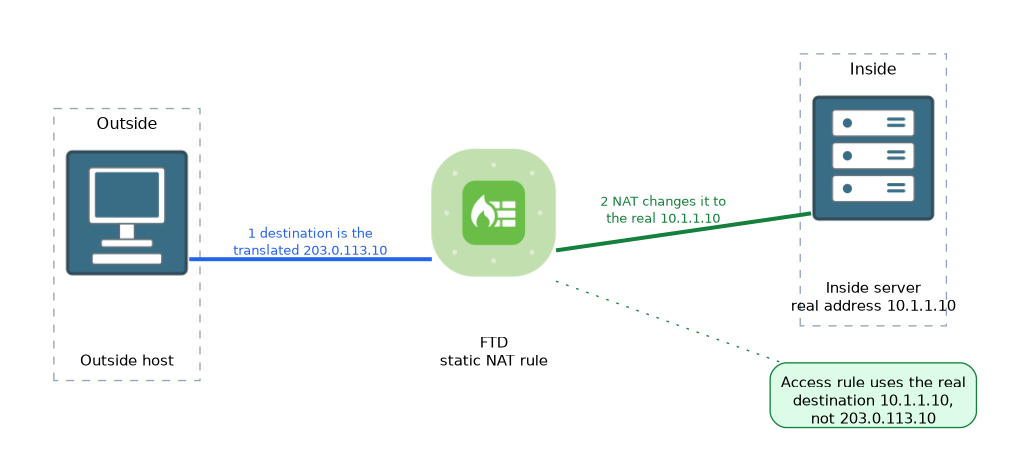 In current releases the access control policy matches the real, untranslated address of the destination when a packet arrives from outside to a statically translated server. You write the rule with the real address, not with the translated address.
QoS policy
FTD QoS is rate limiting that is also called policing. A rule can match on traffic conditions such as interfaces, networks and ports. It either leaves traffic alone or limits the rate in each direction.
It does not offer queuing or traffic shaping, so you cannot give priority to voice with it. Use it to stop one kind of traffic from filling a link.
Routing
Routing is set under the Routing tab of a device.
| Feature | Notes |
|---|---|
| Static routes | A destination, a gateway and a metric |
| OSPF and BGP | Dynamic routing protocols |
| ECMP | Equal cost paths through a traffic zone |
| Virtual routers | Separate routing tables on one device |
| Policy based routing | Routes selected by traffic match |
A static route can have a tracking option that links it to an SLA monitor, as covered in the Deployment chapter.
> show routeUse show route to see the table on the device.
What to remember for the exam
Seven facts cover the usual questions.
- NAT rules are read in three sections, with manual before, then auto, then manual after.
- Auto NAT works on one object, and manual NAT can match source and destination.
- Static NAT is one to one, and dynamic NAT uses a pool or the interface address.
show natlists rules andshow xlatelists active translations.- FTD QoS is rate limiting only, with no priority queuing.
- Routing options include static routes, OSPF, BGP and ECMP.
show routeshows the routing table on the device.
For an inside server that must be reachable from outside, a static NAT rule is the usual answer.
Common mistakes
These four mistakes are common here.
Writing access rules with translated addresses. The policy uses the real destination address.
Putting a broad manual rule in the first section. It can hide the auto NAT rules below it.
Expecting QoS to prioritise voice. FTD QoS only limits rates.
Forgetting a return route. NAT works only when replies can be routed back.
The order of NAT rules matters. A rule in a higher section is matched before the ones below it.
Check yourself
Work through these three questions.
In which order are NAT policy sections read?
Manual NAT rules before, then auto NAT rules, then manual NAT rules after.
What does FTD QoS do?
It rate limits chosen traffic, which is policing, and it does not offer priority queuing.
Which commands show NAT rules and active translations?
show natlists the rules andshow xlatelists active translations.
Topic 7 of 9 in Configuration
Test yourself on Configuration
The full Cisco CCNP 300-710 SNCF question bank has 865 questions, with timed practice exams and an explanation for every answer.
This study guide is independent and is not affiliated with, endorsed by, or sponsored by Cisco. Vendor names, certification names and exam codes are trademarks of their respective owners and are used for identification only.