Layer 3 Technologies · Topic 4 of 8
VRF-Lite and Bidirectional Forwarding Detection
Learn how VRF-Lite builds separate routing tables on one router, how to configure and verify it on IOS XE, and how BFD detects link failures quickly.
- 5 min
- Includes a diagram
- A VRF is a separate routing table, and VRF-Lite uses it without MPLS.
vrf forwarding NAMEon an interface removes its IP address.- Use
ip route vrf NAME,show ip route vrf NAMEandping vrf NAME.
What it is
VRF-Lite gives one router several independent routing tables, and BFD detects a failed path much faster than routing protocol timers.
A VRF is a virtual routing and forwarding instance. Each VRF has its own routing table, and interfaces are assigned to one VRF at a time. VRF-Lite means VRFs are used without MPLS.
Bidirectional Forwarding Detection (BFD) is a lightweight hello protocol that routing protocols use to learn about a failure quickly.
How it works
VRF-Lite is configured by defining a VRF, placing interfaces in it, and running routing inside it.
Configuring a VRF on IOS XE
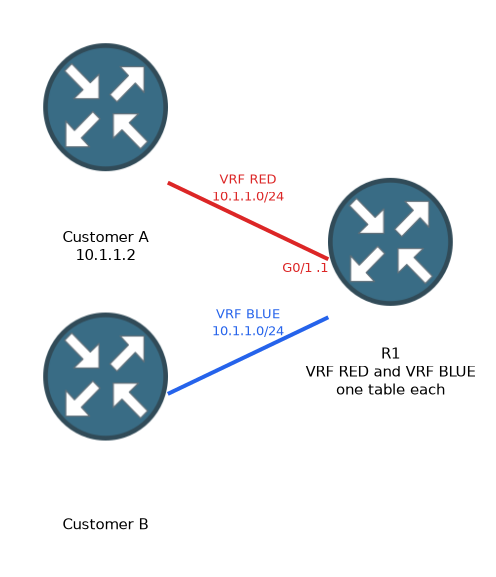
R1(config)# vrf definition RED
R1(config-vrf)# rd 65000:1
R1(config-vrf)# address-family ipv4
R1(config-vrf-af)# exit-address-family
R1(config)# interface GigabitEthernet0/1
R1(config-if)# vrf forwarding RED
R1(config-if)# ip address 10.1.1.1 255.255.255.0
The vrf forwarding command removes any IP address already on the interface. Add the address again afterwards. Older releases use ip vrf RED and ip vrf forwarding RED.
Overlapping address space works because each VRF is separate. Two VRFs can both use 10.1.1.0 slash 24.
Routing inside a VRF
Each routing protocol needs to be told which VRF it serves.
R1(config)# ip route vrf RED 0.0.0.0 0.0.0.0 10.1.1.2
R1(config)# router ospf 2 vrf RED
R1(config-router)# network 10.1.1.0 0.0.0.255 area 0
R1(config)# router eigrp NAMED
R1(config-router)# address-family ipv4 unicast vrf RED autonomous-system 100
R1(config)# router bgp 65000
R1(config-router)# address-family ipv4 vrf RED
EIGRP and BGP use an address family for each VRF. OSPF uses a separate process for each VRF, so one OSPF process cannot serve two VRFs.
Verifying and troubleshooting
Most mistakes come from using a normal command that looks only at the global table.
R1# show vrf
R1# show ip route vrf RED
R1# ping vrf RED 10.1.1.2
R1# show ip ospf 2 neighbor
A ping without vrf uses the global table and fails to reach hosts inside a VRF. Check that the interface is in the right VRF with show vrf.
Routes do not cross between VRFs on their own. Traffic between VRFs needs a deliberate leak, such as leaked static routes, or an external device that connects both.
| Item | Global table | VRF |
|---|---|---|
| Route command | ip route | ip route vrf NAME |
| Show routes | show ip route | show ip route vrf NAME |
| Ping | ping | ping vrf NAME |
What BFD does
Routing protocols detect failures with their own timers, which are often seconds long. BFD runs between two neighbours and sends small control packets at a fast, configurable rate.
If a set number of packets are missed, BFD reports the neighbour as down to the routing protocol. The protocol then reacts immediately. BFD is independent of the protocol, so one BFD session can serve OSPF, EIGRP and BGP.
BFD single hop control packets use UDP port 3784. BFD can run in asynchronous mode, where both sides send periodic packets, and can also use an echo function.
R1(config)# interface GigabitEthernet0/0
R1(config-if)# bfd interval 300 min_rx 300 multiplier 3
R1(config)# router ospf 1
R1(config-router)# bfd all-interfaces
R1(config)# router bgp 65000
R1(config-router)# neighbor 192.0.2.2 fall-over bfd
R1# show bfd neighbors
The interval is the transmit rate in milliseconds, min_rx is the receive rate, and the multiplier is the number of missed packets before failure. With 300 and 3, failure is detected in about 900 milliseconds.
BFD must be configured on both ends, and each routing protocol must be told to register with it.
A BFD session that does not come up usually means the interface timers or the protocol registration is missing on one side.
What to remember for the exam
Seven facts cover most questions on this topic.
- A VRF is a separate routing table, and VRF-Lite uses it without MPLS.
vrf forwarding NAMEon an interface removes its IP address.- Use
ip route vrf NAME,show ip route vrf NAMEandping vrf NAME. - OSPF uses one process for each VRF. EIGRP and BGP use address families.
- VRFs do not share routes unless you leak them.
- BFD detects failures faster than routing hellos and serves several protocols.
- BFD needs
bfd interval, a protocol registration, and the same setup on both ends.
Pinging from the global table to a host inside a VRF fails even if the VRF routing is perfect.
Common mistakes
These four mistakes appear often.
Forgetting to re-add the address. After vrf forwarding, the interface has no IP address until you add it again.
Using global commands. show ip route hides everything in the VRF.
One OSPF process for two VRFs. Each VRF needs its own process.
Configuring BFD on one end. The session never forms and the protocol gets no benefit.
Check yourself
Work through these three questions.
What happens to an interface address when you apply
vrf forwarding RED?The address is removed, so you must configure it again.
How do you ping a host inside a VRF from the router?
Use
ping vrf NAME ADDRESS, such asping vrf RED 10.1.1.2.Why use BFD with a routing protocol?
BFD detects a failed path in a fraction of a second and tells the protocol, which is much faster than routing hello timers.
Topic 4 of 8 in Layer 3 Technologies
Test yourself on Layer 3 Technologies
The full Cisco CCNP 300-410 ENARSI question bank has 857 questions, with timed practice exams and an explanation for every answer.
This study guide is independent and is not affiliated with, endorsed by, or sponsored by Cisco. Vendor names, certification names and exam codes are trademarks of their respective owners and are used for identification only.