Application Deployment and Security · Topic 7 of 8
Firewalls, DNS, Load Balancers and Reverse Proxies
Learn how firewalls, DNS, load balancers and reverse proxies work together to expose, scale and protect an application deployed behind them.
- 5 min
- Includes a diagram
- DNS maps names to addresses, using records such as A, AAAA and CNAME.
- A firewall filters traffic by source, destination, protocol and port.
- A load balancer spreads requests over several servers and removes failed ones.
What it is
A deployed application depends on network services that find it, protect it and spread the load across its servers.
The four services on the outline are the firewall, DNS, the load balancer and the reverse proxy. Each has one main job, and a request often passes through all of them.
Understanding the order of the path helps you explain both how an application is reached and where a fault may sit.
How it works
A request is resolved, filtered, balanced and then handed to an application server.
DNS
DNS, the Domain Name System, turns a name such as the application's host name into an IP address. Users remember names, and networks need addresses.
Common record types:
| Record | Purpose |
|---|---|
| A | Maps a name to an IPv4 address |
| AAAA | Maps a name to an IPv6 address |
| CNAME | Makes one name an alias for another name |
| MX | Names the mail servers for a domain |
DNS also helps deployment. Moving an application to a new server means changing the record, and the users keep the same name.
A short time to live lets the change spread quickly. Some designs return several addresses, or use DNS to send users to the nearest site.
Firewall
A firewall allows or blocks traffic based on rules. A rule looks at the source, the destination, the protocol and the port.
For a web application, the firewall usually allows inbound TCP on ports 80 and 443 from the internet, and blocks the rest. The database port should be reachable only from the application servers.
A stateful firewall remembers connections, so replies to allowed requests return without a separate rule. A web application firewall looks inside HTTP requests to block attacks such as SQL injection and cross site scripting.
Load balancer
A load balancer spreads incoming requests over a group of servers behind a single address.
Its benefits are:
- Scale. Add servers to handle more users.
- Availability. Health checks remove a failed server from the group.
- Maintenance. You can update one server at a time.
Common methods to choose a server are round robin, which takes each server in turn, least connections, which picks the server with the fewest active connections, and source hashing, which keeps a given client on the same server.
Some applications keep a user's session on one server. A balancer can support this with session persistence, often called sticky sessions. Designs that keep sessions in a shared store avoid the need for it.
A load balancer can work at Layer 4, using addresses and ports, or at Layer 7, where it reads the HTTP request and can route by path or host name.
Reverse proxy
A reverse proxy sits in front of servers and receives requests on their behalf. The client talks to the proxy and never directly to the application server.
Its jobs include:
- Terminating TLS, so that servers do not each handle certificates.
- Routing requests to different back ends by path or host name.
- Caching responses and compressing them.
- Hiding the internal servers, which adds protection.
- Acting as a point to apply rules such as rate limits.
A forward proxy is the opposite direction. It sits in front of clients and sends their requests out to the internet. Nginx and HAProxy are common reverse proxies, and many can also act as load balancers.
Putting it together
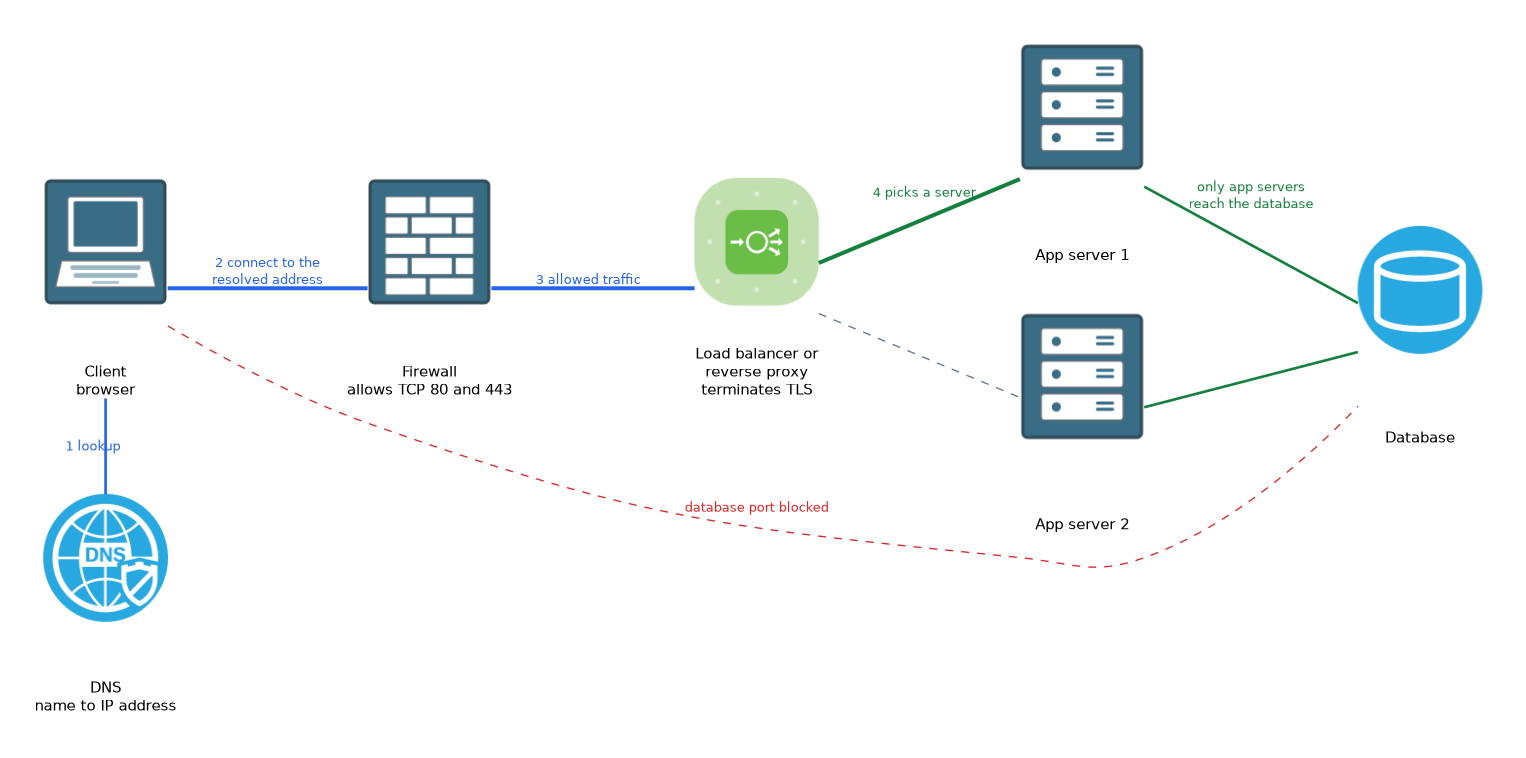
Client -> DNS lookup -> Firewall -> Load balancer / reverse proxy -> App servers -> DatabaseThe firewall protects the entry. The load balancer or reverse proxy shares the traffic and terminates TLS. The application servers do the work, and a second internal firewall rule limits access to the database.
Troubleshooting by position
- The name does not resolve: check DNS.
- The name resolves, but the connection times out: check firewall rules and routing.
- Connections succeed, but some users see errors: check the health of the servers behind the balancer.
- The application sees the proxy's address, not the client's: the proxy normally passes the original address in a header such as
X-Forwarded-For.
Think of the order as name, gate, share, serve. DNS gives the name, the firewall guards the gate, the load balancer shares the load, and the servers serve the request.
What to remember for the exam
Six facts cover this topic.
- DNS maps names to addresses, using records such as A, AAAA and CNAME.
- A firewall filters traffic by source, destination, protocol and port.
- A load balancer spreads requests over several servers and removes failed ones.
- A reverse proxy receives requests for the servers, and often terminates TLS and caches.
- A reverse proxy sits before servers, while a forward proxy sits before clients.
- Load balancers can work at Layer 4 or Layer 7.
Common mistakes
Four mistakes are typical.
Confusing forward and reverse proxies. A forward proxy serves clients, and a reverse proxy serves servers.
Opening the database port to the internet. Only the application servers should reach it.
Blaming the application for a DNS fault. If the name does not resolve, the server is never contacted.
Forgetting sessions. Without persistence or a shared session store, users may be logged out as the balancer switches servers.
A load balancer is a single point of failure unless it is itself made redundant.
Check yourself
Work through these three questions.
What does a load balancer do when a server fails its health check?
It stops sending requests to that server and uses the remaining ones.
How does a reverse proxy differ from a forward proxy?
A reverse proxy sits in front of servers and receives requests for them. A forward proxy sits in front of clients and sends their requests out.
What does a DNS A record do?
It maps a name to an IPv4 address.
Topic 7 of 8 in Application Deployment and Security
Test yourself on Application Deployment and Security
The full Cisco CCNA 200-901 DEVASC question bank has 808 questions, with timed practice exams and an explanation for every answer.
This study guide is independent and is not affiliated with, endorsed by, or sponsored by Cisco. Vendor names, certification names and exam codes are trademarks of their respective owners and are used for identification only.