Application Deployment and Security · Topic 5 of 8
Reading a Dockerfile and Using Docker Images
Read a Dockerfile line by line and use Docker commands to build, run, list, stop and remove images and containers in a local development environment.
- 5 min
- Includes a diagram
- A Dockerfile defines how an image is built, and it starts with
FROM. COPYadds files,RUNexecutes commands at build time, andCMDsets the default start command.EXPOSEdocuments a port, and-ppublishes it.
What it is
A Dockerfile is a text file of instructions that tells Docker how to build an image for an application.
An image is a read only template that holds the application, its libraries and its settings. A container is a running instance of an image.
On a developer machine you build an image from the Dockerfile, then start containers from it to test the application.
How it works
Each Dockerfile instruction adds a step, and Docker turns the steps into layers of an image.
A sample Dockerfile
FROM python:3.12-slim
WORKDIR /app
COPY requirements.txt .
RUN pip install --no-cache-dir -r requirements.txt
COPY . .
EXPOSE 5000
ENV APP_ENV=production
CMD ["python", "app.py"]
Reading the instructions
| Instruction | Meaning |
|---|---|
FROM | The base image to start from. A Dockerfile normally begins with it |
WORKDIR | Sets the working folder inside the image for later steps |
COPY | Copies files from your folder into the image |
RUN | Runs a command while building the image, such as installing packages |
EXPOSE | Documents the port that the application listens on |
ENV | Sets an environment variable |
CMD | The default command that runs when a container starts |
ENTRYPOINT | A fixed command for the container, with CMD giving default arguments |
Reading the sample from top to bottom:
- Start from a small Python image.
- Work in the
/appfolder. - Copy the requirements list and install the packages.
- Copy the rest of the code.
- Note that the app listens on port 5000.
- Set an environment variable.
- Run
python app.pywhen the container starts.
The requirements file is copied first on purpose. Docker caches each layer, so the install step is reused if only the code changed.
EXPOSE does not publish the port. You publish it when you run the container.
Building an image
$ docker build -t myapp:1.0 .The -t option gives the image a name and a tag. The dot at the end says that the build context is the current folder. A .dockerignore file lists files to leave out, such as local secrets.
Listing and removing images
$ docker images
$ docker pull python:3.12-slim
$ docker rmi myapp:1.0
docker images lists the images on your machine. docker pull downloads an image from a registry, such as Docker Hub. docker rmi removes an image.
Running a container
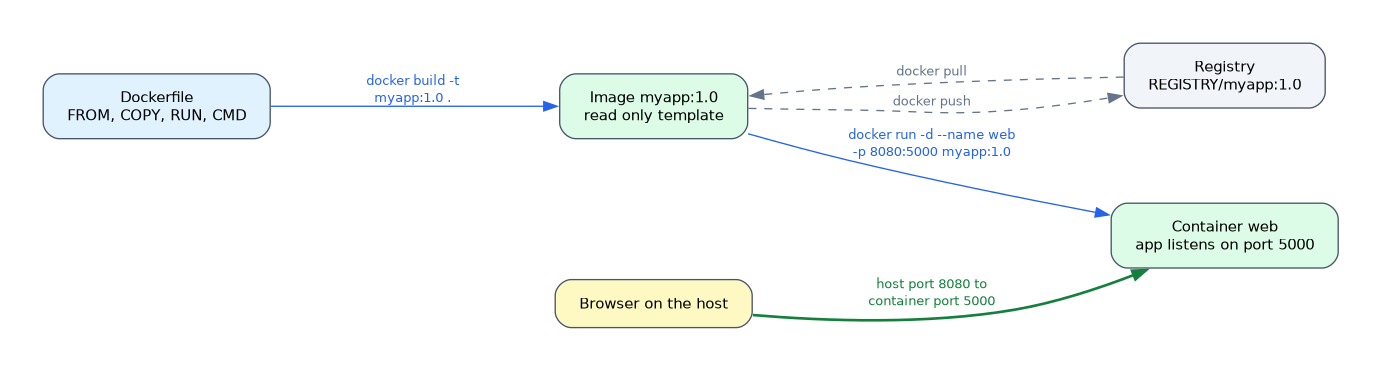
$ docker run -d --name web -p 8080:5000 myapp:1.0| Option | Meaning |
|---|---|
-d | Run in the background |
--name web | Give the container a name |
-p 8080:5000 | Publish container port 5000 on port 8080 of the host |
-e NAME=value | Set an environment variable |
-v HOSTPATH:CONTAINERPATH | Mount a folder, so data outlives the container |
--rm | Remove the container when it stops |
With this mapping, a browser on the host reaches the application on port 8080. The left number is the host port, and the right number is the container port.
Managing containers
$ docker ps
$ docker ps -a
$ docker logs web
$ docker exec -it web sh
$ docker stop web
$ docker rm web
docker ps shows running containers, and docker ps -a shows stopped ones as well. docker logs prints the output of the container.
docker exec -it opens an interactive shell inside it. Docker refuses to remove a running container unless you force it, so stop it first.
Sharing an image
To share an image, tag it with a registry name and push it.
$ docker tag myapp:1.0 REGISTRY/myapp:1.0
$ docker push REGISTRY/myapp:1.0
Other developers and the CI pipeline then pull the same image, so everyone runs the identical environment.
Containers are disposable
The writable layer of a container disappears when the container is removed. Keep data that matters in a volume or an external database, and rebuild the image to change the code.
In a port mapping such as 8080:5000, the host port comes first. Remember that outside traffic reaches the host first.
What to remember for the exam
Seven facts cover this topic.
- A Dockerfile defines how an image is built, and it starts with
FROM. COPYadds files,RUNexecutes commands at build time, andCMDsets the default start command.EXPOSEdocuments a port, and-ppublishes it.docker build -t NAME:TAG .builds an image.docker runstarts a container, anddocker pslists running containers.docker imageslists images, anddocker pullfetches one from a registry.- Data in a container is lost when it is removed, unless it is on a volume.
Common mistakes
Four mistakes are typical.
Thinking EXPOSE opens the port. You still need -p on docker run.
Mixing up RUN and CMD. RUN happens when the image is built, and CMD happens when a container starts.
Reversing the port numbers. The host port is on the left and the container port is on the right.
Putting secrets in the image. Anyone with the image can read them, so pass secrets at run time instead.
Do not store passwords or keys in a Dockerfile or in a layer of an image. They remain visible in the image history.
Check yourself
Work through these three questions.
What is the difference between
RUNandCMDin a Dockerfile?RUNexecutes a command while the image is built, andCMDgives the default command when a container starts.What does
-p 8080:5000do?It publishes container port 5000 on port 8080 of the host.
Which command lists running containers?
docker ps.
Topic 5 of 8 in Application Deployment and Security
Test yourself on Application Deployment and Security
The full Cisco CCNA 200-901 DEVASC question bank has 808 questions, with timed practice exams and an explanation for every answer.
This study guide is independent and is not affiliated with, endorsed by, or sponsored by Cisco. Vendor names, certification names and exam codes are trademarks of their respective owners and are used for identification only.