Application Deployment and Security · Topic 2 of 8
Virtual Machines, Bare Metal and Containers
Compare bare metal servers, virtual machines and containers by isolation, speed, size and portability, and learn when each deployment type fits best.
- 4 min
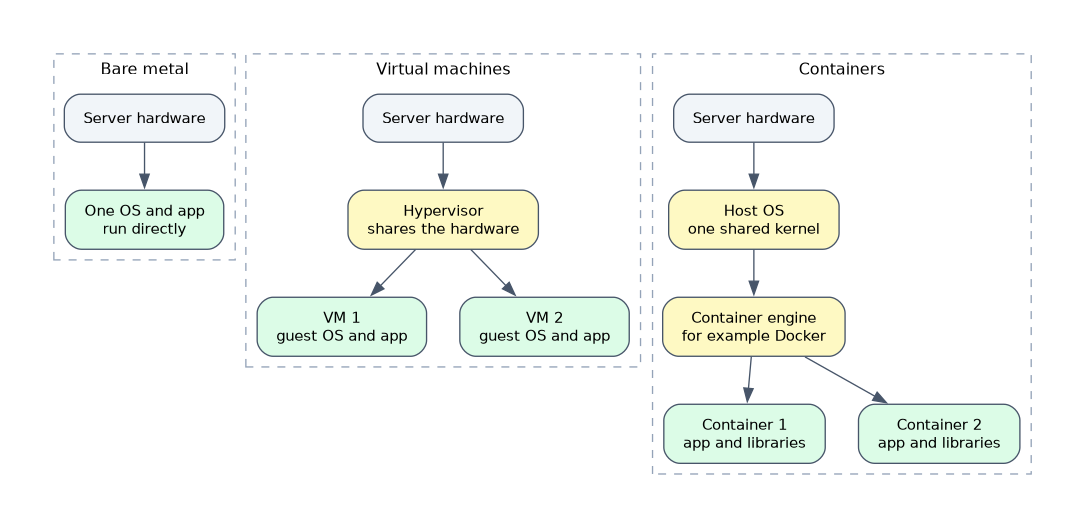
- Includes a diagram
- Bare metal runs directly on hardware and gives the best performance with the least flexibility.
- A VM runs a full guest operating system on a hypervisor and gives strong isolation.
- A container shares the host kernel and packages one application with its dependencies.
What it is
A deployment type is the form of the environment in which an application runs on a server.
The three types are bare metal, virtual machines and containers. They sit at different levels of the stack, and each gives a different mix of speed, isolation and efficiency.
Knowing what each one shares and what it keeps separate is the key to comparing them.
How it works
The difference comes from what is shared between applications and what is private.
Bare metal
Bare metal means the application runs on an operating system installed directly on physical hardware, with nothing in between.
It gives the best raw performance and full access to the hardware, with no virtualisation overhead. It is less flexible. One server usually runs one purpose, it takes longer to provision, and unused capacity is wasted.
Typical uses are very heavy databases, high performance computing and workloads with special hardware needs.
Virtual machines
A virtual machine, or VM, is a complete computer simulated in software. A hypervisor shares the physical hardware among several VMs, and each VM has its own guest operating system.
Examples of hypervisors are VMware ESXi, Microsoft Hyper-V and KVM.
VMs give strong isolation, because each has its own operating system and a fault in one does not reach the others. They can run different operating systems on the same host. The cost is size and speed: each VM carries a full operating system, so it uses more memory and disk and starts in minutes.
Containers
A container packages an application with its libraries and settings. Containers on a host share the host's operating system kernel, and the container engine keeps them isolated from each other.
Docker is the best known container engine. Because there is no guest operating system, containers are much smaller than VMs, and they start in seconds.
A container image holds the files, and a container is a running instance of that image. The same image runs the same way on a laptop, a test server or a cloud, which solves the problem of an application working on one machine only.
Isolation is lighter than for VMs, because the kernel is shared. A kernel flaw can affect every container on the host.
Comparing the three
| Attribute | Bare metal | Virtual machine | Container |
|---|---|---|---|
| Operating system | One, on the hardware | One guest per VM | Shares the host kernel |
| Isolation | Physical | Strong | Lighter |
| Startup time | Minutes | Minutes | Seconds |
| Size | Full server | Gigabytes | Megabytes |
| Efficiency | Low sharing | Moderate | High density |
| Portability | Low | Moderate | High |
| Performance | Best | Small overhead | Near native |
Orchestration
When there are many containers, a tool such as Kubernetes starts, stops, scales and heals them across a group of hosts. This is called container orchestration. VMs have their own management platforms for the same purpose.
Containers inside VMs
The types are often combined. A common design runs containers inside VMs, which gives container speed and VM isolation. Cloud providers run containers in this way for different customers.
Choosing a type
- Need maximum performance or direct hardware access: bare metal.
- Need strong isolation or different operating systems: VMs.
- Need fast start, high density and easy movement between environments: containers.
- Need microservices that scale in and out: containers.
A quick test is the kernel. Containers share the host kernel, VMs each have their own guest operating system, and bare metal has no sharing layer.
What to remember for the exam
Six facts cover this topic.
- Bare metal runs directly on hardware and gives the best performance with the least flexibility.
- A VM runs a full guest operating system on a hypervisor and gives strong isolation.
- A container shares the host kernel and packages one application with its dependencies.
- Containers are lighter and start faster than VMs.
- A container image is the package, and a container is a running instance of it.
- Orchestration tools such as Kubernetes manage many containers.
Common mistakes
Four mistakes are typical.
Saying containers have their own operating system. They share the host kernel.
Calling a VM and a container the same thing. A VM includes a guest operating system. A container does not.
Assuming containers are always more secure. The shared kernel gives weaker isolation than a VM.
Mixing up image and container. The image is the template, and the container is a running copy.
Do not assume that a container can run any operating system. It uses the host's kernel, so a Linux container needs a Linux kernel.
Check yourself
Work through these three questions.
What does a hypervisor do?
It shares the physical hardware among several virtual machines, each with its own guest operating system.
Why do containers start faster than virtual machines?
They share the host kernel and do not boot a full guest operating system.
What is the difference between a container image and a container?
The image is the packaged template, and a container is a running instance of it.
Topic 2 of 8 in Application Deployment and Security
Test yourself on Application Deployment and Security
The full Cisco CCNA 200-901 DEVASC question bank has 808 questions, with timed practice exams and an explanation for every answer.
This study guide is independent and is not affiliated with, endorsed by, or sponsored by Cisco. Vendor names, certification names and exam codes are trademarks of their respective owners and are used for identification only.