Security Fundamentals · Topic 7 of 10
Layer 2 Security Features
Configure and verify port security, DHCP snooping and dynamic ARP inspection on a Cisco switch to stop rogue devices, rogue DHCP servers and ARP spoofing.
- 6 min
- Exam objective 5.7
- Includes a diagram
- Port security limits the MAC addresses on a port. The default maximum is one, and the default violation mode is shutdown.
- The violation modes are protect, restrict and shutdown. Only restrict and shutdown log violations.
- Sticky learning saves learned MAC addresses to the configuration.
What it is
Port security, DHCP snooping and dynamic ARP inspection protect the local network from attacks that start inside it.
Many attacks happen where devices tend to trust each other. A person can plug an unknown device into a wall port, run a fake DHCP server, or forge ARP messages to redirect traffic. Switches have features built to prevent these attacks.
This topic covers three of them: port security, DHCP snooping and dynamic ARP inspection (DAI).
| Feature | Threat it addresses | Main idea |
|---|---|---|
| Port security | Unknown devices, MAC flooding | Limit which MAC addresses can use a port |
| DHCP snooping | Rogue DHCP servers | Only trusted ports may send DHCP server replies |
| Dynamic ARP inspection | ARP spoofing | Check ARP messages against known bindings |
How it works
Each feature checks traffic on untrusted ports, and DAI builds on the table that DHCP snooping creates.
Port security
Port security limits the MAC addresses allowed on a switch port. It applies to access ports, and to trunk ports only if they are set statically. A port does not work with port security until you set it as an access port.
interface GigabitEthernet0/5
 switchport mode access
 switchport port-security
 switchport port-security maximum 2
 switchport port-security mac-address sticky
 switchport port-security violation restrict
switchport port-securityturns the feature on.maximum 2allows at most two MAC addresses on the port. The default is one.mac-address stickymakes the port learn the MAC addresses it sees and save them in the configuration. You can also enter them by hand withmac-address ADDRESS.violationsets what happens when a new, unauthorised address appears or the maximum is exceeded.
There are three violation modes:
- protect: drops traffic from the unknown addresses. It does not log anything or count violations.
- restrict: drops that traffic, logs a message and increases a violation counter.
- shutdown: puts the port into the err-disabled state. This is the default.
Default maximum is one MAC address, and the default violation mode is shutdown. Only restrict and shutdown log violations.
An err-disabled port is down until an administrator runs shutdown and then no shutdown on it, or until automatic recovery is enabled.
To check:
show port-security
show port-security interface GigabitEthernet0/5
show port-security address
Port security also protects against MAC flooding, where an attacker sends frames with many fake source addresses to fill the switch's address table, so that the switch begins to flood traffic to all ports.
DHCP snooping
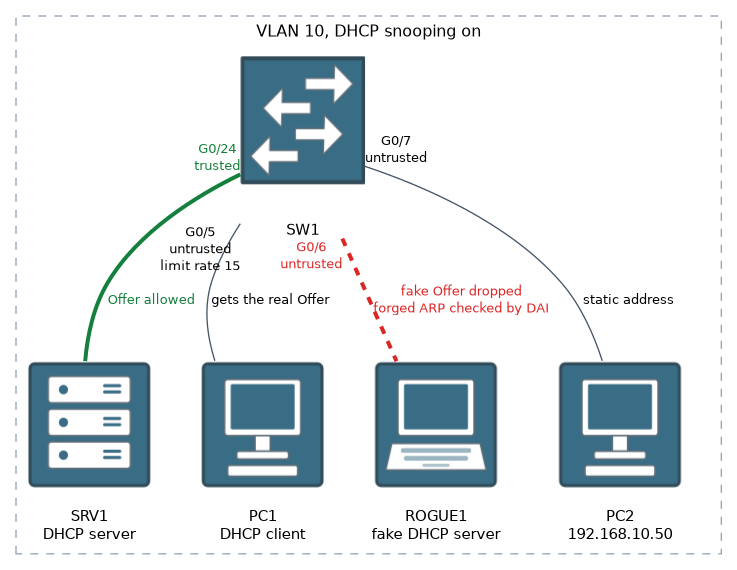 An attacker can connect a rogue DHCP server that hands out wrong gateway addresses, so that clients send traffic through the attacker. DHCP snooping prevents this by dividing ports into two kinds:
- Trusted ports: where legitimate DHCP servers or uplinks are connected. DHCP server messages are allowed.
- Untrusted ports: all others, such as user ports. Server type DHCP messages, such as Offer and Acknowledge, are dropped.
ip dhcp snooping
ip dhcp snooping vlan 10
interface GigabitEthernet0/24
 ip dhcp snooping trust
interface GigabitEthernet0/5
 ip dhcp snooping limit rate 15
By default all ports are untrusted once snooping is on, so you must mark the uplinks and server-facing ports as trusted. The limit rate command caps DHCP packets per second on a port, which protects against DHCP starvation, where an attacker asks for all the addresses in the pool.
As the switch watches legitimate DHCP exchanges, it builds the DHCP snooping binding table. It records the client's MAC address, IP address, VLAN, port and lease time. You can see it with show ip dhcp snooping binding.
Dynamic ARP inspection
ARP spoofing is when an attacker sends false ARP replies to link their own MAC address to someone else's IP address, typically the gateway. The victim's traffic then flows through the attacker.
DAI stops this by checking each ARP message on untrusted ports against the DHCP snooping binding table. If the MAC and IP address in the ARP message do not match a known binding, the message is dropped.
ip arp inspection vlan 10
interface GigabitEthernet0/24
 ip arp inspection trust
As with DHCP snooping, uplinks are set as trusted, and user ports stay untrusted. DAI depends on the binding table, so DHCP snooping is normally enabled first.
For hosts with static addresses, which are not in the binding table, you must add an ARP access list, or those hosts will be blocked.
arp access-list STATIC-HOSTS
 permit ip host 192.168.10.50 mac host 0050.56aa.bbcc
ip arp inspection filter STATIC-HOSTS vlan 10
To check:
show ip arp inspection
show ip arp inspection interfaces
Other good habits
Shut down unused ports, place them in an unused VLAN, and turn off features that are not needed, such as discovery protocols on user ports.
What to remember for the exam
Eight facts cover the defaults, the modes and the dependencies.
- Port security limits the MAC addresses on a port. The default maximum is one, and the default violation mode is shutdown.
- The violation modes are protect, restrict and shutdown. Only restrict and shutdown log violations.
- Sticky learning saves learned MAC addresses to the configuration.
- DHCP snooping allows DHCP server messages only on trusted ports.
- Uplinks and server ports must be trusted. User ports stay untrusted.
- DHCP snooping builds a binding table of MAC, IP, VLAN and port.
- DAI uses the binding table to validate ARP messages.
- An err-disabled port needs a manual reset or automatic recovery.
If the uplink toward the DHCP server is left untrusted, snooping drops the server replies and no client gets an address.
Common mistakes
Five faults cause most failures with these features.
Forgetting to trust the uplink. If the port toward the DHCP server is untrusted, no client gets an address.
Turning on DAI without snooping. There is no binding table, so valid ARP traffic is dropped.
Applying port security to a dynamic port. The port must be a static access or trunk port.
Confusing protect and restrict. Both drop traffic, but only restrict logs and counts it.
Not recovering an err-disabled port. The port stays down until it is reset.
Check yourself
Try these three prompts.
What does each of the three port security violation modes do, and which is the default?
Protect drops the traffic silently, restrict drops it and also logs and counts it, and shutdown puts the port into err-disabled, which is the default.
How does DHCP snooping build its binding table, and how does DAI use it?
It records each client's MAC address, IP address, VLAN, port and lease time from legitimate DHCP exchanges. DAI drops ARP messages on untrusted ports whose MAC and IP do not match a binding.
Which threat does each of port security, DHCP snooping and DAI address?
Port security addresses MAC flooding, DHCP snooping addresses rogue DHCP servers, and DAI addresses ARP spoofing.
Topic 7 of 10 in Security Fundamentals
Test yourself on Security Fundamentals
The full Cisco CCNA 200-301 question bank has 1,206 questions, with timed practice exams and an explanation for every answer.
This study guide is independent and is not affiliated with, endorsed by, or sponsored by Cisco. Vendor names, certification names and exam codes are trademarks of their respective owners and are used for identification only.