Security Fundamentals · Topic 6 of 10
Access Control Lists
Learn how Cisco standard and extended ACLs filter traffic, how wildcard masks and the implicit deny work, where to place them, and how to verify them.
- 6 min
- Exam objective 5.6
- Includes a diagram
- Rules are read top to bottom, and the first match is final.
- There is an implicit
deny anyat the end of every ACL. - Wildcard mask is the inverse of the subnet mask.
hostmeans 0.0.0.0 andanymeans 255.255.255.255.
What it is
An access control list (ACL) is an ordered list of permit and deny rules that a router uses to filter traffic.
Each packet is compared with the rules. The first matching rule decides what happens to it.
ACLs are used for filtering traffic between networks, for protecting management access, and also to select traffic for other features, such as NAT.
How it works
The router checks rules from the top, stops at the first match, and drops anything that matches nothing.
How a list is processed
- Rules are checked from the top down.
- The first match wins. The router does not look at later rules.
- At the end of every ACL is an invisible implicit deny any. If a packet matches no rule, it is dropped.
- An ACL that has only deny rules therefore blocks everything. Include at least one
permit. - An ACL does nothing until it is applied to an interface, in a direction.
The implicit deny at the end is invisible. A list with only deny lines blocks all traffic.
Wildcard masks
ACLs use a wildcard mask, which is the inverse of a subnet mask. A 0 bit means "this bit must match" and a 1 bit means "ignore this bit".
0.0.0.255matches any address in a /24, such as 192.168.1.0 to 192.168.1.255.0.0.0.0matches exactly one address. The keywordhostis shorthand for this.255.255.255.255matches everything. The keywordanyis shorthand for this.
To find the wildcard mask, subtract the subnet mask from 255.255.255.255. For 255.255.255.192, the wildcard is 0.0.0.63.
Standard and extended ACLs
| Feature | Standard | Extended |
|---|---|---|
| Matches on | Source address only | Protocol, source, destination and ports |
| Numbered ranges | 1 to 99, 1300 to 1999 | 100 to 199, 2000 to 2699 |
| Placement | Close to the destination | Close to the source |
A standard ACL is simple but coarse, since it only looks at the source. An extended ACL can say, for example, "allow TCP from this subnet to that server on port 80".
Both can be numbered or named. Named ACLs are easier to read and edit.
Standard ACL example:
access-list 10 permit 192.168.1.0 0.0.0.255
access-list 10 deny any
Extended named ACL example:
ip access-list extended WEB-ONLY
 permit tcp 192.168.1.0 0.0.0.255 host 10.1.1.10 eq 80
 permit tcp 192.168.1.0 0.0.0.255 host 10.1.1.10 eq 443
 deny ip any any
An extended entry has this order: action, protocol, source, destination, and then an optional operator and port, such as eq 80 (equals port 80).
Applying an ACL
interface GigabitEthernet0/1
 ip access-group WEB-ONLY in
The direction is from the router's point of view. In filters packets as they arrive on the interface. Out filters packets as they leave it.
An interface can have one ACL per direction, per protocol.
To protect remote logins to the device itself, use an ACL on the vty lines:
line vty 0 15
 access-class 10 in
Placement
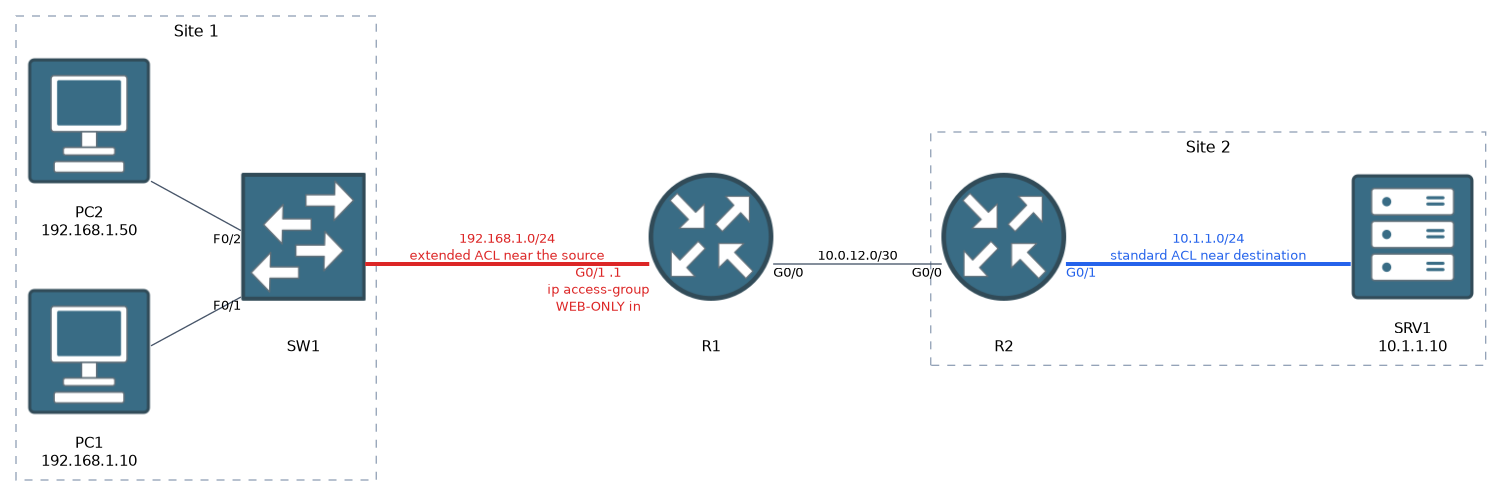 Where you put the ACL depends on how much it can see.
- Standard ACLs go close to the destination, because they only see the source. Placed near the source, they could block that source from everything.
- Extended ACLs go close to the source, because they can be exact. This stops unwanted traffic early, before it crosses the network.
Editing named lists
Named ACLs use sequence numbers, so you can remove or insert a single line without rewriting the whole list:
ip access-list extended WEB-ONLY
 no 20
 15 permit tcp host 192.168.1.50 any eq 22
On numbered ACLs, editing is more limited, so it is usually easier to use a named list. Always add a remark to describe the purpose.
IPv6 ACLs
IPv6 uses named ACLs only, applied with ipv6 traffic-filter:
ipv6 access-list BLOCK-TELNET
 deny tcp any any eq 23
 permit ipv6 any any
interface GigabitEthernet0/1
 ipv6 traffic-filter BLOCK-TELNET in
An IPv6 ACL also has implicit permit rules for neighbour discovery before the implicit deny, since IPv6 depends on it.
Verifying
show access-lists
show ip access-lists WEB-ONLY
show ip interface GigabitEthernet0/1
show running-config | section access-list
show access-lists lists every rule with a match counter, which shows how many packets hit each line. show ip interface reveals which ACL is applied on an interface and in which direction.
What to remember for the exam
Eight facts cover processing, masks, placement and commands.
- Rules are read top to bottom, and the first match is final.
- There is an implicit
deny anyat the end of every ACL. - Wildcard mask is the inverse of the subnet mask.
hostmeans 0.0.0.0 andanymeans 255.255.255.255. - Standard ACLs filter by source only and go near the destination.
- Extended ACLs filter by protocol, source, destination and port, and go near the source.
- Apply with
ip access-group NAME in|out. For vty, useaccess-class. - Named ACLs allow editing with sequence numbers.
- IPv6 uses
ipv6 traffic-filter.
Remember placement as extended near the source and standard near the destination. For the wildcard mask, subtract the subnet mask from 255.255.255.255.
Common mistakes
Six faults account for most broken ACLs.
Forgetting the implicit deny. A list with only deny lines blocks all traffic. Add a permit where needed.
Wrong order. A broad permit placed above a specific deny makes the deny unreachable.
Using a subnet mask instead of a wildcard mask. The result matches the wrong range.
Applying it in the wrong direction. Check whether traffic is entering or leaving the interface.
Creating the ACL but not applying it. An unapplied ACL filters nothing.
Placing a standard ACL near the source. It can block a host from every destination.
Check yourself
Try these three prompts.
What is the wildcard mask for the subnet mask 255.255.255.192?
0.0.0.63, found by subtracting the subnet mask from 255.255.255.255.Why does the order of lines in an ACL matter, and what does the implicit deny do?
Rules are checked from the top down and the first match wins, so a later rule is never reached once an earlier one matches. The invisible implicit deny any at the end drops any packet that matches no rule.
Where should a standard ACL and an extended ACL be placed, and why?
A standard ACL goes close to the destination because it only sees the source, while an extended ACL goes close to the source because it can be exact and stops unwanted traffic early.
Topic 6 of 10 in Security Fundamentals
Test yourself on Security Fundamentals
The full Cisco CCNA 200-301 question bank has 1,206 questions, with timed practice exams and an explanation for every answer.
This study guide is independent and is not affiliated with, endorsed by, or sponsored by Cisco. Vendor names, certification names and exam codes are trademarks of their respective owners and are used for identification only.