Network Access · Topic 5 of 9
Rapid PVST+ Spanning Tree Operations
Learn how Rapid PVST+ elects a root bridge, sets port roles and states, and how PortFast, BPDU guard, root guard and loop guard protect a network.
- 6 min
- Exam objective 2.5
- Includes a diagram
- The lowest bridge ID (priority, then MAC address) becomes the root bridge.
- The default priority is 32768, and the VLAN number is added to it.
- Priority changes in steps of 4096.
What it is
Spanning Tree blocks the redundant ports that would otherwise create a switching loop.
Redundant links between switches are good for resilience, but they create a danger. A broadcast frame can circle round a loop forever, and because Ethernet frames have no hop count, the loop does not end. The result is a broadcast storm that can bring a network down within seconds.
Spanning Tree Protocol (STP) prevents this. It chooses a loop-free path through the network and blocks the ports that would create a loop. If an active link fails, a blocked port can take over.
Rapid PVST+ is Cisco's fast version. It uses the Rapid Spanning Tree standard (802.1w) for quick convergence, and it runs a separate instance for each VLAN. That lets different VLANs use different paths.
How it works
The switches elect a root, each port takes a role, and protection features guard the edges.
Electing the root bridge
The switches elect one root bridge for each VLAN. Every other switch then finds its best path to the root.
The election uses the bridge ID, which is made of a priority value, the VLAN number (the extended system ID) and the switch MAC address. The lowest bridge ID wins.
The default priority is 32768. Because the VLAN number is added to it, the priority for VLAN 10 shows as 32778.
If priorities are equal, the lowest MAC address wins, which often picks an old switch. You should choose the root yourself:
spanning-tree mode rapid-pvst
spanning-tree vlan 10 root primary
spanning-tree vlan 10 root secondary
root primary lowers the priority, to 24576 or lower if needed, so the switch becomes the root. root secondary sets 28672 so the switch is the backup. You can also set the priority directly, in multiples of 4096:
spanning-tree vlan 10 priority 4096Port roles
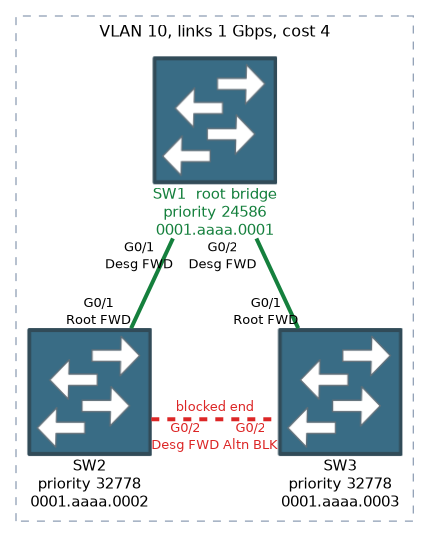 Each switch port gets a role:
- Root port: the best path from a non-root switch to the root bridge. Each non-root switch has one.
- Designated port: the best path on a segment, away from the root. Every segment has one. All ports on the root bridge are designated.
- Alternate port: a backup path to the root, on a different switch. It is the port that takes over if the root port fails.
- Backup port: a backup path to a segment that the same switch already reaches. This appears with hubs or shared links, and is rare.
The best path is the one with the lowest path cost. Cost depends on link speed.
| Link speed | Cost, short method |
|---|---|
| 10 Mbps | 100 |
| 100 Mbps | 19 |
| 1 Gbps | 4 |
| 10 Gbps | 2 |
These are the short method values, which Cisco switches use by default. The long method gives larger values. If costs tie, the lowest sender bridge ID decides, then the lowest sender port priority, then the lowest port number.
Port states
In Rapid PVST+ there are three states:
- Discarding: does not forward user frames and does not learn MAC addresses. This covers the older blocking and listening states.
- Learning: builds the MAC table but does not yet forward.
- Forwarding: sends and receives normally.
Classic STP has five states, including blocking and listening, and takes 30 to 50 seconds to react to a change. Rapid PVST+ uses a handshake of proposal and agreement between neighbours, so it usually recovers within a few seconds.
Protection features
| Feature | Command | What it does |
|---|---|---|
| PortFast | spanning-tree portfast | Moves an access port straight to forwarding |
| BPDU guard | spanning-tree bpduguard enable | Shuts down a PortFast port that receives a BPDU |
| BPDU filter | spanning-tree bpdufilter enable | Stops sending and receiving BPDUs on the port |
| Root guard | spanning-tree guard root | Blocks a port if it hears a better (superior) BPDU |
| Loop guard | spanning-tree guard loop | Stops a port from forwarding if BPDUs stop arriving |
PortFast is for ports connected to end devices. It skips the waiting period, so a PC gets network access quickly. It must never be used on a link to another switch, because it could allow a loop.
BPDU guard protects PortFast ports. If a switch is plugged into such a port, a BPDU arrives, and the port is put into the err-disabled state.
BPDU filter hides BPDUs from a port. It is risky, because it can allow loops.
Root guard keeps the intended root in place. If a port receives a better BPDU, it goes into a root-inconsistent state, and recovers when the better BPDUs stop.
Loop guard protects against a one-way link failure, where a blocking port stops getting BPDUs and wrongly starts forwarding.
Verifying
show spanning-tree
show spanning-tree vlan 10
show spanning-tree summary
The output shows the root bridge ID, this switch's bridge ID, and a table of ports with their role (Root, Desg, Altn), state (FWD, LRN, BLK) and cost.
What to remember for the exam
Eight facts cover most questions on this topic.
- The lowest bridge ID (priority, then MAC address) becomes the root bridge.
- The default priority is 32768, and the VLAN number is added to it.
- Priority changes in steps of 4096.
- Port roles are root, designated, alternate and backup.
- Rapid PVST+ states are discarding, learning and forwarding.
- PortFast is for access ports only. BPDU guard shuts down a PortFast port that hears a BPDU.
- Root guard stops a port from accepting a better root.
- Loop guard handles a unidirectional link.
To pick the root in a question, compare priority first and MAC address second, and remember the lowest value always wins.
Common mistakes
These five mistakes are the usual ones.
Leaving the root to chance. Without a configured priority, the oldest switch with the lowest MAC address can become the root, which may be a poor choice.
Using PortFast on a switch to switch link. It can create a loop before STP can react.
Mixing up root guard and BPDU guard. BPDU guard shuts a PortFast port on any BPDU. Root guard only reacts to a superior BPDU.
Forgetting STP is per VLAN. Each VLAN has its own root, so check each one.
Counting the root bridge's ports as root ports. All ports on the root bridge are designated. The root bridge has no root port.
The root bridge has no root port. If an answer gives the root switch a root port, it is wrong.
Check yourself
Work through these three prompts.
How is the root chosen and set?
Lowest bridge ID wins;
spanning-tree vlan 10 root primary.How do root, designated, alternate ports differ?
Root: best path to root. Designated: best per segment. Alternate: backup.
What happens if a switch joins a BPDU guard PortFast port?
Err-disabled.
Topic 5 of 9 in Network Access
Test yourself on Network Access
The full Cisco CCNA 200-301 question bank has 1,206 questions, with timed practice exams and an explanation for every answer.
This study guide is independent and is not affiliated with, endorsed by, or sponsored by Cisco. Vendor names, certification names and exam codes are trademarks of their respective owners and are used for identification only.