IP Connectivity · Topic 3 of 5
IPv4 and IPv6 Static Routing
Configure and verify IPv4 and IPv6 static routes, including network routes, host routes, default routes and floating static routes with a higher distance.
- 6 min
- Exam objective 3.3
- Includes a diagram
- A static route has an administrative distance of 1 by default.
- A default route uses 0.0.0.0 0.0.0.0 in IPv4 and
::/0in IPv6. - A host route uses a /32 mask in IPv4 or /128 in IPv6.
What it is
A static route is a route that an administrator types in by hand, and it does not change unless someone changes it.
It is simple, predictable and uses no bandwidth or CPU to maintain, which makes it a good fit for small networks and for specific jobs in larger ones.
The downside is that it does not react to changes. If a link fails, a static route does not find another path by itself unless you plan for it.
The administrative distance of a static route is 1 by default, so it is preferred over almost every dynamic routing protocol.
How it works
You give the router a destination and a way to reach it, and the router installs the route if that way is usable.
IPv4 syntax
The command takes the destination network, its mask and the way to reach it:
ip route DESTINATION MASK NEXT-HOP
ip route DESTINATION MASK EXIT-INTERFACE
ip route DESTINATION MASK EXIT-INTERFACE NEXT-HOP
On Ethernet links, giving the next-hop address, or both the interface and the next hop, is the usual choice. An exit interface alone makes the router ARP for every destination. On a point-to-point serial link, the exit interface alone is common.
The four types of static route
| Type | Example | Use |
|---|---|---|
| Network route | ip route 192.168.20.0 255.255.255.0 10.1.1.2 | Reach a specific remote network |
| Default route | ip route 0.0.0.0 0.0.0.0 203.0.113.2 | Send everything else to one next hop |
| Host route | ip route 10.9.9.9 255.255.255.255 10.1.1.2 | Reach one specific host |
| Floating static | ip route 0.0.0.0 0.0.0.0 198.51.100.2 200 | Backup route with a higher distance |
Network route. The mask matches the destination subnet. It teaches the router the path to one remote network.
Default route. The destination and mask are both zeros, so it matches any address. It is the route of last resort and is commonly used at the edge of a network, pointing at the internet provider. It appears in the table as S*.
Host route. A /32 mask matches a single address. It is useful for reaching one server through a specific path. Because it is the longest possible prefix, it always wins over broader routes.
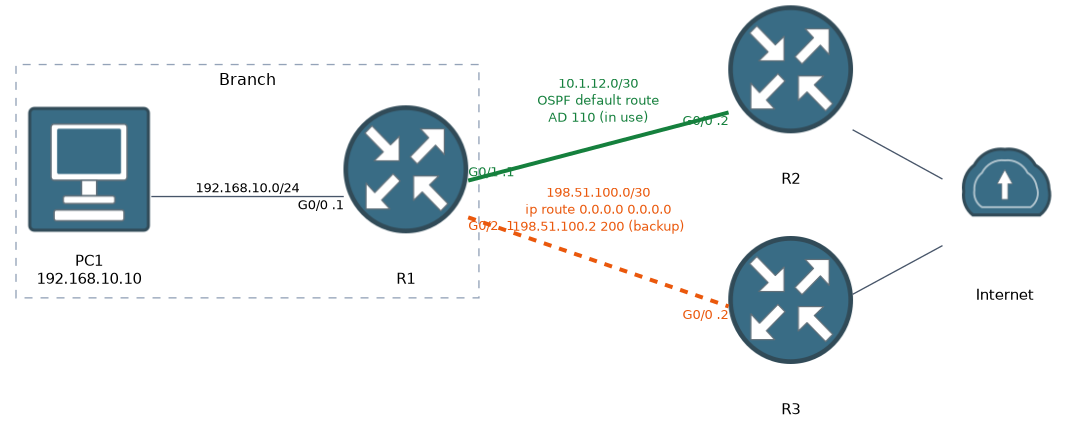
Floating static route. This is a static route with a deliberately higher administrative distance, so it does not get used while a better route exists. The number goes at the end of the command.
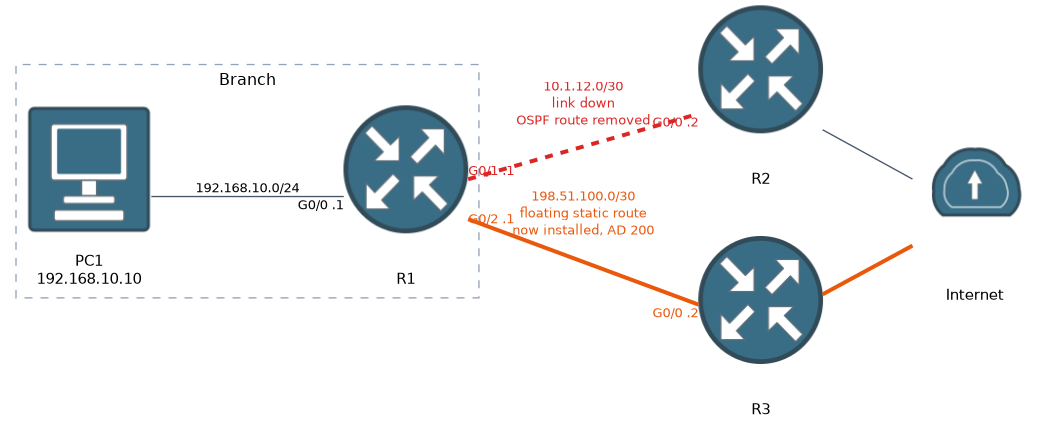
Suppose the primary path to the internet is learned by OSPF (distance 110). A floating static route with a distance of 200 stays hidden.
If the OSPF route disappears, the floating route enters the table and takes over. When the OSPF route comes back, the floating route steps aside.
The distance of a floating static route must be higher than the route it backs up. If it is lower, it replaces the main route instead of waiting.
IPv6 syntax
First, IPv6 routing must be enabled:
ipv6 unicast-routingThen the routes use a prefix length instead of a mask:
ipv6 route 2001:db8:20::/64 2001:db8:12::2
ipv6 route ::/0 2001:db8:12::2
ipv6 route 2001:db8:99::1/128 2001:db8:12::2
ipv6 route ::/0 2001:db8:13::2 200
The four lines show a network route, a default route (::/0), a host route (/128) and a floating static route.
If the next hop is a link-local address, you must also name the exit interface, because the same link-local prefix exists on every link:
ipv6 route 2001:db8:20::/64 GigabitEthernet0/0 FE80::2When a static route is installed
 A static route enters the routing table only if the router can use it.
If the next hop address is not reachable, or the exit interface is down, the route is not installed. The router also needs a route for the next hop itself, which is usually satisfied by a connected network.
Verifying
These commands show what is installed and whether it works.
show ip route static
show ip route
show ipv6 route static
show running-config | include ip route
ping 192.168.20.1
traceroute 192.168.20.1
show ip route static lists only the static routes. The show running-config | include ip route command shows exactly what was typed.
Always test with ping or traceroute. Also remember that traffic needs a return path. If the remote router has no route back to the sender, the ping fails even though the forward route is perfect.
What to remember for the exam
Eight facts cover static routing.
- A static route has an administrative distance of 1 by default.
- A default route uses 0.0.0.0 0.0.0.0 in IPv4 and
::/0in IPv6. - A host route uses a /32 mask in IPv4 or /128 in IPv6.
- A floating static route has a higher administrative distance, so it acts as a backup.
- IPv6 static routes need
ipv6 unicast-routingto be enabled on the router. - A link-local next hop needs the exit interface as well.
- A route is not installed if its next hop or interface is unreachable.
- Routing must work in both directions.
A floating static route is just a normal static route with a distance number added at the end. Pick a number above the distance of the route you want to back up.
Common mistakes
These six errors are the usual ones.
Setting the floating distance too low. If the distance is lower than the main route, the floating route becomes the main route.
Using a wrong mask. A mask that does not match the destination subnet covers the wrong range.
Forgetting the return route. The remote network must also know how to get back.
Pointing at an unreachable next hop. The route stays out of the table, and you see nothing.
Using only an exit interface on Ethernet. It can force the router to ARP for every destination, which is inefficient.
Forgetting ipv6 unicast-routing. IPv6 routes can be typed in, but the router does not forward IPv6 traffic.
Check yourself
Work through these three prompts.
Which type of static route suits a single server, a backup link and the internet?
A host route for a single server, a floating static route for a backup link and a default route for the internet.
How does a floating static route behave when the main route is present and when it disappears?
While the main route is present, the floating route stays hidden because of its higher administrative distance. If the main route disappears, the floating route enters the table and takes over.
Why must an IPv6 static route with a link-local next hop include the exit interface?
The same link-local prefix exists on every link, so the router needs the exit interface to know which link the next hop is on.
Topic 3 of 5 in IP Connectivity
Test yourself on IP Connectivity
The full Cisco CCNA 200-301 question bank has 1,206 questions, with timed practice exams and an explanation for every answer.
This study guide is independent and is not affiliated with, endorsed by, or sponsored by Cisco. Vendor names, certification names and exam codes are trademarks of their respective owners and are used for identification only.