IP Connectivity · Topic 4 of 5
Single-Area OSPFv2
Learn how single-area OSPFv2 forms neighbour adjacencies, elects a DR and BDR, chooses a router ID, and how to configure and verify it on Cisco routers.
- 6 min
- Exam objective 3.4
- Includes a diagram
- OSPF is link-state, uses cost as its metric and has an AD of 110. Single area OSPF uses area 0.
- Router ID order: manual setting, highest loopback, highest active interface.
- Hellos go to 224.0.0.5. The DR and BDR listen on 224.0.0.6.
What it is
OSPF (Open Shortest Path First) is a dynamic routing protocol that lets routers find each other and learn routes automatically.
Routers share what they know and each calculate the best path to every destination. OSPFv2 is the version for IPv4.
OSPF is a link-state protocol. Each router describes its own links to the others, so that every router ends up with the same map of the area.
Each router runs the shortest path first algorithm on that map to build its routing table. The metric is cost, based on bandwidth.
In a single-area design, all routers belong to the same area, which is area 0 (the backbone). This is the simplest setup and the one the CCNA focuses on.
How it works
Routers pick an ID, become neighbours and, on shared segments, elect a DR.
Router ID
Every OSPF router needs a unique 32-bit identifier, written like an IPv4 address. It is chosen in this order:
- A manually configured
router-id. - Otherwise, the highest IP address on an up loopback interface.
- Otherwise, the highest IP address on an active physical interface.
Setting it by hand is best practice.
Becoming neighbours
OSPF routers find each other by sending hello packets to the multicast address 224.0.0.5.
On broadcast and point-to-point links, hellos go out every 10 seconds, and a neighbour is declared dead after 40 seconds without hearing from it. These are the hello and dead timers. Non-broadcast network types use 30 and 120 seconds.
For two routers to become neighbours, several settings must agree on both:
- the area
- the hello and dead timers
- the subnet and mask of the link
- any authentication
The router IDs must be different. A mismatch in any of these prevents the adjacency.
A neighbour relationship moves through states:
| State | Meaning |
|---|---|
| Down | No hello heard |
| Init | A hello has been received, but not yet from this router |
| 2-Way | Each router has seen itself in the other's hello |
| ExStart | They decide who leads the exchange of database summaries |
| Exchange | They send summaries of their link-state databases |
| Loading | They request and receive the missing details |
| Full | Their databases match, and the adjacency is complete |
A healthy neighbour shows FULL. Neighbours stuck in INIT, 2-WAY or EXSTART often signal a problem.
On a broadcast segment, two DROTHER routers correctly stay at 2-Way with each other. Do not treat that as a fault.
Network types and the DR/BDR
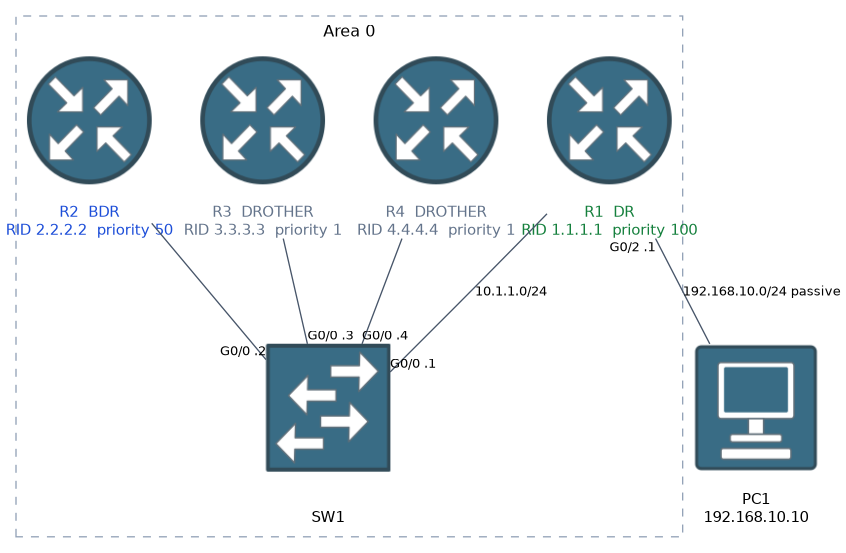 On a point-to-point link, only two routers share it. They become fully adjacent with each other, and no election is needed.
On a broadcast network, such as an Ethernet segment with several routers, full adjacency between every pair would create a lot of overhead. OSPF avoids this by electing a Designated Router (DR) and a Backup Designated Router (BDR).
Every other router, called a DROTHER, forms a full adjacency only with the DR and the BDR. Between DROTHERs the state stays at 2-Way.
The DR and BDR use multicast address 224.0.0.6, and the DR sends updates to everyone.
The election works like this:
- The router with the highest OSPF priority becomes the DR. The default priority is 1.
- A tie is broken by the highest router ID.
- The second best becomes the BDR.
- A priority of 0 means the router can never be DR or BDR.
The election is not pre-emptive. If a router with a better priority joins later, it does not take over until the DR fails or OSPF restarts.
Ethernet interfaces default to the broadcast type. If only two routers share an Ethernet link, you can change it to point-to-point on both routers and avoid the election:
interface GigabitEthernet0/0
 ip ospf network point-to-point
Configuration
router ospf 1
 router-id 1.1.1.1
 network 10.1.1.0 0.0.0.255 area 0
 network 192.168.10.0 0.0.0.255 area 0
 passive-interface GigabitEthernet0/2
router ospf 1starts the process. The number is the process ID, with only local meaning, so it need not match on other routers.network ADDRESS WILDCARD area 0enables OSPF on any interface whose address falls inside that range. Notice the wildcard mask, which is the inverse of a subnet mask.passive-interfacestops hellos on an interface, such as one facing users. The network is still advertised, but no neighbours form there.
An alternative is to turn OSPF on directly under the interface:
interface GigabitEthernet0/0
 ip ospf 1 area 0
A default route can be shared with the others using default-information originate. The cost of an interface can be set with ip ospf cost, or the reference bandwidth can be adjusted with auto-cost reference-bandwidth, which should then be set the same on all routers.
Verifying
show ip ospf neighbor
show ip ospf interface brief
show ip protocols
show ip route ospf
show ip ospf neighbor lists each neighbour, its router ID, its state (such as FULL/DR) and the interface. show ip ospf interface brief shows the area, cost and state of each OSPF interface. show ip route ospf shows the learned routes, marked with O.
What to remember for the exam
Eight facts cover single-area OSPF.
- OSPF is link-state, uses cost as its metric and has an AD of 110. Single area OSPF uses area 0.
- Router ID order: manual setting, highest loopback, highest active interface.
- Hellos go to 224.0.0.5. The DR and BDR listen on 224.0.0.6.
- Default timers on Ethernet are hello 10 seconds and dead 40 seconds.
- Neighbours must agree on area, timers, subnet and authentication, and have unique router IDs.
- DR election uses the highest priority, then the highest router ID. Priority 0 never wins.
- DROTHERs stay at 2-Way with each other, which is normal.
- A
networkcommand uses a wildcard mask.
Make user facing ports passive, and set point-to-point on a two router Ethernet link to skip the DR election.
Common mistakes
These six errors are the usual ones.
Duplicate router IDs. Two routers with the same ID will not work properly together.
Using a subnet mask in the network command. It needs a wildcard mask.
Expecting every neighbour to be FULL. On a broadcast segment, DROTHERs show 2-Way with each other.
Mismatched timers or subnets. The routers see each other's hellos but never move beyond the early states.
Expecting a new router to take over as DR. The election is not pre-emptive.
Forgetting passive interfaces. Hellos on user-facing ports are unnecessary and reveal routing information.
Check yourself
Work through these three prompts.
How is an unset router ID chosen?
Highest up loopback IP, else highest active interface IP.
Why are a DR and BDR elected?
To limit overhead; DROTHERs are Full only with them.
Which settings must OSPF neighbours agree on?
Area, timers, subnet and authentication.
Topic 4 of 5 in IP Connectivity
Test yourself on IP Connectivity
The full Cisco CCNA 200-301 question bank has 1,206 questions, with timed practice exams and an explanation for every answer.
This study guide is independent and is not affiliated with, endorsed by, or sponsored by Cisco. Vendor names, certification names and exam codes are trademarks of their respective owners and are used for identification only.