Network Services and Security · Topic 7 of 7
Layer 2 Security
Configure Layer 2 security on Cisco switches: port security, DHCP snooping, DAI, storm control and IPv6 RA guard, with show commands for each.
- 5 min
- Includes a diagram
- Port security: default maximum one MAC, default violation shutdown.
- Only restrict and shutdown log violations. Sticky saves learned MACs.
- DHCP snooping allows server messages only on trusted ports and builds a binding table.
What it is
Layer 2 security features protect the local network from attacks that start on a user port.
Switches trust their neighbors by default. Someone can plug in an unknown device, run a fake DHCP server, forge ARP replies, flood the LAN with broadcasts or send false IPv6 router advertisements.
| Feature | Threat | Main idea |
|---|---|---|
| Port security | Unknown devices, MAC flooding | Limit the MAC addresses on a port |
| DHCP snooping | Rogue DHCP server | Only trusted ports may send server replies |
| Dynamic ARP inspection | ARP spoofing | Check ARP messages against known bindings |
| Storm control | Broadcast, multicast and unicast storms | Limit the traffic level on a port |
| RA guard | Rogue IPv6 router advertisements | Drop RAs from ports that are not routers |
How it works
Each feature checks traffic on untrusted ports. DAI builds on the table that DHCP snooping creates.
Port security
interface GigabitEthernet0/5
 switchport mode access
 switchport port-security
 switchport port-security maximum 2
 switchport port-security mac-address sticky
 switchport port-security violation restrict
The port must be a static access port first. The default maximum is one MAC address. sticky learns addresses and saves them in the configuration.
| Violation mode | Drops traffic | Logs and counts | Port goes err-disabled |
|---|---|---|---|
| protect | Yes | No | No |
| restrict | Yes | Yes | No |
| shutdown (default) | Yes | Yes | Yes |
On a port left at the defaults (maximum 1, violation shutdown), a violation looks like this:
SW1# show port-security interface GigabitEthernet0/5
Port Security              : Enabled
Port Status                : Secure-shutdown
Violation Mode             : Shutdown
Maximum MAC Addresses      : 1
Security Violation Count   : 1
Secure-shutdown means a violation put the port in err-disabled. Recover it with shutdown then no shutdown, or enable errdisable recovery cause psecure-violation.
DHCP snooping
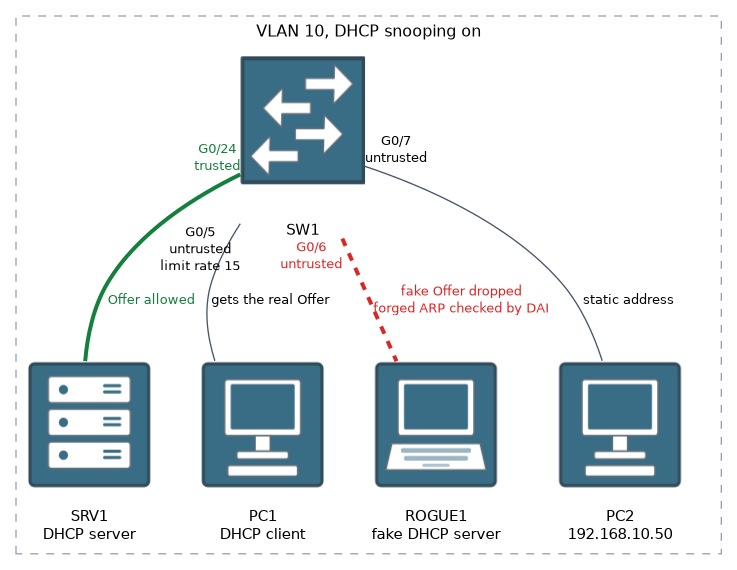
ip dhcp snooping
ip dhcp snooping vlan 10
interface GigabitEthernet0/24
 ip dhcp snooping trust
interface GigabitEthernet0/5
 ip dhcp snooping limit rate 15
Once snooping is on, every port is untrusted. Trust the uplink toward the real DHCP server. Untrusted ports drop DHCP server messages, such as Offer and Acknowledge. limit rate caps DHCP packets per second and limits starvation attacks.
The switch records each lease in the binding table: MAC address, IP address, VLAN, port and lease time. View it with show ip dhcp snooping binding.
If the uplink toward the DHCP server stays untrusted, snooping drops the replies and no client gets an address.
Dynamic ARP inspection
DAI checks ARP messages on untrusted ports against the snooping binding table and drops forged ones.
ip arp inspection vlan 10
interface GigabitEthernet0/24
 ip arp inspection trust
Trust the uplinks and leave user ports untrusted. Hosts with static addresses are not in the binding table, so they need an ARP ACL or their ARP is dropped. Check with show ip arp inspection.
Storm control
Storm control measures broadcast, multicast or unicast traffic on a port and acts when it passes a threshold.
interface GigabitEthernet0/5
 storm-control broadcast level 20
 storm-control multicast level 30
 storm-control action shutdown
level 20 means 20 percent of the port bandwidth. By default the switch drops the excess traffic. action shutdown puts the port into err-disabled instead, and action trap sends an SNMP trap.
SW1# show storm-control broadcast
Interface  Filter State   Upper    Lower    Current
Gi0/5      Forwarding     20.00%   20.00%   0.00%
With the default drop action, a state of Blocking means the port is currently over the threshold and traffic is being dropped.
IPv6 RA guard
IPv6 hosts learn their default gateway from router advertisements (RAs). A rogue RA makes hosts send traffic to the attacker. RA guard drops RAs on ports that are not meant to receive them.
ipv6 nd raguard policy HOSTS
 device-role host
!
interface GigabitEthernet0/5
 ipv6 nd raguard attach-policy HOSTS
A policy with device-role host blocks RAs from that port. Use device-role router on the port toward the real router. Verify with show ipv6 nd raguard policy. Platform support and syntax can differ on some switch models.
DHCP snooping protects IPv4 addressing, and RA guard protects IPv6 addressing. Both rely on marking which ports may speak as a server or router.
Common mistakes
Port security on a dynamic port. Set switchport mode access first.
Forgetting to trust the uplink. DHCP snooping and DAI then break normal traffic.
DAI without snooping. With no binding table, valid ARP traffic is dropped.
Mixing up protect and restrict. Both drop, but only restrict logs and counts.
Leaving an err-disabled port down. Port security and storm control with shutdown need a manual or automatic recovery.
Setting the storm level too low. Normal bursts then trigger the action.
What to remember for the exam
- Port security: default maximum one MAC, default violation shutdown.
- Only restrict and shutdown log violations. Sticky saves learned MACs.
- DHCP snooping allows server messages only on trusted ports and builds a binding table.
- DAI validates ARP against the binding table. Uplinks are trusted.
- Storm control uses
storm-control broadcast|multicast|unicast level N. The action is shutdown or trap. - RA guard uses
ipv6 nd raguardand adevice-roleof host or router. - Err-disabled ports need
shutdownthenno shutdownor recovery. - Verify with
show port-security,show ip dhcp snooping binding,show ip arp inspection,show storm-control.
Check yourself
What does each port security violation mode do, and which is the default?
Protect drops silently, restrict drops and logs and counts, and shutdown puts the port into err-disabled. Shutdown is the default.
Which feature stops a rogue DHCP server, which stops ARP spoofing, and which stops rogue IPv6 router advertisements?
DHCP snooping stops the rogue DHCP server, DAI stops ARP spoofing, and RA guard stops rogue router advertisements.
What does storm control do when a port passes its threshold?
By default it drops the excess traffic. With
action shutdownit puts the port into err-disabled, and withaction trapit sends an SNMP trap.
Topic 7 of 7 in Network Services and Security
Test yourself on Network Services and Security
The full Cisco CCNA 200-301 v2.0 question bank has 1,242 questions, with timed practice exams and an explanation for every answer.
This study guide is independent and is not affiliated with, endorsed by, or sponsored by Cisco. Vendor names, certification names and exam codes are trademarks of their respective owners and are used for identification only.