Network Services and Security · Topic 6 of 7
IPv4 ACLs
Configure IPv4 standard and extended, numbered and named ACLs on Cisco routers: wildcard masks, implicit deny, placement, direction, and show access-lists output.
- 6 min
- Includes a diagram
- Rules are read top to bottom and the first match is final.
- Every ACL ends with an implicit deny any.
- Wildcard mask is the inverse of the subnet mask.
hostis 0.0.0.0 andanyis 255.255.255.255.
What it is
An access control list (ACL) is an ordered list of permit and deny rules that a router uses to filter traffic.
Each packet is compared with the rules from the top. The first matching rule decides what happens to it. ACLs also select traffic for other features, such as NAT, and protect management access to the device.
How it works
The router checks rules from the top, stops at the first match, and drops anything that matches nothing.
- Rules are checked top down and the first match wins.
- Every ACL ends with an invisible implicit deny any.
- An ACL with only deny lines therefore blocks everything.
- An ACL does nothing until it is applied to an interface in a direction.
The implicit deny is not shown in the configuration. A list with only deny lines blocks all traffic.
Wildcard masks
A wildcard mask is the inverse of a subnet mask. A 0 bit must match and a 1 bit is ignored.
0.0.0.255matches a whole /24, such as 192.168.1.0 to 192.168.1.255.0.0.0.0matches one address. The keywordhostis shorthand.255.255.255.255matches everything. The keywordanyis shorthand.
Subtract the subnet mask from 255.255.255.255. For 255.255.255.192, the wildcard is 0.0.0.63.
Standard and extended ACLs
| Feature | Standard | Extended |
|---|---|---|
| Matches on | Source address only | Protocol, source, destination and ports |
| Numbered ranges | 1 to 99 and 1300 to 1999 | 100 to 199 and 2000 to 2699 |
| Placement | Close to the destination | Close to the source |
Both kinds can be numbered or named. Named ACLs are easier to read and edit.
! Numbered standard
access-list 10 permit 192.168.1.0 0.0.0.255

! Named standard
ip access-list standard MGMT-HOSTS
 permit host 192.168.1.50

! Named extended
ip access-list extended WEB-ONLY
 permit tcp 192.168.1.0 0.0.0.255 host 10.1.1.10 eq 80
 permit tcp 192.168.1.0 0.0.0.255 host 10.1.1.10 eq 443
 deny ip any any log
An extended entry has this order: action, protocol, source, destination, then an optional operator and port such as eq 80. The optional log keyword adds a console message when the line matches.
Apply the ACL
interface GigabitEthernet0/1
 ip access-group WEB-ONLY in
Direction is from the router's point of view. In filters packets as they arrive on the interface. Out filters packets as they leave it. An interface can have one ACL per direction for IPv4.
To limit who can log in to the device, apply a standard ACL to the vty lines:
line vty 0 15
 access-class MGMT-HOSTS in
Placement
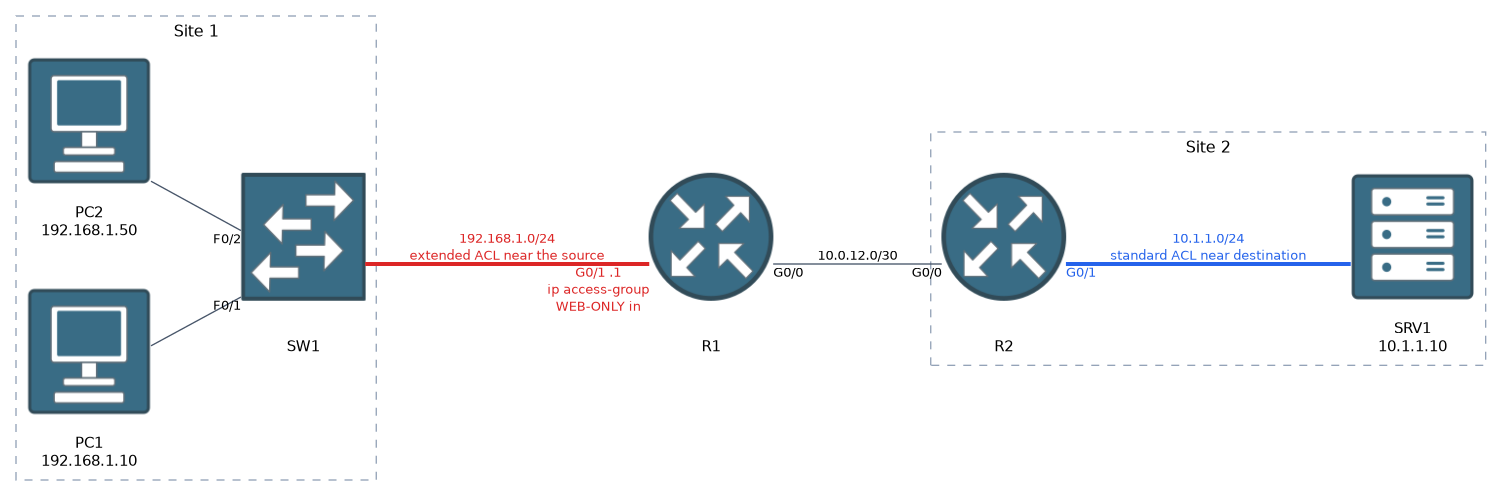
A standard ACL sees only the source, so it goes close to the destination. Near the source it could block that source from everything. An extended ACL is exact, so it goes close to the source and stops unwanted traffic early.
Editing named ACLs
Named ACLs use sequence numbers, so one line can be removed or inserted without rewriting the list.
ip access-list extended WEB-ONLY
 no 20
 15 permit tcp host 192.168.1.50 any eq 22
 remark Allow SSH from admin PC
New lines without a number are added at the end, after the last rule. ip access-list resequence WEB-ONLY 10 10 renumbers the lines. Numbered ACLs can also be edited this way when entered through ip access-list standard 10.
Verify
R1# show access-lists
Extended IP access list WEB-ONLY
    10 permit tcp 192.168.1.0 0.0.0.255 host 10.1.1.10 eq www (14 matches)
    20 permit tcp 192.168.1.0 0.0.0.255 host 10.1.1.10 eq 443 (3 matches)
    30 deny ip any any log (27 matches)
R1# show ip interface GigabitEthernet0/1
  Outgoing access list is not set
  Inbound  access list is WEB-ONLY
The match counters show which line catches the traffic. If a permit line shows no matches while users complain, the traffic is hitting an earlier deny, arriving in the other direction, or being matched by a different ACL. show ip interface proves which ACL is applied and in which direction.
A line with zero matches is a clue. Either the traffic never arrives on that interface, or an earlier line catches it first.
Common mistakes
Forgetting the implicit deny. A list with only deny lines blocks everything. Add a permit.
Wrong order. A broad permit above a specific deny makes the deny unreachable.
Using a subnet mask instead of a wildcard mask. The ACL then matches the wrong range.
Wrong direction. Check whether the traffic enters or leaves the interface.
Creating the ACL but not applying it. An unapplied ACL filters nothing.
Standard ACL near the source. It can block a host from every destination.
Blocking return traffic. A filter on the way back can drop replies that the first ACL allowed.
What to remember for the exam
- Rules are read top to bottom and the first match is final.
- Every ACL ends with an implicit deny any.
- Wildcard mask is the inverse of the subnet mask.
hostis 0.0.0.0 andanyis 255.255.255.255. - Standard ACLs match source only, go near the destination, and use numbers 1 to 99 and 1300 to 1999.
- Extended ACLs match protocol, source, destination and ports, go near the source, and use 100 to 199 and 2000 to 2699.
- Apply with
ip access-group NAME in|out. For vty lines useaccess-class. - Named ACLs allow editing by sequence number.
show access-listsshows match counters.show ip interfaceshows where it is applied.
Check yourself
What is the wildcard mask for the subnet mask 255.255.255.192?
0.0.0.63, found by subtracting the subnet mask from 255.255.255.255.Where do you place a standard ACL and an extended ACL, and why?
A standard ACL goes close to the destination because it sees only the source. An extended ACL goes close to the source because it is exact and stops unwanted traffic early.
An ACL permits web traffic but users are blocked. What do you check in
show access-lists?Check the match counters. The traffic may be caught by an earlier line, or it may be hitting the final deny, or the ACL is applied in the wrong direction.
Topic 6 of 7 in Network Services and Security
Test yourself on Network Services and Security
The full Cisco CCNA 200-301 v2.0 question bank has 1,242 questions, with timed practice exams and an explanation for every answer.
This study guide is independent and is not affiliated with, endorsed by, or sponsored by Cisco. Vendor names, certification names and exam codes are trademarks of their respective owners and are used for identification only.