SDLC Automation · Topic 6 of 6
Container and Serverless Deployments
Compare rolling, blue green, canary and linear releases for Amazon ECS, AWS Lambda and Elastic Beanstalk, with traffic shifting, hooks and rollback.
- 6 min
- Includes a diagram
- Choose blue green or canary when the question demands fast rollback and minimal user impact.
- ECS rolling updates are tuned with
minimumHealthyPercentandmaximumPercent. - The ECS deployment circuit breaker can roll back automatically.
What it is
A deployment strategy decides how new code replaces old code and how much risk users face while it happens. The main strategies are all at once, rolling, blue green, canary and linear, and each has a different cost and rollback speed.
Containers on Amazon Elastic Container Service (ECS) and functions on AWS Lambda both support gradual traffic shifting. AWS Elastic Beanstalk packages several strategies behind one setting.
How it works
Strategy comparison
| Strategy | How it works | Rollback | Risk |
|---|---|---|---|
| All at once | Replace everything together | Redeploy | Highest, and short outage possible |
| Rolling | Replace in batches | Redeploy old version | Mixed versions, reduced capacity |
| Blue green | Build a full new environment, then switch | Switch back | Low, but double resources for a while |
| Canary | Send a small percentage first, then the rest after a wait | Shift back | Low |
| Linear | Increase the percentage by equal steps | Shift back | Low, slower |
ECS rolling updates
The ECS deployment controller replaces tasks gradually. Two settings bound the process: minimumHealthyPercent is the lowest share of desired tasks that must stay running, and maximumPercent is the most that may run at once, including new tasks. The deployment circuit breaker detects tasks that keep failing and can roll the service back to the last completed deployment.
{
  "deploymentConfiguration": {
    "minimumHealthyPercent": 100,
    "maximumPercent": 200,
    "deploymentCircuitBreaker": {"enable": true, "rollback": true}
  }
}
ECS blue green with CodeDeploy
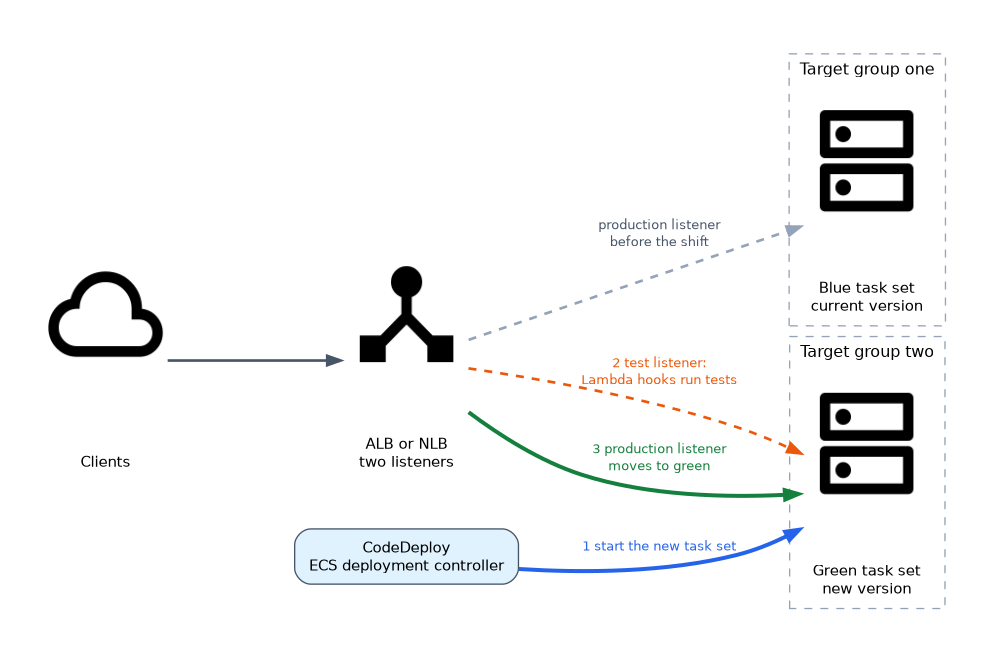 For a controlled traffic shift, set the service to use the CodeDeploy deployment controller. You need an Application Load Balancer or Network Load Balancer with two target groups. CodeDeploy starts the new task set (green) in one target group, optionally exposes it on a test listener, then moves the production listener to it.
The appspec for ECS names the task definition and the container that receives traffic.
version: 0.0
Resources:
  - TargetService:
      Type: AWS::ECS::Service
      Properties:
        TaskDefinition: "arn:aws:ecs:us-east-1:111122223333:task-definition/web:7"
        LoadBalancerInfo:
          ContainerName: "web"
          ContainerPort: 80
Hooks:
  - AfterAllowTestTraffic: "RunSmokeTests"
  - BeforeAllowTraffic: "CheckDatabase"
ECS hooks are BeforeInstall, AfterInstall, AfterAllowTestTraffic, BeforeAllowTraffic and AfterAllowTraffic. Each names a Lambda function that must report success or failure back to CodeDeploy.
Built in ECS configurations include all at once, linear and canary types. Amazon ECS also offers a built in blue green option managed by the ECS service itself, so check which deployment controller a question names.
Lambda versions and aliases
A published Lambda version is immutable. An alias is a pointer to a version, and it can split traffic between two versions by weight. Clients call the alias, so you shift traffic without changing callers.
aws lambda update-alias --function-name orders --name live \
  --function-version 2 \
  --routing-config '{"AdditionalVersionWeights":{"3":0.1}}'
That command keeps most traffic on version 2 and sends 10 percent to version 3.
Lambda with CodeDeploy and SAM
CodeDeploy automates the shifting for Lambda, using canary or linear configurations such as LambdaCanary10Percent5Minutes and LambdaLinear10PercentEvery1Minute. The AWS Serverless Application Model (SAM) wires this up in a few lines.
Resources:
  OrderFunction:
    Type: AWS::Serverless::Function
    Properties:
      Handler: app.handler
      Runtime: python3.12
      AutoPublishAlias: live
      DeploymentPreference:
        Type: Canary10Percent5Minutes
        Alarms:
          - !Ref ErrorAlarm
        Hooks:
          PreTraffic: !Ref PreTrafficFunction
Lambda deployments have two hooks: BeforeAllowTraffic and AfterAllowTraffic. In SAM they are named PreTraffic and PostTraffic. If the listed alarm fires during the shift, CodeDeploy moves the alias back to the old version.
Elastic Beanstalk
Beanstalk offers deployment policies as a setting on the environment.
| Policy | Behavior |
|---|---|
| All at once | Fastest, brief downtime |
| Rolling | Batches, reduced capacity |
| Rolling with additional batch | Launches an extra batch first, so full capacity is kept |
| Immutable | Launches fresh instances in a temporary Auto Scaling group and moves them into the original group once healthy; fast and safe rollback |
| Traffic splitting | Canary style, sends a share of traffic to new instances for an evaluation period |
Blue green in Beanstalk means a second environment and a swap of the environment URLs (CNAME swap). The database should live outside the environment so a swap does not lose data.
Storage in deployments
Deployments replace compute, so keep state off the compute. Pick the store by how the data is used.
| Store | Use in a deployment | Watch out for |
|---|---|---|
| Amazon S3 | Build artifacts, static assets, configuration and uploads; durable and Regional, no mount needed | Object store, not a file system |
| Amazon EFS | Shared file system for many ECS tasks, EKS pods, EC2 instances or Lambda functions at once; data survives task replacement | Lambda needs VPC access and an access point to mount it |
| Amazon EBS | Block volume for one instance, good for boot volumes and single node databases | Lives in one AZ and normally attaches to one instance |
EBS ties data to a single instance, which fights immutable and blue green releases because the replacement instances start with new volumes. Store durable state in S3, EFS or a managed database, and treat the instance as disposable. Take EBS snapshots when a volume must be backed up.
What to remember for the exam
- Choose blue green or canary when the question demands fast rollback and minimal user impact.
- ECS rolling updates are tuned with
minimumHealthyPercentandmaximumPercent. - The ECS deployment circuit breaker can roll back automatically.
- ECS blue green with CodeDeploy needs a load balancer and two target groups.
- Lambda aliases route traffic by weight between two versions.
- SAM
AutoPublishAliasandDeploymentPreferencegive you CodeDeploy traffic shifting. - Lambda hooks are
BeforeAllowTrafficandAfterAllowTraffic; the ECS appspec addsAfterAllowTestTraffic. - Beanstalk immutable and traffic splitting keep the old instances until the new ones prove healthy.
Match the strategy to the constraint in the question: lowest cost points to rolling, fastest rollback points to blue green, and gradual exposure points to canary or linear.
Common mistakes
Assuming canary needs two stacks. For Lambda it is one alias with weights, so there is no duplicate infrastructure.
Ignoring database changes. Blue green only works safely if the schema supports both versions at once.
Skipping alarms. A traffic shift with no alarm attached has no automatic way to notice a bad release.
Rolling with a low minimum healthy percentage can cut capacity under load, so set the percent to match the traffic the service must keep serving.
Check yourself
How does a Lambda alias help with a canary release?
It can split traffic by weight between two function versions, so you move a small share to the new version first.
What does the ECS deployment circuit breaker do?
It detects a rolling deployment that keeps failing and can roll the service back to the last good deployment.
Which Beanstalk policy keeps full capacity and enables a fast rollback?
Immutable, which launches fresh instances in a temporary Auto Scaling group and removes them if the deployment fails.
Topic 6 of 6 in SDLC Automation
Test yourself on SDLC Automation
The full AWS DOP-C02 question bank has 844 questions, with timed practice exams and an explanation for every answer.
This study guide is independent and is not affiliated with, endorsed by, or sponsored by AWS. Vendor names, certification names and exam codes are trademarks of their respective owners and are used for identification only.