SDLC Automation · Topic 5 of 6
CodeDeploy for EC2 and the AppSpec File
Deploy to EC2 and on premises servers with CodeDeploy using in place or blue green deployments, appspec hooks, deployment configurations and rollback.
- 5 min
- Includes a diagram
- Deployment groups target instances by tag, Auto Scaling group, or both.
- In place works on EC2 and on premises servers; blue green on EC2 normally copies an Auto Scaling group.
- The appspec for EC2 is
appspec.ymlat the revision root.
What it is
AWS CodeDeploy automates application deployment to Amazon EC2 instances, on premises servers, AWS Lambda functions and Amazon ECS services. This page covers the instance case. The Lambda and ECS cases are on the next page.
The key objects are the application, the deployment group (which instances to target), the revision (a bundle in S3 or a Git commit) and the appspec file that tells CodeDeploy what to do on each instance.
How it works
The agent and the roles
Each instance needs the CodeDeploy agent running. The instance profile must be able to read the revision from S3, and CodeDeploy itself uses a separate service role to list instances and talk to Auto Scaling and load balancers.
You choose instances by EC2 tag, by Auto Scaling group, or both.
In place deployments
An in place deployment stops the application on each instance, installs the new revision and starts it again. Instances are updated in batches. If the instance is behind a load balancer, CodeDeploy deregisters it first and registers it again afterwards.
Capacity drops while a batch is out of service, and a rollback means redeploying the old revision.
Blue green deployments
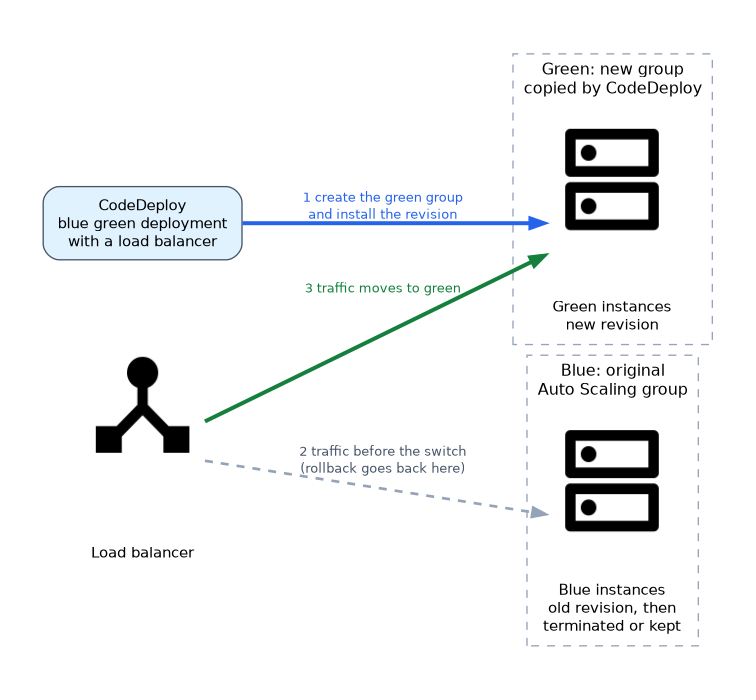 A blue green deployment on EC2 normally uses an Auto Scaling group that CodeDeploy copies. CodeDeploy creates a new group of instances (green), installs the revision, moves load balancer traffic from blue to green, and then terminates or keeps the blue instances for a chosen wait time.
| Aspect | In place | Blue green |
|---|---|---|
| Extra instances | None | A full replacement fleet |
| Capacity during deploy | Reduced per batch | Full on both sides |
| Rollback | Redeploy previous revision | Switch traffic back to blue |
| Load balancer | Optional | Required |
| Works on premises | Yes | No |
Deployment configurations
For EC2 the built in configurations control how many instances may be unhealthy at once.
| Configuration | Behavior |
|---|---|
CodeDeployDefault.AllAtOnce | Every instance at once |
CodeDeployDefault.HalfAtATime | Up to half the fleet at a time |
CodeDeployDefault.OneAtATime | One instance at a time, the safest and slowest |
You can also define a custom minimum healthy host count or percentage.
The appspec file
For EC2 the file is appspec.yml in the root of the revision. It lists files to copy and scripts to run for each lifecycle event.
version: 0.0
os: linux
files:
  - source: /
    destination: /var/www/app
hooks:
  ApplicationStop:
    - location: scripts/stop_app.sh
      timeout: 60
      runas: root
  BeforeInstall:
    - location: scripts/backup.sh
  AfterInstall:
    - location: scripts/set_permissions.sh
  ApplicationStart:
    - location: scripts/start_app.sh
  ValidateService:
    - location: scripts/health_check.sh
      timeout: 120
Lifecycle event order
DownloadBundle and Install are handled by the agent, and you cannot attach scripts to them. When an instance sits behind a load balancer, extra events are added: BeforeBlockTraffic, BlockTraffic, AfterBlockTraffic before the stop, and BeforeAllowTraffic, AllowTraffic, AfterAllowTraffic after validation.
A script that exits with a non zero code fails that event, and a failed event fails the deployment on that instance. The ApplicationStop script runs from the previous successful revision, so a broken stop script in a deployed revision can block the next deployment.
Rollback
Turn on automatic rollback to react to a failed deployment or to a CloudWatch alarm. CodeDeploy then deploys the last known good revision as a new deployment. Alarms attached to the deployment group give you metric based safety, for example a rise in 5xx errors.
aws deploy create-deployment --application-name MyApp \
  --deployment-group-name Prod \
  --s3-location bucket=my-bucket,key=app.zip,bundleType=zip \
  --deployment-config-name CodeDeployDefault.OneAtATime
Auto Scaling interaction
When an Auto Scaling group scales out, CodeDeploy installs the latest successful revision on the new instance through a lifecycle hook, so new capacity matches the current release. Keep hooks idempotent, because scale out, redeploys and rollbacks all run them again.
What to remember for the exam
- Deployment groups target instances by tag, Auto Scaling group, or both.
- In place works on EC2 and on premises servers; blue green on EC2 normally copies an Auto Scaling group.
- The appspec for EC2 is
appspec.ymlat the revision root. - Order: ApplicationStop, DownloadBundle, BeforeInstall, Install, AfterInstall, ApplicationStart, ValidateService.
- You cannot script DownloadBundle, Install, BlockTraffic or AllowTraffic.
OneAtATimeis the safest built in configuration.- Automatic rollback redeploys the last good revision as a new deployment.
- The instance profile needs S3 read access; the service role is a separate role.
- Use ValidateService to prove the application works before it takes traffic.
If a question asks for zero capacity loss and instant rollback on EC2, choose blue green with a load balancer.
Common mistakes
Forgetting the agent. An instance without a running agent never receives the deployment.
Mixing up the two roles. The instance profile reads S3, while the service role lets CodeDeploy manage instances.
Writing non idempotent scripts. Redeploys and rollbacks repeat hooks, so a script that fails when a folder already exists breaks the next run.
Putting the appspec in a subfolder. It must sit at the root of the bundle.
Because ApplicationStop comes from the previous revision, a broken stop script can keep failing every later deployment, and fixing the script in the new revision does not help until you redeploy with the option that ignores ApplicationStop failures (--ignore-application-stop-failures).
Check yourself
Which EC2 deployment type builds a replacement fleet by copying an Auto Scaling group?
Blue green, where CodeDeploy creates the green instances and then moves load balancer traffic to them.
Where must the EC2 appspec file be stored?
At the root of the application revision bundle, named
appspec.yml.Which role lets the instance download the bundle?
The EC2 instance profile role, which needs read access to the S3 bucket.
Topic 5 of 6 in SDLC Automation
Test yourself on SDLC Automation
The full AWS DOP-C02 question bank has 844 questions, with timed practice exams and an explanation for every answer.
This study guide is independent and is not affiliated with, endorsed by, or sponsored by AWS. Vendor names, certification names and exam codes are trademarks of their respective owners and are used for identification only.