Cloud Technology and Services · Topic 2 of 11
AWS Global Infrastructure
Understand AWS Regions, Availability Zones, edge locations, Local Zones and Outposts, how to choose a Region, and how they support high availability.
- 4 min
- Includes a diagram
- A Region is a geographic area. An Availability Zone is one or more data centers inside a Region.
- Each Region has multiple Availability Zones, and they are connected with low delay links.
- Use multiple AZs for high availability and multiple Regions for disaster recovery.
What it is
The AWS global infrastructure is the physical network of data centers and connections that all AWS services run on.
It is organised in layers. A Region is a geographic area, an Availability Zone is a data center group inside a Region, and edge locations bring content close to users.
Knowing these terms is central to the exam, because many design questions are about availability and speed.
How it works
Regions
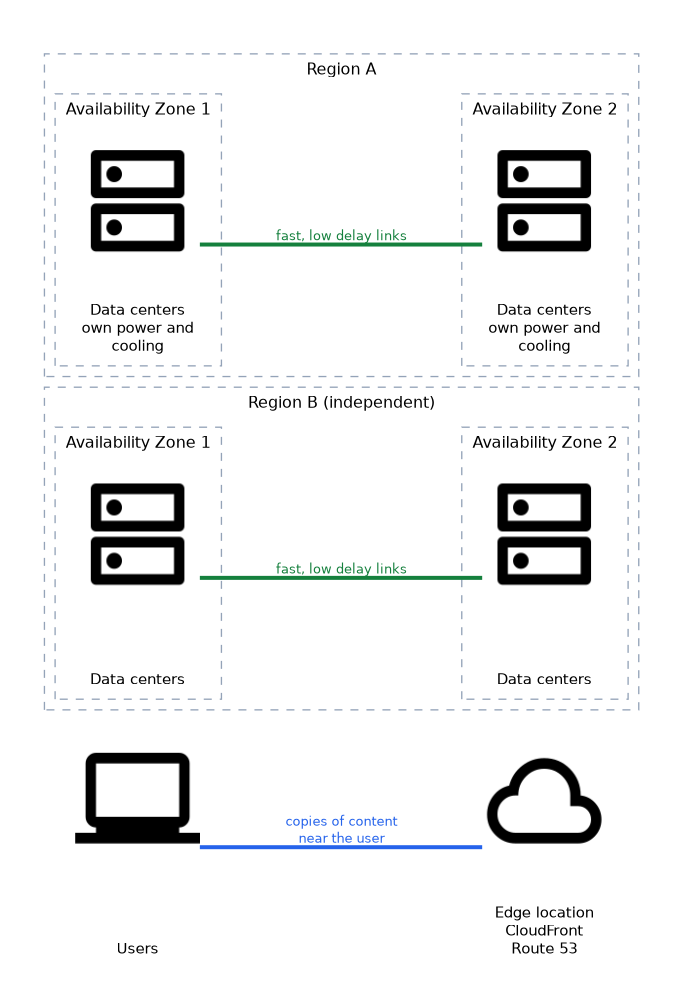 A Region is a separate geographic area, such as one in Europe or one in Asia. Each Region contains several Availability Zones.
Regions are independent. Your data stays in the Region you choose unless you copy or move it, and a problem in one Region does not normally affect another.
Region names have codes such as us-east-1. Not every service or feature is available in every Region.
Availability Zones
An Availability Zone (AZ) is one or more data centers in a Region, with its own power, cooling and networking. AZs in a Region are separate from each other but connected by fast, low delay links.
Running an application in more than one AZ protects it from the failure of a single data center. This is the basic method for high availability on AWS.
Edge locations
Edge locations are sites in many cities that host services such as Amazon CloudFront (a content delivery network) and Amazon Route 53 (the Domain Name System, or DNS, service). They store copies of content close to users so pages load faster.
Edge locations are not Regions or AZs. You do not launch servers in them.
Extending beyond Regions
| Option | What it is |
|---|---|
| AWS Local Zones | Places some AWS services close to a large city, for low delay |
| AWS Wavelength | Puts AWS services inside telecom 5G networks for mobile apps that need very low delay |
| AWS Outposts | AWS hardware installed in your own data center, run as part of AWS |
Use Local Zones or Wavelength when users need very low delay. Use Outposts when data or processing must stay on site.
How to choose a Region
Four factors guide the choice.
| Factor | Why it matters |
|---|---|
| Compliance and data residency | Some rules require data to stay in a country or area |
| Latency | A Region near your users gives faster response |
| Service availability | New services may appear first in some Regions |
| Price | Prices differ between Regions |
Compliance usually comes first. If a law says the data must stay in a country, speed or price should not change that decision.
High availability and disaster recovery
High availability inside a Region means using multiple AZs. Disaster recovery means being able to restore service after a large failure, often by using a second Region.
| Strategy | Idea |
|---|---|
| Backup and restore | Keep backups and rebuild when needed. Cheapest and slowest |
| Pilot light | Keep a minimal core of the system running in another Region |
| Warm standby | Keep a smaller full copy running |
| Multi site active active | Run full capacity in more than one place. Fastest and most expensive |
Global services
Some services are not tied to one Region. Examples are AWS Identity and Access Management, Amazon Route 53 and Amazon CloudFront. Most others are Regional, so you choose where to create them.
What to remember for the exam
- A Region is a geographic area. An Availability Zone is one or more data centers inside a Region.
- Each Region has multiple Availability Zones, and they are connected with low delay links.
- Use multiple AZs for high availability and multiple Regions for disaster recovery.
- Edge locations serve content close to users and are used by CloudFront and Route 53.
- Choose a Region by compliance first, then latency, service availability and price.
- Data does not leave a Region unless you move it.
- Local Zones, Wavelength and Outposts extend AWS closer to users or on premises.
- IAM, Route 53 and CloudFront are global services.
If a question says "survive the loss of a data center", the answer is another Availability Zone. If it says "survive the loss of a whole Region", the answer is another Region.
Common mistakes
Confusing an edge location with an Availability Zone. Edge locations cache content for speed, while AZs run your workloads.
Choosing a Region only by price. Compliance and latency often decide first.
Assuming one AZ is enough. A single AZ is a single point of failure.
Thinking all services exist in all Regions. Check availability before planning.
Spreading across AZs protects against a data center failure, not against a Region wide failure or a mistake such as deleting data.
Check yourself
What is an Availability Zone?
One or more data centers inside a Region with their own power and networking.
Which factor usually comes first when choosing a Region?
Compliance and data residency requirements.
What are edge locations used for?
Serving cached content close to users, mainly through Amazon CloudFront and Route 53.
Topic 2 of 11 in Cloud Technology and Services
Test yourself on Cloud Technology and Services
The full AWS CLF-C02 question bank has 832 questions, with timed practice exams and an explanation for every answer.
This study guide is independent and is not affiliated with, endorsed by, or sponsored by AWS. Vendor names, certification names and exam codes are trademarks of their respective owners and are used for identification only.