Cloud Technology and Services · Topic 3 of 11
EC2, Auto Scaling and Load Balancing
Learn Amazon EC2 instance types, AMIs, Auto Scaling groups and Elastic Load Balancing options, and when each fits, for the Cloud Practitioner exam.
- 4 min
- Includes a diagram
- EC2 gives resizable virtual servers. You choose the operating system, size and storage.
- An AMI is a template used to launch instances.
- Instance families: general purpose, compute optimized, memory optimized, storage optimized and accelerated computing.
What it is
Amazon Elastic Compute Cloud (EC2) provides virtual servers, called instances, that you can launch in minutes. You choose the size, the operating system and the storage, and you pay for the time they run.
Two helper services make EC2 more useful. Auto Scaling adds or removes instances automatically, and Elastic Load Balancing spreads traffic across them.
EC2 is the most flexible compute option, and it also gives you the most responsibility, because you manage the guest operating system.
How it works
Launching an instance
To launch an instance you pick an Amazon Machine Image (AMI), which is a template holding the operating system and software. You then pick an instance type, storage, network settings and a key pair for secure login.
An AMI can be reused to launch many identical servers, so it also acts as a way to copy a configuration.
Instance type families
Instance types are grouped into families by the kind of work they suit.
| Family | Best for | Example use |
|---|---|---|
| General purpose | Balanced central processing unit (CPU), memory and network | Web servers, small databases |
| Compute optimized | High processing power | Batch jobs, gaming servers, scientific modelling |
| Memory optimized | Large amounts of memory | In memory databases, big caches |
| Storage optimized | Fast access to local storage | Data warehouses, high volume transaction systems |
| Accelerated computing | Graphics processors or special chips | Machine learning, graphics rendering |
A name such as m5.large has a family and generation (m5) and a size (large). Larger sizes in a family have more CPU and memory.
How you pay
EC2 offers several purchasing options, such as On Demand, Savings Plans, Reserved Instances and Spot. They are explained in the Billing, Pricing, and Support chapter.
Auto Scaling
Amazon EC2 Auto Scaling keeps the right number of instances running. You define an Auto Scaling group with a minimum, a desired and a maximum number of instances.
It can add instances when demand rises and remove them when it falls. It also replaces instances that fail a health check.
| Scaling approach | Idea |
|---|---|
| Dynamic | React to a measure such as CPU use |
| Scheduled | Change capacity at known times |
| Predictive | Use past patterns to scale ahead of demand |
Scaling out and in this way delivers elasticity and saves cost, because you do not pay for idle servers.
Elastic Load Balancing
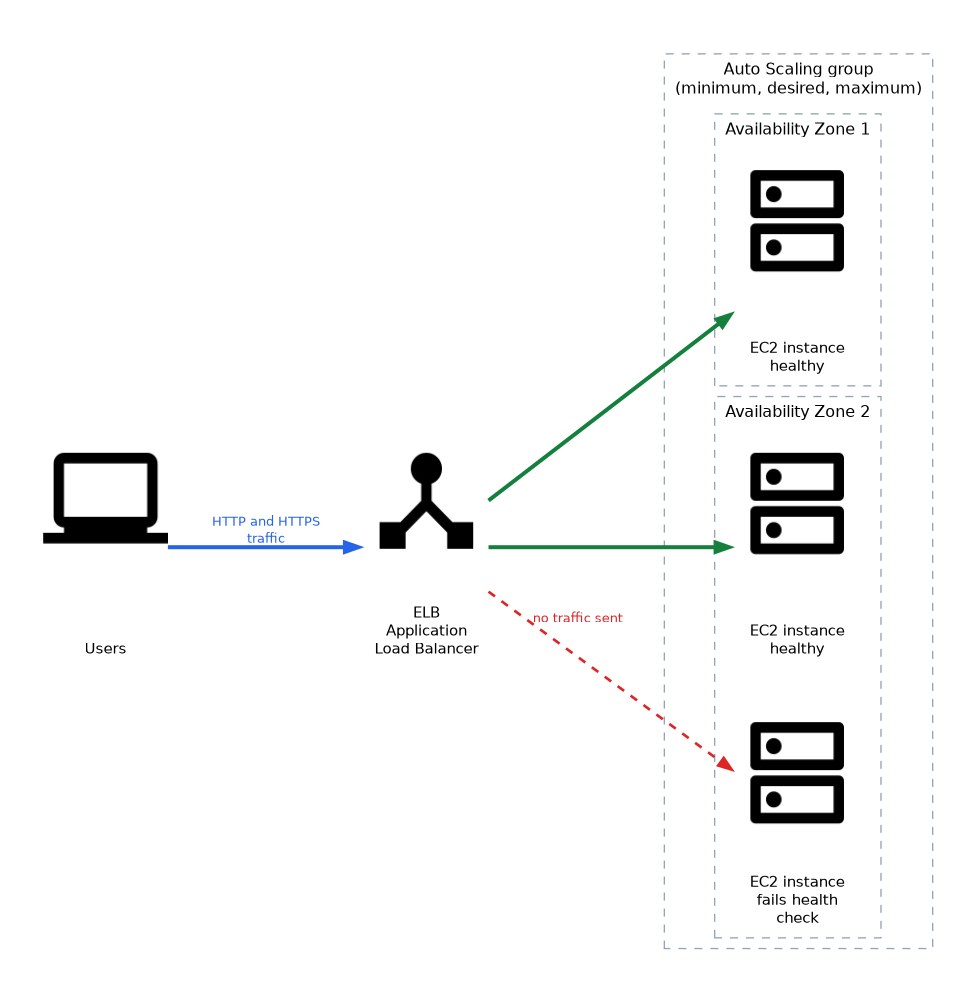 Elastic Load Balancing (ELB) distributes incoming traffic across targets such as EC2 instances in several Availability Zones. If a target is unhealthy, the load balancer stops sending traffic to it.
| Type | Works at | Choose when |
|---|---|---|
| Application Load Balancer | Application layer, Hypertext Transfer Protocol (HTTP) and its secure form HTTPS | Routing by URL path or host name |
| Network Load Balancer | Transport layer, Transmission Control Protocol (TCP) and User Datagram Protocol (UDP) | Very high performance or static IP addresses |
| Gateway Load Balancer | Network layer | Running third party security or inspection appliances |
Together, Auto Scaling and load balancing give high availability and elasticity. The load balancer sends traffic to healthy instances, while Auto Scaling changes how many exist.
Customer duties on EC2
Under the shared responsibility model, you patch the guest operating system, manage security groups and protect your data on EC2.
What to remember for the exam
- EC2 gives resizable virtual servers. You choose the operating system, size and storage.
- An AMI is a template used to launch instances.
- Instance families: general purpose, compute optimized, memory optimized, storage optimized and accelerated computing.
- Auto Scaling keeps capacity matched to demand and replaces unhealthy instances.
- An Auto Scaling group has minimum, desired and maximum sizes.
- Elastic Load Balancing spreads traffic across healthy targets in multiple AZs.
- The Application Load Balancer is for HTTP and HTTPS. The Network Load Balancer is for TCP and UDP with high performance.
- You manage patching of the guest operating system on EC2.
Memory heavy work such as large in memory databases points to memory optimized instances. Graphics processor (GPU) or machine learning work points to accelerated computing.
Common mistakes
Thinking Auto Scaling needs a load balancer. They work well together, but each one can be used alone.
Confusing the load balancers. Path based routing for web traffic is an Application Load Balancer feature.
Choosing the largest instance "to be safe". Right sizing and scaling out save money.
Forgetting that EC2 requires patching. AWS does not patch your instances for you.
A load balancer spreads traffic but does not create servers. Auto Scaling is the feature that changes how many instances exist.
Check yourself
What does an Auto Scaling group do when an instance becomes unhealthy?
It replaces it, keeping the group at the desired number of instances.
Which load balancer routes HTTP traffic by URL path?
The Application Load Balancer.
Which instance family suits large in memory databases?
Memory optimized.
Topic 3 of 11 in Cloud Technology and Services
Test yourself on Cloud Technology and Services
The full AWS CLF-C02 question bank has 832 questions, with timed practice exams and an explanation for every answer.
This study guide is independent and is not affiliated with, endorsed by, or sponsored by AWS. Vendor names, certification names and exam codes are trademarks of their respective owners and are used for identification only.