Snowflake for Gen AI · Topic 12 of 13
Cortex REST APIs and the Model Context Protocol (MCP)
The Cortex REST APIs for inference, search, Analyst and agents, and how a Snowflake-managed MCP server exposes Cortex tools to AI clients with OAuth.
- 4 min
- Includes a diagram
- Endpoints:
inference/complete,analyst/message,agent:run, Search:query. - Managed MCP server:
CREATE MCP SERVER ... FROM SPECIFICATION; up to 50 tools. - Tool types:
CORTEX_SEARCH_SERVICE_QUERY,CORTEX_ANALYST_MESSAGE,SYSTEM_EXECUTE_SQL,GENERIC,CORTEX_AGENT_RUN.
What it is
The REST APIs let applications outside SQL call Cortex features over HTTPS. The Model Context Protocol (MCP) is an open standard that lets AI clients discover and call tools. Snowflake can act as an MCP server, so a client such as Claude, ChatGPT or Cursor can use Cortex Analyst, Cortex Search or an agent without you running any server.
How it works
Cortex REST APIs
| API | Endpoint |
|---|---|
| Inference (complete) | POST /api/v2/cortex/inference/complete |
| List models | GET /api/v2/cortex/models |
| Cortex Search query | POST /api/v2/databases/{database}/schemas/{schema}/cortex-search-services/{service_name}:query |
| Cortex Analyst | POST /api/v2/cortex/analyst/message |
| Analyst feedback | POST /api/v2/cortex/analyst/feedback |
| Agent run (agent object) | POST /api/v2/databases/{database}/schemas/{schema}/agents/{name}:run |
| Agent run (no object) | POST /api/v2/cortex/agent:run |
Every request carries an Authorization header and Content-Type: application/json. The Analyst API sends X-Snowflake-Authorization-Token-Type, which is optional and defaults to OAuth. Streaming uses server sent events when requested. Cortex Search REST calls accept a programmatic access token, key pair (JWT) or OAuth.
REST suits applications and latency sensitive use, while SQL AI functions suit batch work over tables.
"Which endpoint runs a Cortex Analyst question?" is /api/v2/cortex/analyst/message. The Analyst data source is one of semantic_view, semantic_model_file, semantic_model or semantic_models.
Model Context Protocol
MCP defines how a client lists the tools a server offers and calls them. Snowflake provides a managed MCP server as a schema level object, so there is no infrastructure to deploy.
CREATE [ OR REPLACE ] MCP SERVER [ IF NOT EXISTS ] <server_name>
  FROM SPECIFICATION $$ <specification_yaml> $$;
The specification is YAML that lists tools. Tool types in the documentation are:
| Type | Does |
|---|---|
| CORTEX_SEARCH_SERVICE_QUERY | Search over a Cortex Search service |
| CORTEX_ANALYST_MESSAGE | Natural language to SQL through a semantic view; semantic models are not supported |
| SYSTEM_EXECUTE_SQL | Runs SQL; read only by default |
| GENERIC | Calls a UDF or stored procedure |
| CORTEX_AGENT_RUN and CODING_AGENT | Invoke a Cortex Agent or a coding agent |
A server supports up to 50 tools. The endpoint has the form https://<account_url>/api/v2/databases/{database}/schemas/{schema}/mcp-servers/{name}.
Privileges and authentication
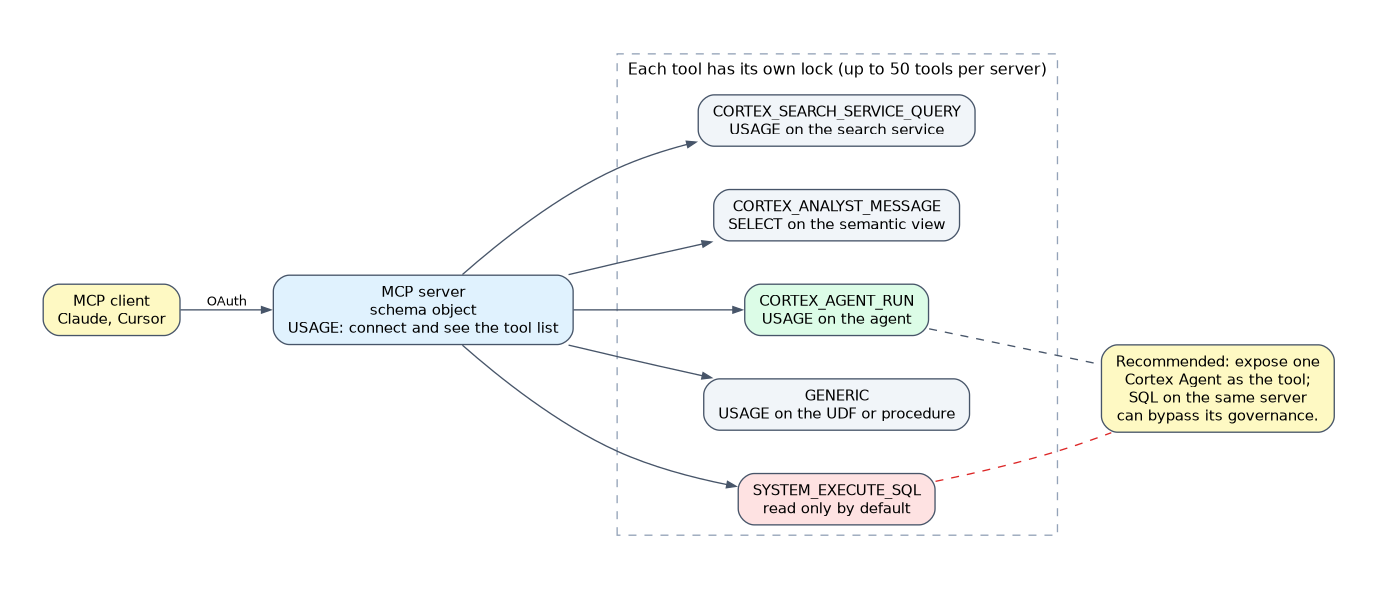 Think of the MCP server as a front door and the tools as separate rooms. Opening the door (USAGE on the server) lets a client see the list of rooms, but each room has its own lock. Administrators therefore grant the server and each tool object deliberately, and review them together.
- USAGE on the MCP server connects and discovers tools; CREATE creates it; OWNERSHIP changes it; MODIFY covers updating and invoking tools.
- Access to the server does not grant access to its tools. Each underlying object needs its own privilege, such as USAGE on a search service or agent, SELECT on a semantic view, or USAGE on a UDF or procedure.
- OAuth is recommended, and Snowflake OAuth is the default. An External OAuth integration is optional (bound with
OAUTH_AUTHORIZATION_SERVER), and dynamic client registration is not supported. - Programmatic access tokens work too. Give each the least privileged role that can use MCP and never hardcode them.
- With network policies enabled, allow the client provider's outbound IP addresses.
Snowflake recommends exposing a Cortex Agent as the single client facing tool for governed business questions. Direct SYSTEM_EXECUTE_SQL on the same server can bypass the agent's governance.
Common mistakes
Assuming USAGE on the server grants tool access. Each tool object needs its own privilege.
Using a semantic model YAML with CORTEX_ANALYST_MESSAGE. Only semantic views are supported.
Using REST for a big batch. SQL functions are advised for large tables.
Hardcoding a PAT in a client. Use OAuth, or a least privilege token stored safely.
Forgetting network policies. Allow the client's outbound IPs.
What to remember for the exam
- Endpoints:
inference/complete,analyst/message,agent:run, Search:query. - Managed MCP server:
CREATE MCP SERVER ... FROM SPECIFICATION; up to 50 tools. - Tool types:
CORTEX_SEARCH_SERVICE_QUERY,CORTEX_ANALYST_MESSAGE,SYSTEM_EXECUTE_SQL,GENERIC,CORTEX_AGENT_RUN. - Privileges are per tool; OAuth recommended.
Check yourself
Which privilege lets a client connect and list tools on an MCP server?
USAGE on the MCP server.
Why is exposing an agent safer than exposing
SYSTEM_EXECUTE_SQL?The agent applies its governance, while direct SQL can bypass it.
Which authentication does Snowflake recommend for MCP?
OAuth, with Snowflake OAuth as the default.
Topic 12 of 13 in Snowflake for Gen AI
Test yourself on Snowflake for Gen AI
The full Snowflake GES-C02 question bank has 585 questions, with timed practice exams and an explanation for every answer.
This study guide is independent and is not affiliated with, endorsed by, or sponsored by Snowflake. Vendor names, certification names and exam codes are trademarks of their respective owners and are used for identification only.