Snowflake for Gen AI · Topic 10 of 13
Cortex Agents and Snowflake Intelligence Capabilities
Cortex Agents capabilities: tools, orchestration, run API, threads, budgets and access control, plus what Snowflake Intelligence adds for business users.
- 4 min
- Includes a diagram
- Tools: Analyst, Search, custom UDF and procedure, Data to Chart, web search, MCP connectors.
agent:run, threads,tool_choiceauto, required or tool.- Roles:
CORTEX_USERorCORTEX_AGENT_USER, plus object privileges.
What it is
Agents combine the earlier building blocks. A Cortex Agent receives a request, plans, chooses tools such as Cortex Analyst and Cortex Search, runs them and writes the answer. Snowflake Intelligence is the business user application that sits on top of the same agent platform.
The exam asks you to know which tools an agent can use, how it is invoked, what controls cost, and what access it needs.
How it works
Agent capabilities
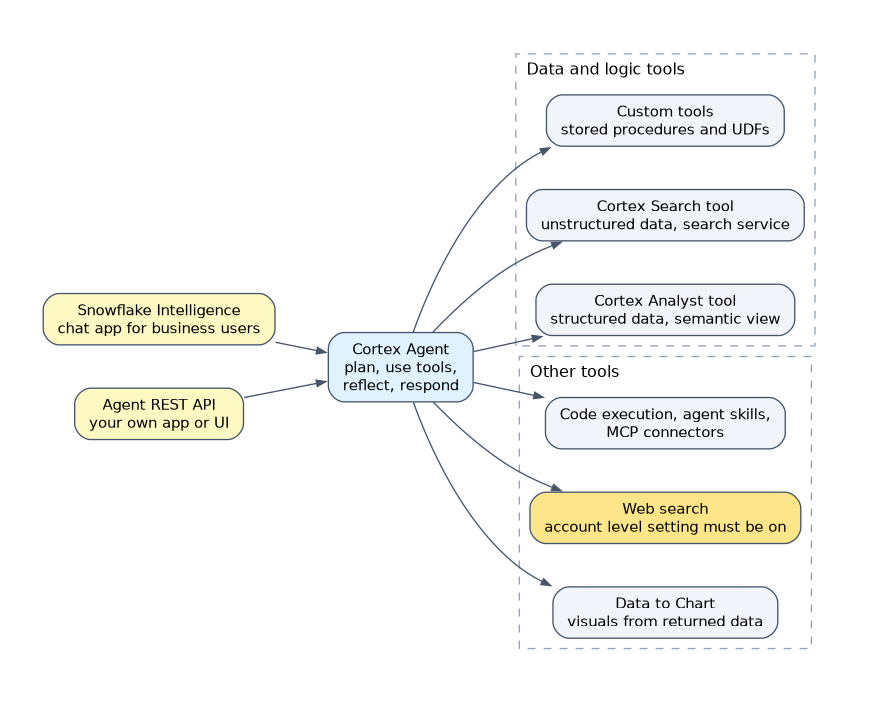
- Orchestration: the loop plan, use tools, reflect and respond can repeat within one request. You set instructions in natural language and pick a model or
auto. - Structured data: Cortex Analyst tool over a semantic view.
- Unstructured data: Cortex Search tool over a service.
- Custom tools: stored procedures and UDFs, for business logic or calls to backend systems.
- Data to Chart: builds visualizations from the data other tools returned.
- Web search: public internet information, enabled at the account level.
- Other tools: code execution, analytical search, agent skills, agent toolsets and MCP connectors to remote servers such as Jira or Salesforce.
Running an agent
An agent object is called with POST /api/v2/databases/{database}/schemas/{schema}/agents/{name}:run. There is also a form with no agent object, POST /api/v2/cortex/agent:run, where the full configuration travels in the request body.
| Field | Meaning |
|---|---|
| messages | Conversation history plus the new message |
| thread_id and parent_message_id | Continue a thread; the first message uses parent_message_id 0 |
| tool_choice | auto (default), required or tool |
| stream | Defaults to true; false returns one JSON response |
| background | When true, a run times out after 6 hours instead of 15 minutes; requires threads |
The agent object form does not accept models, instructions or orchestration in the request. Those are changed through the update endpoint. The response streams server sent events such as response.text.delta, response.tool_use and response.table, and ends with a response event holding the full output.
Threads, budgets and control
Threads store conversation context across turns so the client need not resend everything. Cost controls are an orchestration budget that limits one run, resource budgets that monitor an agent's spend, and per user quotas that enforce credit limits.
Access control
Calling an agent needs the SNOWFLAKE.CORTEX_USER or SNOWFLAKE.CORTEX_AGENT_USER database role, privileges on the agent object, and privileges on the objects its tools use. The agent should not become a bypass: a user who cannot read a table through RBAC must not read it through a tool.
Web search must be enabled at the account level. An agent configured with it still cannot use it if the account setting is off.
Snowflake Intelligence capabilities
Snowflake Intelligence gives business users a chat interface over governed data. Compared with building your own agent client, it adds a ready made application, agents prepared for it, file upload and a mobile app experience, with no application code. Newer documentation presents this application under the name Snowflake CoWork.
- Questions: natural language over structured data (Analyst with semantic views) and unstructured data (Search).
- Actions: agents can analyze, produce insights and, through custom tools, take action.
- Governance: row access policies and column level security still apply; admins can use identity providers to limit teams to specific experiences.
- Files: a user can upload documents, spreadsheets, presentations, JSON and images. The documented limits are 50 MB per file and 5 files at a time, stored in the user's stage and cleaned up when the thread is deleted or expires.
| Question | Builder with Agent API | Snowflake Intelligence |
|---|---|---|
| Custom UI or product embedding | Yes | No |
| Ready chat for business staff | You build it | Yes |
| Same governance | Yes | Yes |
"Business users need a chat experience quickly with no code" points to Snowflake Intelligence. "Embed the agent in our own app" points to the Agent REST API.
Common mistakes
Describing an agent as one model call. It loops over tools.
Sending the whole history when threads exist. Threads keep context across turns.
Granting only the CORTEX role. Tool objects need their own privileges.
Expecting a long job to finish in a normal run. Standard runs time out after 15 minutes; background raises it to 6 hours.
Thinking Snowflake Intelligence bypasses row access policies. It inherits them.
What to remember for the exam
- Tools: Analyst, Search, custom UDF and procedure, Data to Chart, web search, MCP connectors.
agent:run, threads,tool_choiceauto, required or tool.- Roles:
CORTEX_USERorCORTEX_AGENT_USER, plus object privileges. - Budgets: orchestration, resource and per user quotas.
- Snowflake Intelligence = business chat on Cortex Agents; governance inherited; file limits 50 MB and 5 files.
Check yourself
What does
tool_choicedefault to?auto.How do you let an agent call business logic in a stored procedure?
Add it as a custom tool, and grant privileges on the procedure.
Does Snowflake Intelligence ignore row access policies?
No, it inherits existing governance such as row access policies and column level security.
Topic 10 of 13 in Snowflake for Gen AI
Test yourself on Snowflake for Gen AI
The full Snowflake GES-C02 question bank has 585 questions, with timed practice exams and an explanation for every answer.
This study guide is independent and is not affiliated with, endorsed by, or sponsored by Snowflake. Vendor names, certification names and exam codes are trademarks of their respective owners and are used for identification only.