Performance Optimization · Topic 2 of 7
Warehouse Sizing, Multi-cluster and Snowpark-optimized Warehouses
Choose between scaling up and scaling out in Snowflake, set virtual warehouse properties, and know when a Snowpark-optimized warehouse is the right fit.
- 5 min
- Includes a diagram
- Scale up for query complexity and size, scale out (multi-cluster, Enterprise) for concurrency.
- Maximized mode means min equals max; Auto-scale means max is above min. Policies are
STANDARD(default) andECONOMY. - Know
AUTO_SUSPEND,AUTO_RESUME,MAX_CONCURRENCY_LEVEL(default 8) and the two statement timeout parameters.
What it is
A virtual warehouse is the compute that runs your queries and DML. You tune it in two directions. Scale up means a bigger size for faster individual queries. Scale out means more clusters for more concurrent queries.
A Snowpark-optimized warehouse is a special warehouse type with much more memory per node, built for memory hungry Snowpark code such as machine learning training.
How it works
Scale up compared to scale out
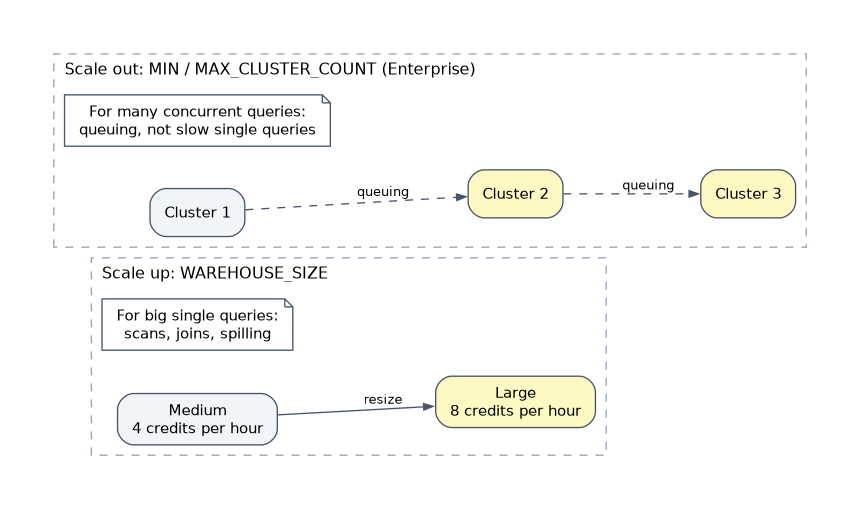
| Scale up (resize) | Scale out (multi-cluster) | |
|---|---|---|
| Change | WAREHOUSE_SIZE | MIN_CLUSTER_COUNT and MAX_CLUSTER_COUNT |
| Solves | Slow single queries, large scans, joins, sorts, spilling, big loads | Queuing from many concurrent users or jobs |
| Does not solve | Concurrency limits | One query that is too big for one cluster |
| Edition | All editions | Enterprise or higher |
| Applies to | New queries after the change; running queries finish on the old size | Clusters start and stop as load changes |
Sizes run from X-Small to 6X-Large, and each step up doubles the compute and the credits per hour (X-Small is 1 credit per hour, Small is 2, Medium is 4). A query that scans little data gains little from a bigger size, so test rather than assume.
"Dashboard users complain about waiting" means concurrency, so add clusters. "One nightly query takes too long" means a bigger warehouse.
Multi-cluster modes and scaling policy
- Maximized mode: minimum and maximum cluster counts are equal (and above 1). All clusters start with the warehouse.
- Auto-scale mode: maximum is higher than minimum. Snowflake adds clusters when queries queue and removes them when load falls.
| Scaling policy | Behavior |
|---|---|
STANDARD (default) | Favors avoiding queues; starts additional clusters soon after queuing appears |
ECONOMY | Favors keeping clusters fully used; starts a new cluster only when enough work exists to keep it busy for about 6 minutes, so queries may wait longer |
Maximum hourly credits equal the credits for the size times the maximum cluster count. Resizing applies the new size to all clusters.
Virtual warehouse properties to know
| Property | Meaning |
|---|---|
WAREHOUSE_SIZE | Compute per cluster |
WAREHOUSE_TYPE | STANDARD or SNOWPARK-OPTIMIZED |
MIN_CLUSTER_COUNT, MAX_CLUSTER_COUNT, SCALING_POLICY | Multi-cluster settings |
AUTO_SUSPEND | Seconds idle before suspending; saves credits but drops the warehouse cache |
AUTO_RESUME | Wakes automatically when a query arrives |
INITIALLY_SUSPENDED | Create the warehouse without starting it |
MAX_CONCURRENCY_LEVEL | Concurrent statements per cluster before queuing (default 8) |
STATEMENT_QUEUED_TIMEOUT_IN_SECONDS | How long a statement may wait in the queue before it is cancelled |
STATEMENT_TIMEOUT_IN_SECONDS | How long a statement may run before it is cancelled |
RESOURCE_MONITOR | Resource monitor assigned to the warehouse |
ENABLE_QUERY_ACCELERATION, QUERY_ACCELERATION_MAX_SCALE_FACTOR | Query acceleration service settings |
CREATE WAREHOUSE bi_wh
  WAREHOUSE_SIZE = 'MEDIUM'
  MIN_CLUSTER_COUNT = 1
  MAX_CLUSTER_COUNT = 4
  SCALING_POLICY = 'STANDARD'
  AUTO_SUSPEND = 60
  AUTO_RESUME = TRUE
  INITIALLY_SUSPENDED = TRUE;
Billing is per second, with a 60 second minimum each time a warehouse starts or resumes. Lowering MAX_CONCURRENCY_LEVEL gives each query more of the cluster's resources, which can help heavy queries at the cost of throughput.
Very short AUTO_SUSPEND values save idle credits but throw away the warehouse's local disk cache. For repeated, similar queries a slightly longer idle time can be cheaper overall.
Configure for a scenario
Separate workloads onto separate warehouses so loading, reporting and data science do not compete, and so each can be sized and monitored on its own.
Snowpark-optimized warehouses
Set WAREHOUSE_TYPE = 'SNOWPARK-OPTIMIZED'. The default gives 16 times the memory per node of a standard warehouse, and RESOURCE_CONSTRAINT chooses the memory level and CPU architecture.
| Constraint | Memory (up to) | Minimum size |
|---|---|---|
MEMORY_1X, MEMORY_1X_x86 | 16 GB | X-Small |
MEMORY_16X (default), MEMORY_16X_x86 | 256 GB | Medium |
MEMORY_64X, MEMORY_64X_x86 | 1 TB (preview, AWS only) | Large |
CREATE WAREHOUSE ml_wh WITH
  WAREHOUSE_SIZE = 'LARGE'
  WAREHOUSE_TYPE = 'SNOWPARK-OPTIMIZED'
RESOURCE_CONSTRAINT = 'MEMORY_16X';- Best for machine learning training in a stored procedure on a single node, and memory heavy UDFs and UDTFs in Snowpark.
- Plain SQL workloads usually gain little.
- Creating or resuming one can take longer than a standard warehouse.
Common mistakes
Adding clusters to speed up one query. Extra clusters serve more queries at once; they do not make a single query faster.
Resizing to fix queuing. A bigger warehouse raises throughput somewhat, but the targeted fix for concurrency is multi-cluster.
Expecting a running query to speed up after a resize. The new size applies to queries that start afterward.
Using Snowpark-optimized for ordinary SQL. It costs more per hour and helps only memory bound code.
What to remember for the exam
- Scale up for query complexity and size, scale out (multi-cluster, Enterprise) for concurrency.
- Maximized mode means min equals max; Auto-scale means max is above min. Policies are
STANDARD(default) andECONOMY. - Know
AUTO_SUSPEND,AUTO_RESUME,MAX_CONCURRENCY_LEVEL(default 8) and the two statement timeout parameters. - Snowpark-optimized:
WAREHOUSE_TYPE = 'SNOWPARK-OPTIMIZED', 16x memory by default, Medium or larger forMEMORY_16X, for ML training and memory heavy UDFs.
Check yourself
Many analysts run queries at once and queries queue. What do you change?
Enable multi-cluster (increase MAX_CLUSTER_COUNT) so extra clusters start to absorb the concurrent load.
Which scaling policy waits to start clusters until they would stay busy for about 6 minutes?
ECONOMY, which favors credit savings over minimal queuing.
What warehouse type suits training a machine learning model in a Snowpark stored procedure?
A Snowpark-optimized warehouse, which provides far more memory per node.
Topic 2 of 7 in Performance Optimization
Test yourself on Performance Optimization
The full Snowflake DEA-C02 question bank has 709 questions, with timed practice exams and an explanation for every answer.
This study guide is independent and is not affiliated with, endorsed by, or sponsored by Snowflake. Vendor names, certification names and exam codes are trademarks of their respective owners and are used for identification only.