Performance Optimization · Topic 5 of 7
Monitoring Usage, Resource Monitors and Credit Control
Use ACCOUNT_USAGE and warehouse load metrics, set resource monitors and timeouts, trim storage cost and balance Snowflake speed against credit spend.
- 5 min
- Includes a diagram
ACCOUNT_USAGE: 365 days, includes dropped objects, has latency;WAREHOUSE_LOAD_HISTORYshows queuing.- Resource monitor actions:
NOTIFY,SUSPEND,SUSPEND_IMMEDIATE; created byACCOUNTADMIN; warehouses only; one account level monitor. - Other limits:
STATEMENT_TIMEOUT_IN_SECONDS,STATEMENT_QUEUED_TIMEOUT_IN_SECONDS,AUTO_SUSPEND,MAX_CLUSTER_COUNT.
What it is
Performance work always has a price tag in credits and storage. This page covers where to measure usage (the ACCOUNT_USAGE schema and warehouse metrics), how to limit it (resource monitors and warehouse constraints), and how to balance speed against cost, including storage.
How it works
The ACCOUNT_USAGE schema
SNOWFLAKE.ACCOUNT_USAGE is a shared, read only schema with account wide history.
- Data is kept for 365 days, and views include dropped objects.
- Views have latency, from about 45 minutes to a few hours depending on the view, so it is not real time. The Information Schema is real time but keeps less history.
- Access comes with
ACCOUNTADMIN, or through database roles such asUSAGE_VIEWERgranted to other roles.
| View | Use |
|---|---|
QUERY_HISTORY | Per query time, bytes, spilling, queuing |
WAREHOUSE_METERING_HISTORY | Credits per warehouse per hour, compute and cloud services |
METERING_HISTORY, METERING_DAILY_HISTORY | Credits by service type, including serverless features |
WAREHOUSE_LOAD_HISTORY | Running and queued load per warehouse |
WAREHOUSE_EVENTS_HISTORY | Resume, suspend, resize and cluster events |
TABLE_STORAGE_METRICS | Storage per table by category |
STORAGE_USAGE | Account storage over time |
Cloud services credits are free up to 10 percent of daily warehouse credits; usage above that is billed.
Warehouse metrics and queues
WAREHOUSE_LOAD_HISTORY reports average load in short intervals:
| Column | Meaning |
|---|---|
AVG_RUNNING | Queries running |
AVG_QUEUED_LOAD | Queries queued because the warehouse was overloaded |
AVG_QUEUED_PROVISIONING | Queries waiting while the warehouse was starting |
AVG_BLOCKED | Queries blocked by a transaction lock |
Sustained AVG_QUEUED_LOAD above zero means the warehouse is saturated. Add clusters for many concurrent users, or resize for heavy individual queries. QUEUED_OVERLOAD_TIME in QUERY_HISTORY shows the same waiting per query.
SELECT warehouse_name, SUM(credits_used) AS credits
FROM snowflake.account_usage.warehouse_metering_history
WHERE start_time > DATEADD('day', -30, CURRENT_TIMESTAMP())
GROUP BY warehouse_name
ORDER BY credits DESC;
Resource monitors
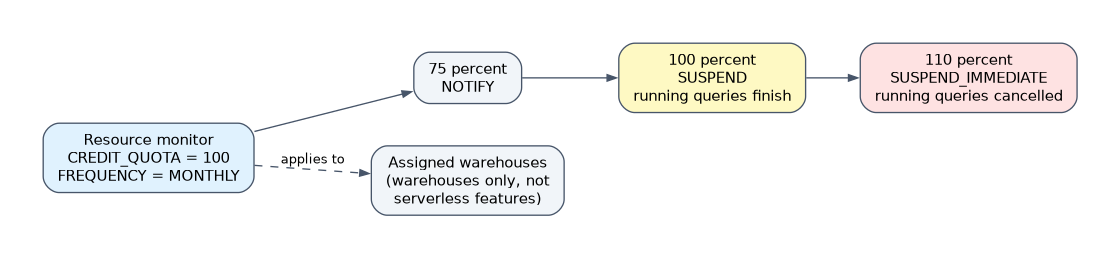 A resource monitor tracks credits used by warehouses and takes action at set thresholds.
CREATE RESOURCE MONITOR monthly_cap
  WITH CREDIT_QUOTA = 500
  FREQUENCY = MONTHLY
  START_TIMESTAMP = IMMEDIATELY
  TRIGGERS ON 75 PERCENT DO NOTIFY
           ON 90 PERCENT DO SUSPEND
           ON 100 PERCENT DO SUSPEND_IMMEDIATE;

ALTER WAREHOUSE etl_wh SET RESOURCE_MONITOR = monthly_cap;| Action | Effect |
|---|---|
NOTIFY | Sends a notification only |
SUSPEND | Notifies, then suspends the warehouse after running statements finish |
SUSPEND_IMMEDIATE | Notifies, then suspends at once and cancels running statements |
- Frequency can be daily, weekly, monthly, yearly or never; the quota resets at the start of each interval.
- Usage counts both warehouse compute and cloud services credits.
- Account level monitor: one per account, covers all warehouses. Warehouse level monitor: assigned to chosen warehouses, and a warehouse belongs to only one.
- Only
ACCOUNTADMINcreates monitors; other roles can getMONITORorMODIFYon one. - Notifications are off until enabled, and recipients need a verified email address.
- Resource monitors work for warehouses only. Serverless features such as Snowpipe, Automatic Clustering or search optimization need a budget instead.
Suspension is not instant. Set the suspend threshold below 100 percent, such as 90, and give critical warehouses their own monitor.
Warehouse constraints on credit consumption
| Control | Effect |
|---|---|
AUTO_SUSPEND | Stops idle billing |
STATEMENT_TIMEOUT_IN_SECONDS | Cancels runaway queries |
STATEMENT_QUEUED_TIMEOUT_IN_SECONDS | Cancels statements that wait too long |
MAX_CLUSTER_COUNT | Caps scale out spend |
WAREHOUSE_SIZE | Caps per query power |
| Resource monitor | Stops the warehouse at a credit quota |
| Separate warehouses per workload | Makes each workload's cost visible and limitable |
Timeouts can also be set at account, user and session level; the lowest value that applies wins.
Balance optimization with credit consumption
| Lever | Faster | Cheaper | Trade off |
|---|---|---|---|
| Larger warehouse | Often | Sometimes: a query twice as fast on twice the size costs the same | Wasted on small queries |
| Multi-cluster | Less queuing | Scale in when idle | Maximum hourly cost is size times max clusters |
Short AUTO_SUSPEND | No | Yes | Loses the warehouse cache |
| Clustering, search optimization, materialized views | Yes | Only if reads outweigh maintenance | Serverless credits and storage |
| Query acceleration | Yes | For occasional large queries | Billed separately |
Optimize storage configurations and costs
Storage is billed on compressed data in the table, plus Time Travel and Fail-safe copies and data retained for clones.
- Find the cost:
TABLE_STORAGE_METRICSsplitsACTIVE_BYTES,TIME_TRAVEL_BYTES,FAILSAFE_BYTESandRETAINED_FOR_CLONE_BYTES. - Lower retention with
DATA_RETENTION_TIME_IN_DAYSon tables that change often and need little recovery. - Use transient tables for staging and rebuildable data: Time Travel of 0 or 1 day and no Fail-safe. Temporary tables last only for the session.
- Drop unused tables, clones and old stage files. A clone shares data until it diverges, then holds old data that costs storage.
- Avoid unneeded clustering and search optimization, which create extra micro-partitions and structures.
High churn tables with long retention are classic storage hogs. Shortening retention or making them transient is the quickest saving.
Common mistakes
Expecting a resource monitor to cap serverless features. It governs warehouses only; use budgets for serverless spend.
Querying ACCOUNT_USAGE for live data. It lags; use Information Schema functions for the last few minutes.
Setting only a 100 percent suspend. Running queries can push usage past the quota; add earlier thresholds.
Ignoring Fail-safe and clone storage. They are billed even though no one queries them.
What to remember for the exam
ACCOUNT_USAGE: 365 days, includes dropped objects, has latency;WAREHOUSE_LOAD_HISTORYshows queuing.- Resource monitor actions:
NOTIFY,SUSPEND,SUSPEND_IMMEDIATE; created byACCOUNTADMIN; warehouses only; one account level monitor. - Other limits:
STATEMENT_TIMEOUT_IN_SECONDS,STATEMENT_QUEUED_TIMEOUT_IN_SECONDS,AUTO_SUSPEND,MAX_CLUSTER_COUNT. - Storage savings: shorter retention, transient tables, drop unused objects; read
TABLE_STORAGE_METRICS.
Check yourself
Which action suspends a warehouse and cancels its running queries at a threshold?
SUSPEND_IMMEDIATE.
Which view shows queries queued because a warehouse was overloaded?
WAREHOUSE_LOAD_HISTORY (AVG_QUEUED_LOAD); per query, QUERY_HISTORY shows QUEUED_OVERLOAD_TIME.
What is the cheapest way to avoid Fail-safe storage on rebuildable staging data?
Make the table transient, which has no Fail-safe period.
Topic 5 of 7 in Performance Optimization
Test yourself on Performance Optimization
The full Snowflake DEA-C02 question bank has 709 questions, with timed practice exams and an explanation for every answer.
This study guide is independent and is not affiliated with, endorsed by, or sponsored by Snowflake. Vendor names, certification names and exam codes are trademarks of their respective owners and are used for identification only.