Performance Optimization · Topic 4 of 7
Materialized Views, Search Optimization, Query Acceleration and Caching
Choose between materialized views, search optimization, query acceleration and Snowflake caches to speed up queries and keep credit cost under control.
- 5 min
- Includes a diagram
- Materialized view: one table, no joins, automatic serverless maintenance, optimizer rewrite, Enterprise.
- Search optimization: point lookups, substring, semi-structured and geo;
ADD SEARCH OPTIMIZATION [ON ...]; estimate withSYSTEM$ESTIMATE_SEARCH_OPTIMIZATION_COSTS. - Query acceleration: warehouse setting
ENABLE_QUERY_ACCELERATION, scale factor default 8, serverless billing, check withSYSTEM$ESTIMATE_QUERY_ACCELERATION.
What it is
Snowflake offers several features that make queries faster without changing the SQL. Each targets one pattern, and each costs something. The exam asks you to match the feature to the symptom.
| Feature | Speeds up | Cost |
|---|---|---|
| Materialized view | Repeated aggregation or filtering on one table | Storage plus serverless maintenance |
| Search optimization service | Selective lookups on huge tables | Storage plus serverless maintenance |
| Query acceleration service | Large scans in otherwise normal queries | Serverless compute while used |
| Caches | Repeated reads and repeated queries | No extra charge |
The first three are Enterprise Edition or higher features.
How it works
Materialized views
A materialized view stores the precomputed result of a query on one table and Snowflake keeps it current automatically in the background using serverless compute.
CREATE MATERIALIZED VIEW daily_totals AS
  SELECT order_date, SUM(amount) AS total
  FROM orders
GROUP BY order_date;- The optimizer can rewrite queries on the base table to use the view when it can answer them.
- Queries always see current data; if the view is behind, Snowflake combines it with the newest base table changes.
- Limits: no joins, and no window functions,
HAVING,ORDER BYorLIMIT; aggregate function support is restricted. - Costs: storage for the stored result and credits for maintenance.
MATERIALIZED_VIEW_REFRESH_HISTORYshows the maintenance credits. - A materialized view can have its own clustering key.
Joins and richer SQL with controlled freshness point to a dynamic table instead. A materialized view is for speed on a single table with simple SQL.
Search optimization service
The search optimization service builds a persistent search access path on a table so queries that return few rows from a very large table can skip nearly all micro-partitions.
ALTER TABLE events ADD SEARCH OPTIMIZATION;

ALTER TABLE events ADD SEARCH OPTIMIZATION ON EQUALITY(user_id), SUBSTRING(message);

SELECT SYSTEM$ESTIMATE_SEARCH_OPTIMIZATION_COSTS('events');- Best for point lookups (equality and
INon high cardinality columns), substring and regular expression searches (LIKE,ILIKE,RLIKE), semi-structured fields and geospatial predicates. - Use the
ONclause to limit the work to chosen columns and search types, such asEQUALITY,SUBSTRINGorGEO, which controls cost. - Costs: storage for the access paths and serverless maintenance as the table changes. Estimate first with
SYSTEM$ESTIMATE_SEARCH_OPTIMIZATION_COSTS, and review spend inSEARCH_OPTIMIZATION_HISTORY. - It complements clustering. Clustering helps range filters; search optimization helps selective lookups on any column.
Query acceleration service
The query acceleration service (QAS) lends extra serverless compute to a warehouse to speed up parts of eligible queries, mainly large scans with selective filters or aggregation. It helps when a few queries are much bigger than the rest, so you need not size the whole warehouse for them.
ALTER WAREHOUSE reporting_wh SET
  ENABLE_QUERY_ACCELERATION = TRUE
QUERY_ACCELERATION_MAX_SCALE_FACTOR = 8;QUERY_ACCELERATION_MAX_SCALE_FACTORcaps how much extra compute QAS may lease, as a multiple of the warehouse size. The default is 8, and 0 removes the limit.SYSTEM$ESTIMATE_QUERY_ACCELERATIONtakes a query id and estimates run times at different scale factors. TheQUERY_ACCELERATION_ELIGIBLEview lists queries that would benefit.- It is billed per second as serverless compute, separately from warehouse credits.
QUERY_ACCELERATION_HISTORYshows the credits used. - Common reasons a query is not eligible: too few partitions to scan, filters that are not selective, a
GROUP BYwith very high cardinality, or nondeterministic functions. - It is enabled by default on Gen2 standard warehouses and multi-cluster warehouses; on other warehouses you turn it on with
ENABLE_QUERY_ACCELERATION = TRUE.
Caching features
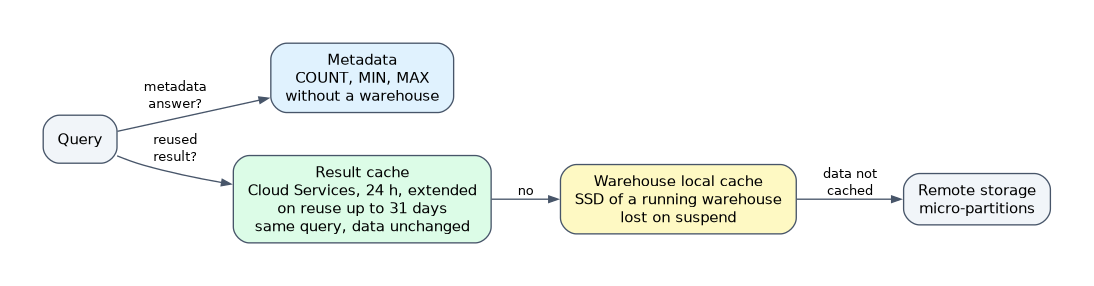
| Cache | Where | What it holds | Lifetime |
|---|---|---|---|
| Result cache | Cloud services | Final results of past queries | 24 hours, extended each time it is reused, up to 31 days |
| Warehouse (local disk) cache | The warehouse's local storage | Table data read by earlier queries | Until the warehouse suspends |
| Metadata cache | Cloud services | Table statistics such as row counts and min and max | Maintained by Snowflake |
The result cache returns a stored result instantly, with no warehouse running and no compute charge, when all of these hold:
- The new query text matches the earlier one exactly.
- The underlying table data has not changed.
- The query has no nondeterministic functions such as
RANDOMorUUID_STRING, and noCURRENT_TIMESTAMPstyle functions that change the result. - The role has the privileges needed to run the query.
- The
USE_CACHED_RESULTparameter isTRUE(the default).
The warehouse cache speeds up repeated scans on the same warehouse. Suspending the warehouse clears it, so an aggressive AUTO_SUSPEND trades credits for cold reads on resume. The metadata cache lets COUNT(*), MIN and MAX on a table finish without scanning data.
For benchmarking, set USE_CACHED_RESULT = FALSE for the session. Otherwise a repeat run returns from the result cache and tells you nothing about warehouse speed.
Common mistakes
Using a materialized view over a join. Materialized views cannot contain joins.
Enabling search optimization on a whole table without an estimate. Maintenance and storage can be large for tables that change often; scope it with the ON clause and estimate first.
Expecting the result cache to survive data changes. Any change to the underlying data invalidates the matching result.
Thinking a suspended warehouse keeps its cache. The local disk cache is lost on suspend; the result cache is not.
What to remember for the exam
- Materialized view: one table, no joins, automatic serverless maintenance, optimizer rewrite, Enterprise.
- Search optimization: point lookups, substring, semi-structured and geo;
ADD SEARCH OPTIMIZATION [ON ...]; estimate withSYSTEM$ESTIMATE_SEARCH_OPTIMIZATION_COSTS. - Query acceleration: warehouse setting
ENABLE_QUERY_ACCELERATION, scale factor default 8, serverless billing, check withSYSTEM$ESTIMATE_QUERY_ACCELERATION. - Result cache: 24 hours (up to 31 with reuse), free, exact same query and unchanged data; warehouse cache is cleared on suspend.
Check yourself
A table with billions of rows is queried by a single customer id and returns a handful of rows. Which feature fits?
The search optimization service, which speeds up selective point lookups.
What is the default QUERY_ACCELERATION_MAX_SCALE_FACTOR and what does 0 mean?
The default is 8, and 0 removes the upper limit on leased compute.
Which cache survives a warehouse suspend?
The result cache (and metadata cache), because they live in the cloud services layer, not on the warehouse's local disk.
Topic 4 of 7 in Performance Optimization
Test yourself on Performance Optimization
The full Snowflake DEA-C02 question bank has 709 questions, with timed practice exams and an explanation for every answer.
This study guide is independent and is not affiliated with, endorsed by, or sponsored by Snowflake. Vendor names, certification names and exam codes are trademarks of their respective owners and are used for identification only.