Data Movement · Topic 5 of 17
Troubleshooting Data Ingestion - Causes and Resolutions
Find why a Snowflake load failed or loaded nothing using VALIDATE, COPY_HISTORY and pipe status, then fix it with the right ON_ERROR or format option.
- 6 min
- Includes a diagram
- Use
VALIDATION_MODEbefore loading andVALIDATEafter a load withCONTINUE. ON_ERRORvalues:ABORT_STATEMENT,CONTINUE,SKIP_FILE,SKIP_FILE_n,SKIP_FILE_n%; defaultABORT_STATEMENTfor COPY andSKIP_FILEfor Snowpipe.- Already loaded files are skipped for 64 days (COPY) or 14 days (pipe);
FORCE = TRUEoverrides but duplicates data.
What it is
Troubleshooting ingestion means answering two questions in order: did the data load, and if not, why? Snowflake gives you several tools to see rows that were rejected, files that were skipped and pipes that never fired.
The causes fall into four groups: the data does not fit the table or format, the file was skipped on purpose, Snowflake cannot reach the file, or an automated pipe is not triggered.
How it works
Tools for finding the cause
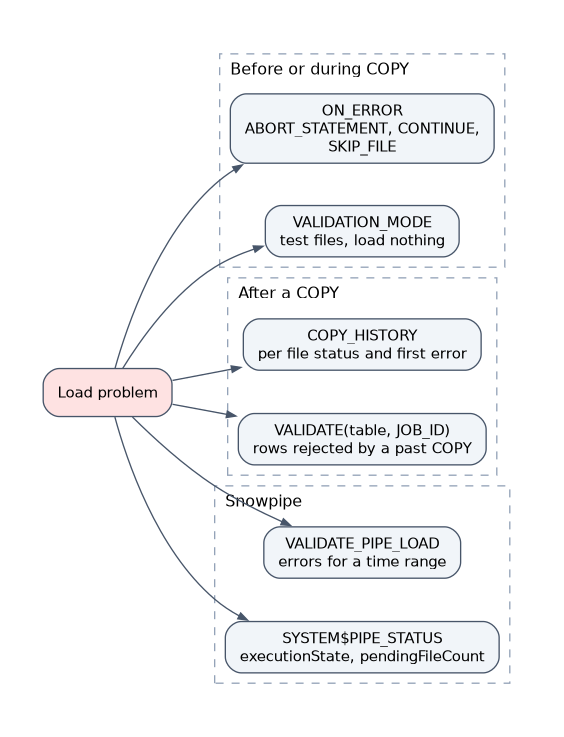
| Tool | What it shows | When to use |
|---|---|---|
| COPY result set | Per file: status, rows_parsed, rows_loaded, errors_seen, first_error, first_error_line, first_error_column_name | Right after a COPY statement |
VALIDATION_MODE | Checks staged files without loading: RETURN_n_ROWS, RETURN_ERRORS, RETURN_ALL_ERRORS | Before loading, to test files |
VALIDATE table function | Returns all errors from a past COPY job, for example VALIDATE(orders, JOB_ID => '_last') | After a COPY with ON_ERROR = CONTINUE |
COPY_HISTORY | Per file load status, error counts and first error; table function (14 days) and ACCOUNT_USAGE view (365 days) | Find what loaded and when |
SYSTEM$PIPE_STATUS | Whether a pipe is running and how many files are pending | Snowpipe not loading |
VALIDATE_PIPE_LOAD | Errors found by a pipe in a time window | Snowpipe loaded fewer rows than expected |
LOAD_HISTORY | COPY INTO loads only, not Snowpipe; Information Schema view (14 days) and ACCOUNT_USAGE view (365 days) | Audit |
VALIDATION_MODE cannot be used with a COPY transformation. VALIDATE works only on COPY jobs that loaded into a table and does not cover Snowpipe.
Causes of ingestion errors and their resolutions
| Symptom or message | Cause | Resolution |
|---|---|---|
| Number of columns in file does not match the table | Extra or missing fields; wrong delimiter | Fix FIELD_DELIMITER; use a column list; set ERROR_ON_COLUMN_COUNT_MISMATCH = FALSE if mismatches are acceptable |
| Numeric or date value is not recognized | Text in a numeric column, or date text in another format | Set DATE_FORMAT or TIMESTAMP_FORMAT; use TRY_TO_NUMBER style casts in a transformation; load as text first |
| String is too long for the column | Value exceeds VARCHAR(n) | Widen the column; TRUNCATECOLUMNS = TRUE cuts the value; ENFORCE_LENGTH = FALSE has the same effect |
| Found character instead of field delimiter | Unescaped quote or embedded delimiter | FIELD_OPTIONALLY_ENCLOSED_BY = '"'; fix the escape character |
| JSON parse error, or one giant row | File is an array or has bad syntax | STRIP_OUTER_ARRAY = TRUE; fix or skip bad files |
| Invalid UTF-8 or garbled text | Wrong encoding | ENCODING = ...; REPLACE_INVALID_CHARACTERS = TRUE |
| Nothing loaded, status says already loaded | Load metadata: same file seen within 64 days | Rename or change the file, or use FORCE = TRUE knowing duplicates may result |
| Files skipped, load status uncertain | Metadata expired for old files | LOAD_UNCERTAIN_FILES = TRUE |
| Access denied or file not found | Missing stage privilege, integration trust policy, wrong path, bad PATTERN | Check cloud role trust policy and STORAGE_ALLOWED_LOCATIONS; grant USAGE or READ on the stage; run LIST @stage |
Fewer columns than expected with MATCH_BY_COLUMN_NAME | Names do not match | Use CASE_INSENSITIVE; rename columns; use a transformation |
The error text almost always names the file, line and column. Read first_error and first_error_line before changing any option.
Choosing ON_ERROR
ON_ERROR decides how much to tolerate.
| Value | Behavior |
|---|---|
ABORT_STATEMENT | Default for COPY; the whole statement fails and nothing is committed |
CONTINUE | Skip bad rows and load the rest |
SKIP_FILE | Skip any file that has an error; default for Snowpipe |
SKIP_FILE_n | Skip a file when it has n or more errors |
SKIP_FILE_n% | Skip a file when the percent of error rows reaches the number |
A good repair pattern is to load with ON_ERROR = CONTINUE, then run VALIDATE for the rejected rows, fix the source data, and load only the corrected rows.
COPY INTO orders FROM @raw_stage/orders/
  FILE_FORMAT = (FORMAT_NAME = 'csv_ff')
  ON_ERROR = CONTINUE;

SELECT * FROM TABLE(VALIDATE(orders, JOB_ID => '_last'));
RETURN_FAILED_ONLY = TRUE trims the COPY output to files that had problems.
Troubleshooting Snowpipe
Snowpipe has no result set to read, so work through the path in order.
- Is the pipe running?
SYSTEM$PIPE_STATUSshowsexecutionStateandpendingFileCount. A paused pipe loads nothing. - Is the event configured? For auto ingest the bucket notification must point at the pipe's
notification_channel(SQS) or topic, with a prefix that matches the stage path. - Are the files in scope? The pipe's stage path must contain the file, and the file must have arrived after the pipe was created. Use
ALTER PIPE ... REFRESHfor files staged in the last 7 days. - Were the files already loaded? Pipe load metadata lasts 14 days and dedups by file.
- Did rows fail? Default
SKIP_FILEskips the whole file on one error. UseCOPY_HISTORYorVALIDATE_PIPE_LOADto see the error.
CREATE OR REPLACE PIPE empties the pipe's load history, so files could load twice. Pause the pipe and confirm what already loaded before replacing it.
Common mistakes
Fixing the warehouse when the data is the problem. An error about a column or format needs a file format or table change, not a larger warehouse.
Using FORCE to retry. FORCE reloads everything and creates duplicates. Re-run without it so only the failed files load.
Running VALIDATE for Snowpipe. VALIDATE covers table COPY jobs. For pipes use VALIDATE_PIPE_LOAD or COPY_HISTORY.
Leaving ABORT_STATEMENT on a large mixed load. One bad row cancels the whole statement. Use CONTINUE or SKIP_FILE and review the errors afterwards.
Missing the notification prefix. An event for s3://bucket/other/ never reaches a pipe reading s3://bucket/orders/.
What to remember for the exam
- Use
VALIDATION_MODEbefore loading andVALIDATEafter a load withCONTINUE. ON_ERRORvalues:ABORT_STATEMENT,CONTINUE,SKIP_FILE,SKIP_FILE_n,SKIP_FILE_n%; defaultABORT_STATEMENTfor COPY andSKIP_FILEfor Snowpipe.- Already loaded files are skipped for 64 days (COPY) or 14 days (pipe);
FORCE = TRUEoverrides but duplicates data. COPY_HISTORYshows per file results;SYSTEM$PIPE_STATUSshows pipe state and backlog.- Access errors point at the stage privilege, integration trust policy or path.
Check yourself
Which option lets a load finish while recording bad rows for later review?
ON_ERROR = CONTINUE, then query the rejected rows with the VALIDATE table function.
An auto ingest pipe loads nothing. What do you check first?
SYSTEM$PIPE_STATUS for the execution state and pending files, then the bucket event notification and its prefix.
A COPY fails with a string too long error. What are two fixes?
Widen the column, or set TRUNCATECOLUMNS = TRUE (or ENFORCE_LENGTH = FALSE) to cut the value.
Topic 5 of 17 in Data Movement
Test yourself on Data Movement
The full Snowflake DEA-C02 question bank has 709 questions, with timed practice exams and an explanation for every answer.
This study guide is independent and is not affiliated with, endorsed by, or sponsored by Snowflake. Vendor names, certification names and exam codes are trademarks of their respective owners and are used for identification only.