Data Movement · Topic 6 of 17
Continuous Data Pipelines - Stages, Tasks and Streams
Build continuous Snowflake pipelines with stages, streams for change capture, and tasks or task graphs, including triggered tasks and stale streams.
- 6 min
- Includes a diagram
- Stream types: standard, append-only, insert-only; offset advances only on committed DML consumption.
- Stale stream: recreate it; retention extension limit defaults to 14 days.
- Task compute: serverless or warehouse; created suspended;
WHEN SYSTEM$STREAM_HAS_DATAsaves empty runs.
What it is
A continuous data pipeline moves and transforms data as it arrives, with no one running statements by hand. In Snowflake the parts are: stages that receive raw files, streams that record what changed, and tasks that run the SQL on a schedule or when new data appears.
The design question is always how data flows from raw to clean, how each step knows what is new, and what happens when a step fails.
How it works
Designing the pipeline
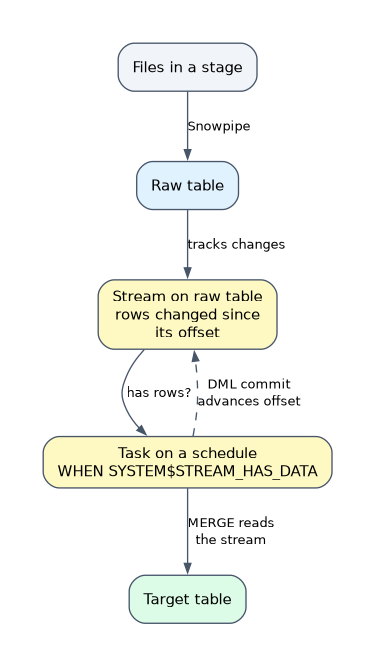 A typical design has three layers.
| Layer | Object | Job |
|---|---|---|
| Landing | Stage plus Snowpipe or COPY | Get files into a raw table, unchanged |
| Change capture | Stream on the raw table | Expose only new and changed rows |
| Transformation | Task (or task graph) | Consume the stream and write to curated tables |
Design choices to weigh:
- Latency. Task schedules and Snowpipe set the delay; for second level latency use Snowpipe Streaming.
- Cost. Serverless tasks and Snowpipe bill for use; a task with a warehouse also keeps the warehouse running during its run.
- Failure handling. Use task retries, an error notification integration and monitoring views.
Stages in a pipeline
The stage is the contact point with the outside world.
- Internal stage: files pushed by clients with
PUTor the Snowpipe REST API. - External stage: files landing in your own bucket, with a storage integration, read by auto ingest.
- Directory table with a stream: tracks each file added to a stage, so a task can process each new file once, for example to read unstructured data.
Organize stage paths so each pipe or COPY reads one location, and give each pipe its own non overlapping path.
Streams
A stream stores an offset, a point in the table's version history, and returns the rows changed since that offset plus three metadata columns.
| Column | Meaning |
|---|---|
METADATA$ACTION | INSERT or DELETE |
METADATA$ISUPDATE | TRUE when the row is half of an update, shown as a DELETE and INSERT pair |
METADATA$ROW_ID | Unique, stable row identifier |
| Stream type | Captures | Source |
|---|---|---|
| Standard (delta) | Inserts, updates and deletes | Tables, views, dynamic tables, directory tables, Snowflake managed Iceberg tables |
| Append-only | Inserts only | Tables, views, dynamic tables, Snowflake managed Iceberg tables |
| Insert-only | Inserts only | External tables, externally managed Iceberg tables |
Creating a stream turns on change tracking on the source table. Important behavior:
- The offset moves only when a DML statement that reads the stream commits. A plain
SELECTdoes not move it. - Inside one transaction the stream gives repeatable reads, so several statements see the same changes.
- A stream goes stale if its offset falls out of the source table's retention. Snowflake extends retention for an unconsumed stream up to
MAX_DATA_EXTENSION_TIME_IN_DAYS(default 14 days).SHOW STREAMSshowsSTALE_AFTER; a stale stream must be recreated. SHOW_INITIAL_ROWS = TRUEmakes the first read return all current rows as inserts.- Net changes only. A standard stream shows the final difference since the offset, so an insert followed by a delete in the same period shows nothing.
A stream you never consume goes stale. If a downstream task has been failing for days, check the stream's STALE_AFTER time before anything else.
Tasks
A task runs one SQL statement, a stored procedure call or a Snowflake Scripting block.
CREATE TASK load_curated
  WAREHOUSE = transform_wh
  SCHEDULE = '5 MINUTE'
  WHEN SYSTEM$STREAM_HAS_DATA('raw_stream')
AS
  MERGE INTO curated c USING raw_stream r ON c.id = r.id
  WHEN MATCHED THEN UPDATE SET c.amount = r.amount
  WHEN NOT MATCHED THEN INSERT (id, amount) VALUES (r.id, r.amount);

ALTER TASK load_curated RESUME;| Choice | Options |
|---|---|
| Compute | Serverless (omit WAREHOUSE) or a user managed warehouse |
| Schedule | An interval such as '5 MINUTE', or 'USING CRON 0 2 * * * UTC' |
| Trigger | WHEN SYSTEM$STREAM_HAS_DATA(...) skips empty runs. A triggered task has no SCHEDULE and runs when its stream has new data |
| Failure handling | TASK_AUTO_RETRY_ATTEMPTS, SUSPEND_TASK_AFTER_NUM_FAILURES, and an error integration for notifications |
Rules to remember:
- Tasks are created suspended. Run
ALTER TASK ... RESUME;EXECUTE TASKruns it once for testing. - A run still going when the next is due skips the next run, unless overlapping execution is allowed.
- Privileges. The owner role needs the global
EXECUTE TASKprivilege, plusEXECUTE MANAGED TASKfor serverless tasks. - Monitor with the
TASK_HISTORYtable function.
Task graphs
Tasks chain into a task graph. Only the root task has a schedule or trigger; each child lists its parents with AFTER.
- Children of the same parent run in parallel; a task with several parents waits for all of them.
- A graph holds up to 1,000 tasks, and a task can have up to 100 parents and 100 children.
- A finalizer task runs after the graph finishes or fails, which suits cleanup and alerts.
- Tasks pass small values to each other with
SYSTEM$SET_RETURN_VALUEandSYSTEM$GET_PREDECESSOR_RETURN_VALUE. - Suspend the root before changing the graph, then resume it.
Troubleshooting a pipeline
| Symptom | Likely cause | Check |
|---|---|---|
| Task never runs | Created suspended, or owner lacks EXECUTE TASK | SHOW TASKS state; grants |
| Task runs but does nothing | Stream empty, or WHEN condition false | SYSTEM$STREAM_HAS_DATA |
| Error says stream is stale | Stream not consumed within retention | Recreate stream; consume more often |
| Child task not running | Root suspended, or a parent failed | TASK_HISTORY, root task state |
| Duplicates in target | Plain INSERT retried | Use MERGE |
Common mistakes
Expecting a SELECT to consume the stream. Only committed DML reading the stream advances the offset.
Forgetting RESUME. A new task, and every child in a graph, stays suspended until resumed.
Scheduling child tasks. Only the root has a schedule; children use AFTER.
What to remember for the exam
- Stream types: standard, append-only, insert-only; offset advances only on committed DML consumption.
- Stale stream: recreate it; retention extension limit defaults to 14 days.
- Task compute: serverless or warehouse; created suspended;
WHEN SYSTEM$STREAM_HAS_DATAsaves empty runs. - Task graph: root scheduled,
AFTERfor children, up to 1,000 tasks, finalizer runs at the end. - Pipeline shape: stage and Snowpipe, then stream, then task writing with
MERGE.
Check yourself
How can a task avoid running when nothing changed?
Add WHEN SYSTEM$STREAM_HAS_DATA('stream_name') so the run is skipped for an empty stream.
What do you do with a stale stream?
Recreate it; the pending changes are lost, so consume streams before retention runs out.
Which task in a graph carries the schedule?
Only the root task. Child tasks use AFTER to name their parents.
Topic 6 of 17 in Data Movement
Test yourself on Data Movement
The full Snowflake DEA-C02 question bank has 709 questions, with timed practice exams and an explanation for every answer.
This study guide is independent and is not affiliated with, endorsed by, or sponsored by Snowflake. Vendor names, certification names and exam codes are trademarks of their respective owners and are used for identification only.