Snowflake AI Data Cloud Features & Architecture · Topic 7 of 17
Virtual Warehouse Types, Gen 2 and Multi-Cluster Scaling Policies
Configure Snowflake virtual warehouses: sizes, Standard Gen 1 and Gen 2, Snowpark-optimized memory, multi-cluster modes and Standard versus Economy policy.
- 5 min
- Includes a diagram
- Types: Standard (Gen 1 or Gen 2) and Snowpark-optimized.
- SQL defaults: XSMALL, AUTO_SUSPEND 600, AUTO_RESUME TRUE, 1 cluster, STANDARD policy, MAX_CONCURRENCY_LEVEL 8.
- Each size step doubles compute and credits per hour.
What it is
A virtual warehouse is the compute that runs queries, DML, data loading and Snowpark code. You configure four things: its type, its size, its cluster count (single or multi-cluster) and its scaling policy.
Warehouses can be created and changed at any time with SQL or in Snowsight, and they consume credits only while running.
How it works
Core properties and defaults
CREATE WAREHOUSE bi_wh
  WAREHOUSE_SIZE = 'MEDIUM'
  AUTO_SUSPEND = 300
  AUTO_RESUME = TRUE
  MIN_CLUSTER_COUNT = 1
  MAX_CLUSTER_COUNT = 4
SCALING_POLICY = 'STANDARD';| Property | Default when created with SQL |
|---|---|
WAREHOUSE_TYPE | STANDARD |
WAREHOUSE_SIZE | XSMALL (Snowpark-optimized defaults to MEDIUM) |
AUTO_SUSPEND | 600 seconds (0 or NULL means never suspend) |
AUTO_RESUME | TRUE |
INITIALLY_SUSPENDED | FALSE |
MIN_CLUSTER_COUNT / MAX_CLUSTER_COUNT | 1 / 1 |
SCALING_POLICY | STANDARD |
MAX_CONCURRENCY_LEVEL | 8 |
Sizes run XSMALL, SMALL, MEDIUM, LARGE, XLARGE, XXLARGE, XXXLARGE, X4LARGE, X5LARGE and X6LARGE. Each step up doubles the compute resources and the credits consumed per hour.
Standard warehouses: Gen 1 and Gen 2
Standard warehouses are the general-purpose type for SQL queries, loading and BI. They come in two generations:
| Gen 1 | Gen 2 | |
|---|---|---|
| Hardware | Original standard warehouse | Faster hardware plus software optimizations |
| Best for | General workloads | Analytics and data engineering; faster DELETE, UPDATE, MERGE and table scans |
| How to choose it | GENERATION = '1' or RESOURCE_CONSTRAINT = STANDARD_GEN_1 | GENERATION = '2' (recommended) or RESOURCE_CONSTRAINT = STANDARD_GEN_2 |
| Sizes | All sizes | Not available for X5LARGE or X6LARGE |
New standard warehouses default to Gen 2 when you omit the clause, if Gen 2 is available in the region. The generation clause is set with SQL, and you can switch an existing warehouse between generations whether it is running or suspended. Gen 2 consumes credits at its own rate, so test the workload before switching everything.
Snowpark-optimized warehouses
A Snowpark-optimized warehouse (WAREHOUSE_TYPE = 'SNOWPARK-OPTIMIZED') gives much more memory per node. The default configuration provides 16x the memory per node of a standard warehouse.
Use it for memory-intensive Snowpark work, such as ML training in a stored procedure, or large Python UDFs and UDTFs. Workloads that do not use Snowpark usually gain nothing from it.
RESOURCE_CONSTRAINT sets the memory and CPU architecture: MEMORY_1X, MEMORY_16X (the default) and their _x86 variants, with larger options in preview on some clouds. Snowpark-optimized warehouses can take longer to start and resume than standard ones.
"Out of memory" errors in a Snowpark Python model training procedure point to a Snowpark-optimized warehouse, not just a larger standard warehouse.
Multi-cluster warehouses
A multi-cluster warehouse (Enterprise Edition or higher) runs several clusters of the same size to serve more concurrent queries. It does not make a single query faster.
| Mode | Settings | Behavior |
|---|---|---|
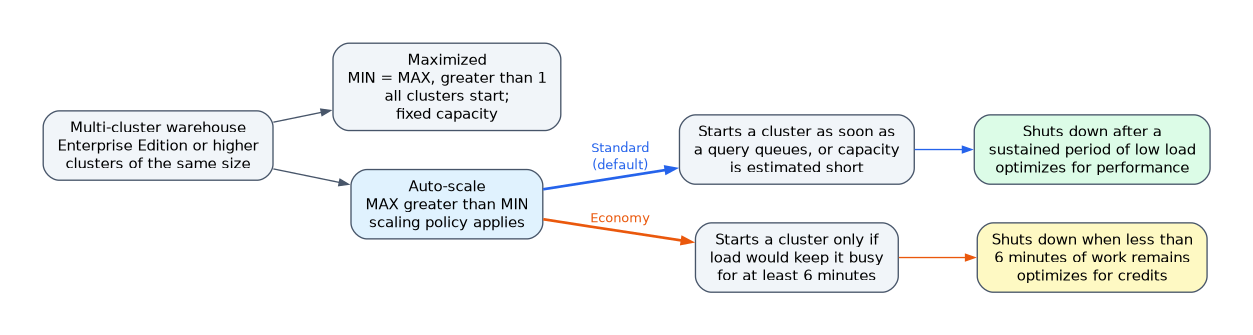
| Maximized | MIN = MAX, greater than 1 | All clusters start with the warehouse; fixed capacity |
| Auto-scale | MAX greater than MIN | Clusters start and stop with demand |
Credits scale with running clusters: a MEDIUM warehouse running 3 clusters uses three times the credits of one MEDIUM cluster.
Scaling policies
!Multi-cluster warehouse modes: Maximized starts all clusters for fixed capacity; Auto-scale uses a scaling policy, where Standard starts a cluster as soon as a query queues and optimizes for performance, and Economy starts one only if it would stay busy for at least 6 minutes and optimizes for credits. The scaling policy applies only in auto-scale mode and controls how eagerly clusters start and stop.
| Policy | Starts a new cluster | Shuts down a cluster | Optimizes for |
|---|---|---|---|
| Standard (default) | As soon as a query queues, or Snowflake estimates the current clusters lack capacity | After a sustained period of low load | Performance, minimal queuing |
| Economy | Only if Snowflake estimates enough load to keep the new cluster busy for at least 6 minutes | When less than 6 minutes of work remains for the least loaded cluster | Credits; accepts some queuing |
How the exam asks about this
- "Several hundred analysts; short waits are acceptable; keep the number of active clusters low" -> auto-scale with the Economy policy.
- "Queries must never queue during the trading day" -> Standard policy, or Maximized mode for fixed capacity.
- "A Python stored procedure trains a model and runs out of memory" -> Snowpark-optimized warehouse.
Common mistakes
Using multi-cluster to speed up one slow query. Extra clusters add concurrency, not power. A complex query needs a larger size.
Setting a scaling policy in Maximized mode. When MIN equals MAX, all clusters run all the time; the policy has no effect.
Choosing Snowpark-optimized for ordinary SQL. It costs more per hour and helps only memory-heavy Snowpark code.
Assuming Gen 2 is a separate warehouse type. Gen 2 is a generation of the Standard type, selected with GENERATION or RESOURCE_CONSTRAINT.
What to remember for the exam
- Types: Standard (Gen 1 or Gen 2) and Snowpark-optimized.
- SQL defaults: XSMALL, AUTO_SUSPEND 600, AUTO_RESUME TRUE, 1 cluster, STANDARD policy, MAX_CONCURRENCY_LEVEL 8.
- Each size step doubles compute and credits per hour.
- Gen 2: faster DML and scans;
GENERATION = '2'; not for X5LARGE or X6LARGE. - Snowpark-optimized: 16x memory per node by default; for ML training and memory-heavy UDFs.
- Multi-cluster needs Enterprise; Maximized vs Auto-scale.
- Standard policy favors performance; Economy favors credits with a 6-minute load estimate.
Resizing a running warehouse does not speed up queries already running. Only queued and new queries use the new size.
Check yourself
Which scaling policy keeps the number of running clusters as low as possible, accepting some queuing?
Economy, which starts a cluster only when Snowflake estimates at least 6 minutes of work for it.
When does a scaling policy have no effect?
In Maximized mode, where MIN_CLUSTER_COUNT equals MAX_CLUSTER_COUNT and all clusters always run.
What does a Snowpark-optimized warehouse provide by default compared to a standard one?
16 times the memory per node, for memory-intensive Snowpark workloads such as ML training.
Topic 7 of 17 in Snowflake AI Data Cloud Features & Architecture
Test yourself on Snowflake AI Data Cloud Features & Architecture
The full Snowflake SnowPro Core COF-C03 question bank has 845 questions, with timed practice exams and an explanation for every answer.
This study guide is independent and is not affiliated with, endorsed by, or sponsored by Snowflake. Vendor names, certification names and exam codes are trademarks of their respective owners and are used for identification only.